Six Colors
Six Colors

Apple, technology, and other stuff

This Week's Sponsor

Monologue: smart dictation and voice notes for Mac, iPhone, iPad, and Apple Watch.

Eddy Cue’s blog and touchscreen Macs

A victory lap for services, and rumors that touchscreen Macs might be back on the agenda.


By Shelly Brisbin

The real secrets of iOS and accessibility

Note: This story has not been updated since 2023.

To change text size for notifications, open Control Center’s Text Size option on the Home screen or Lock screen,and choose Home Screen Only.

There’s a joke I tell a lot: if you encounter an article whose headline includes the words “secret features” and “iOS”, chances are you’re about to be taken on a whirlwind tour of your phone’s accessibility settings. “Did you know you could….?” Or. “Buried deep in iOS settings, you’ll find…”

Truth is, these aren’t secret features at all; they’re just unfamiliar to people whose eyes, ears and hands operate in a typical way. And these “secrets” are rarely written about, even in comprehensive coverage of iOS. “Invisible” might be a more honest way to describe these tools.

I can make a better case for the secret feature moniker when it comes to little-known ways you can use the accessibility suite to do typical iOS tasks, whether you have a disability or not. iOS accessibility has layers, is what I’m sayin’. So let us peel some back.

Continue reading “The real secrets of iOS and accessibility”…


Gurman: Apple working on touchscreen Macs

Bloomberg’s very reliable reporter Mark Gurman says that Apple is working on touchscreen Macs:

Apple Inc. is working on adding touch screens to its Mac computers, a move that would defy long-held company orthodoxy and embrace an approach that co-founder Steve Jobs once called “ergonomically terrible.”

Apple engineers are actively engaged in the project, indicating that the company is seriously considering producing touch-screen Macs for the first time, according to people familiar with the efforts. Still, a launch hasn’t been finalized and the plans could change.

The plan is, apparently, to start with a revision to the MacBook Pro in 2025. So we’re talking at least two years from now. Still, this is big, since it will probably require design changes to macOS to make it more appropriate for touch. I have to wonder if the entire interface will just be made to even more resemble the iPad. Of course, apps built for touch (for the iPad and iPhone) would be able to support touch right out of the box, presumably.

I don’t think this is quite as big a deal as everyone will undoubtedly make it out to be. I frequently use a Mac via a touch interface (using Screens to control a Mac mini from an iPad), and while it’s not ideal, it works just fine. When my daughter used a Chromebook with touchscreen as her main computer, I found myself reaching for the screen to quickly tap an item or scroll something, even though the laptop had a standard trackpad.

And the best example is the one closest to home: The iPad Pro, in a Magic Keyboard, is essentially a touchscreen laptop. I use the keyboard and the trackpad a lot… but I also reach up and touch the screen. Of course the context of using a touchscreen in a laptop configuration is very different than a phone or a tablet. But that doesn’t mean it can’t be useful. (And it opens the doors for different designs, like a tear-off or fold-away keyboard that would make the Mac feel more like an iPad. And Apple Pencil support starts to make more sense in those scenarios, too.)

And the Mac and the iPad continue to move closer together…


By Jason Snell for Macworld

The two paths forward for Apple’s headset

After years of swirling rumors, it seems like Apple’s first proper foray into virtual reality might actually be happening this year. But as the company prepares to unveil the hardware and software it’s been working on for years, reports are unclear about a lot of the details.

According to Bloomberg’s authoritative Apple reporter Mark Gurman, Apple still has to work out “many kinks” with the device, involving “hardware, software, and services, as well as how it will be marketed and sold.” Call those kinks if you want–I’m not going to kink shame you–but don’t they seem to cover literally every aspect of the device?

What I’m saying is, if the device isn’t in flux, our ideas of what it might be certainly are. And yet there are really two paths for Apple to take based on what we think we know. Is this going to be a product that regular people are expected to buy, or is this an expensive preview of technology that won’t appeal to the masses until a few years from now?

What path Apple chooses will have a major impact on how the product is received and whether future Apple products in the category will have a chance to succeed.

Continue reading on Macworld ↦


Video

A look at per-app accessibility features in iOS

Starting in iOS 15, you can adjust accessibility settings on a per-app basis. Here’s a quick walkthrough of how the feature works and why you might want to use it.

It’s a feature I didn’t know about until recently, and I thought you might be interested too, so take a look.

[Dan Moren is the East Coast Bureau Chief of Six Colors, as well as an author, podcaster, and two-time Jeopardy! champion. You can find him on Mastodon at @dmoren@zeppelin.flights or reach him by email at dan@sixcolors.com. His next novel, the sci-fi adventure Eternity's Tomb, will be released in November 2026.]


Our overpowered tech devices, the return of personal blogging, the last time we took our tech in, and the Apple services we subscribe to.


Tapbots shares road map for Mastodon client Ivory’s development

If you’ve spent any time at all over on Mastodon, you’ve probably heard about Ivory, a new client for the social network from Tweetbot developer Tapbots—probably in the context of “Man, they opened like two thousand new testing slots for the Ivory beta and they were all gone within five seconds!”1

Whether you’re using Ivory’s current pre-release version or not, you may be interested in what lies ahead for the client. Well, your curiosity is being rewarded: Tapbots has gone ahead and posted a road map for the app, laying out what exactly is in the works for the near future. Currently on the list, which Tapbots plans to update as it goes, are the ability to create content warnings on posts, enhanced profile features, and a filterable navigation bar, among others.

While the list on the Tapbots road map is limited and, as it proclaims, in no particular order, there’s at least one significant feature that’s nowhere to be found: Mac compatibility. Tapbots has said it’s developing a Mac version of the client as well, but so far that has not materialized even as an Early Access option on par with the iOS client. Personally, it can’t come soon enough, as the current state of Mastodon clients on the Mac is pretty underwhelming.


  1. Having used Ivory and many of the other popular Mastodon clients out there, I’m firmly in the camp of Tapbots’s app currently being the best offering out there. 


It’s a new year, so it’s time to consider the lessons of 2022 and make some predictions for streaming trends in 2023. Plus: was “Glass Onion” a success for Netflix? Is your next workout coming from Netflix? And to Julia’s delight, Sports Corner is back!


Eddy Cue celebrates 2022 in services

Apple SVP Eddy Cue, in a post on Apple’s Newsroom site:

2022 was a groundbreaking year for entertainment. At some point over the past year, you probably discovered a new app, a new song, a new TV show or movie, or game. An experience that made you laugh, taught you something new, or helped you see the world in a new way — and moved you to share it with others.

Cue’s—press release? blog post? open letter?—is a bullet-by-bullet summary of everything Apple’s been doing in its services business this past year. It’s an interesting view into that part of the business.

I have to wonder what prompted this format for all of this information. A lot of this feels like an expanded version of the sort of discussion Tim Cook makes in the scripted portion of his phone call with financial analysts when Apple’s corporate results are released.

Apple’s results for the last quarter of the calendar year, due to be released on February 2, are probably going to be a bit of a bloodbath due to limited iPhone inventory due to factory shutdowns in China. I wonder if the idea of spotlighting Apple’s services success right now is to get it out of the way of the bad news narrative that’s going to form closer to the results release. There’s also probably some ego boosting going on here, as a senior VP gets to personally trumpet all the successes of his division.

Either way, it’s an interesting document for a year where Apple set records and, oh yeah, released the movie that won the Best Picture Oscar.


As the new year begins, reports about Apple’s forthcoming headset product arrive to confuse and perplex us. We also discuss a potentially quiet year for the rest of Apple’s product line, the fundamental dignity of a circular pizza, and a handful of things we cared about at CES 2023.


By Dan Moren for Macworld

Three small ways Apple can make a big impact in 2023

Too often technology companies get focused on the new, shiny features that get added to every release, touting the latest and greatest capabilities of their products. And, sure, who doesn’t love new and shiny?

But when you’re a huge tech company with multiple platforms, tons of products, and a long history, that prioritization of the new can have a deleterious effect on all those features that are, frankly, a little more well-worn.

As Apple gets started on its 2023 agenda, there are a few existing features that could really benefit from some love and attention, rather than the traditional approach of the company patting itself on the back for a job well done as it focuses its sights instead on the future.

Continue reading on Macworld ↦


By John Moltz

This Week in Apple: Physical challenge

This week Apple would like you to get physical (HARD PASS) while we take pity on the lost souls at CES and look aghast at Apple AR headset rumors.

Apple features Fitness+ front and center on Apple.com

It’s January, a new year, and it’s time once again to pretend that this is the year you’re going to finally do it, you’re finally going to get in shape. Luckily, Apple is here to help. This week the company dedicated its home page to Fitness+ ringing in 2023 with the banner “Welcome to the year of you.” Gosh! I was Time’s person of the year back in 2006, and now I get a whole year of me?! What did I do to deserve all this attention?! (Other than all the whining, I mean.)

Honestly, thanks, Apple, but this isn’t my first January rodeo, to use a clumsy metaphor. I’m way past kidding myself about my ability to stick to resolutions.

“Apple Fitness+ adds kickboxing workouts and sleep meditation sessions, announces new season of Time to Walk guests”

Hang on, did you say “sleep meditation”? I can just… lie there and fill my rings?

Nah, I probably still won’t do it. Nice try, though! You almost had me.

CES is back, baby

Believe it or not, it’s also time for CES, so please, this week, spare a thought for those damned souls who are currently in Las Vegas stuffing business cards in fish bowls and vainly trying not to catch communicable diseases or incur hangovers. Look, this is the job. It’s fishbowls, being sick, and, uh, being sick again. Just live with it. Or die trying. I’ve never been to CES but I did go to a few Macworld Expos right after the holidays and it was always an exciting if exhausting time. I kind of miss strolling the showroom floors and seeing what vendors have come up with-

“Withings Debuts iPhone-Connected Urine Reader That Goes in Your Toilet”

Actually, you know what? I’m good. I don’t miss it as much as I thought I did. I’d rather be sitting on my couch eating Fiddle Faddle, watching a Star War, and not catching anything.

That device must make for quite the showroom floor demo, though. Really makes you think.

As much as you try not to.

Fanny packs are in

The release of Apple’s AR headset may have gotten kicked down the road a bit, but The Information has some piping hot rumors about the device, some of which are a little surprising.

For example, the headset will use small motors to automatically adjust its lenses

I’m looking forward to Siri asking “Better A… or B? … A? … Or B?”

The headset will also feature a dial akin to the Digital Crown on the Watch, however the rumors take pains to note that it will not have haptic feedback. But… we didn’t ask about that, rumors. Why would you got to such lengths to detail a feature that’s not in the device… unless you’re not rumors at all?!

[pulls mask off rumors to reveal an angry Tim Cook]

“You meddling kids!”

It would not be the first time Apple has planted fake information in order to identify loose lips within the company. I’m not saying that’s what this is, but some of this sounds a little sus.

A waist-mounted battery, connected via a magnetic…

A battery pack you wear on your belt… Wait, is this some other company’s headset? Did some clerical error get Magic Leap’s peanut butter in Apple’s chocolate?

At least we’ll always have magnets.

[John Moltz is a Six Colors contributor. You can find him on Mastodon at Mastodon.social/@moltz and he sells items with references you might get on Cotton Bureau.]


This podcast wasn’t generated by AI

AI narration and transcription, Shortcuts, and Dark Sky replacements.


By Jason Snell

When two calendars are not better than one

Note: This story has not been updated since 2023.

Speaking of Shortcuts, last weekend my pal Lex Friedman (who just started his own consulting business!) asked me to see if I could help him solve an automation program.

Lex wanted to use this shortcut to quickly generate a list of times where he’s available for meetings. This is a great use of automation—I wish I’d thought of it. Unfortunately, the shortcut only checks a single calendar, and Lex wanted his availability judged based on entries in two different calendars.

I thought of a million ways to attack this problem, but in the end I tried to keep it simple and just modified the existing shortcut. But here’s the problem: While there’s an action in the Calendar app that lets you filter calendar events based on criteria you choose, it doesn’t support both and and or logic.

So how do you find all (for example) all all-day events in a date range, in a specific calendar, containing some specific text in their title? You can’t just add a second calendar there, because the events are generally on one calendar or the other, not both.

I thought the solution was to first find all the events that match the criteria, regardless of calendar, and then place a second filter action that limits to one of the two desired calendars. Seems like it should work, but I just couldn’t get it to. Something fishy is going on there.

Here was what worked: I duplicated the Find Calendar Events action, making two separate actions, one for each calendar. I placed the results of both actions in a variable, and used the variable for the rest of the script. (In the case where I needed to sort the two sets of items together, I added a third filter action that takes all the events in the variable and sorts them together.)

This is pretty unwieldy. I don’t understand why my attempt to filter the filtered items failed, nor do I understand why Apple hasn’t allowed more sophisticated filtering actions. (To be fair, I also don’t understand how Fantastical—the app that Lex and I both use on macOS and iOS—doesn’t offer any actions like this one!)

In any event, if you need to get in touch with Lex, here’s how. I’m sure he’ll tell you when he’s available.


By Jason Snell

Create visual feedback for running Shortcuts

Note: This story has not been updated since 2023.

A picture of the menu bar item in action

Earlier today, I was complaining to Shortcuts expert Matthew Cassinelli about how there’s no really good way to view progress of a running Shortcut on macOS. Yes, the Shortcuts menu item in the menu bar sort of tries to display progress, but… it doesn’t provide any information I find particularly valuable.

I’m frustrated because I do have some Shortcuts that take time to run, yet unless I have them beep or display a notification when they reach a certain point in the process, I have no idea what they’re doing or if they’re even working.

Based on a recommendation from Matt, I managed to come up with my own little notification system. It uses SwiftBar, my favorite utility for ambient data in my Mac’s menu bar, but you could also adapt it to work with BitBar or One Thing or any other utility you’re comfortable with.

Step one is a python script, echo, that serves as my SwiftBar plugin. It reads the contents of a text file and converts them into a format SwiftBar wants: The first line is displayed in the menu bar, and if there are additional lines, they’re displayed when you click on the first line. The script also inserts a timestamp so you know the last time the status was actually updated. (Like I said, some of my Shortcuts take a very long time to run.)

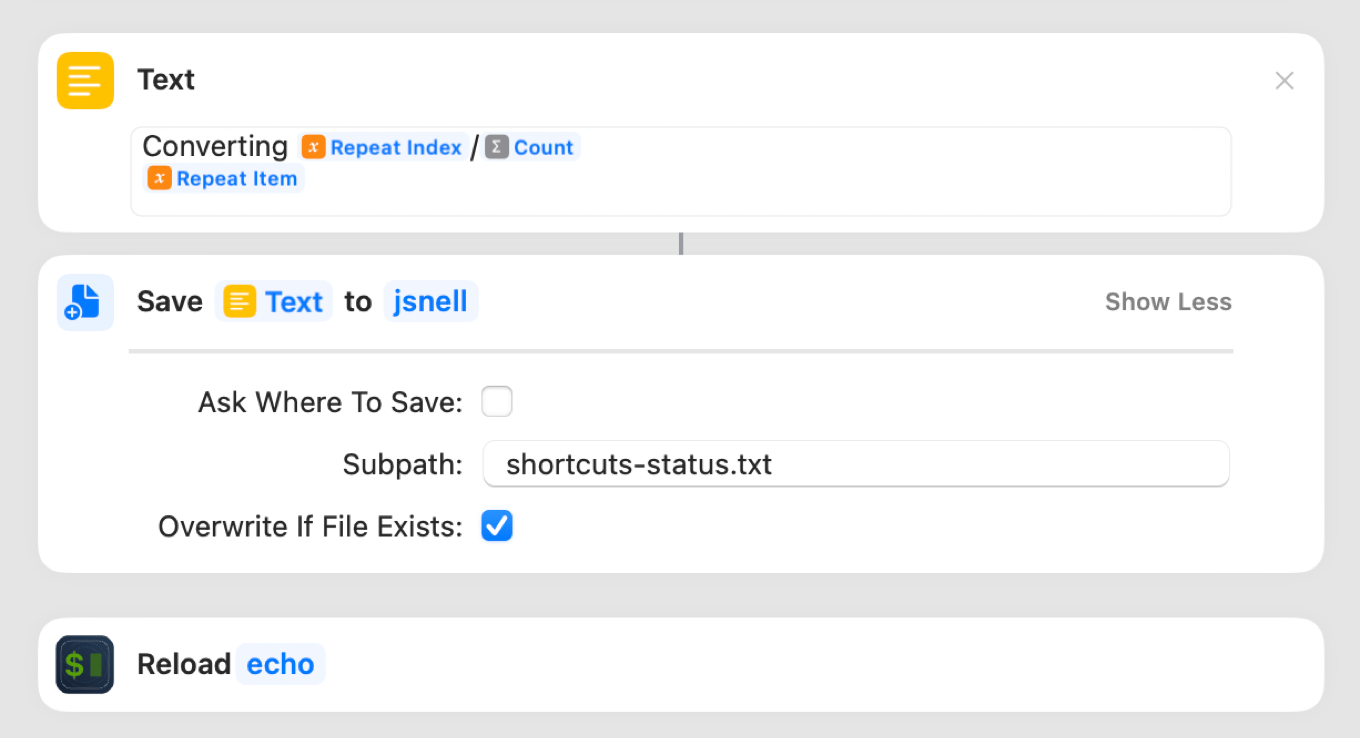
Step two is writing to that text file from Shortcuts and telling SwiftBar to update the menu bar immediately. That’s pretty easy. First, I use SwiftBar’s “enable plug-in” action to turn on my plug-in. Then I create a text field containing my status, save that to my file, and use SwiftBar’s Reload action to immediately force the new data to appear in my menu bar.

A three-step shortcut to write text, save it to disk, and reload the plugin

The result is just what I want—an indicator of where we are in the process, and when I click, a little more information about what’s going on.

Then at the end of the job, I just need to remember to tell SwiftBar to deactivate the plug-in until I need it next. And that’s it! It might not be the ready-made solution I wanted, but it’s better than not having any idea what’s happening.


By Dan Moren for dmoren.com

My writing finances, 2022

It’s that time of the year once again: the time when we talk about numbers.

Wooo! Numbers! Nothing gets the crowd riled up like good old math, especially when it comes from someone whose specialty is nominally words. But what, I ask you, are words but equations with letters?

Don’t answer that.

Anyway, every January I post details about my finances for the past year. I’ve been doing this since 2018; it originally started out as a way to talk about the business of writing fiction, but since that has historically been a small chunk of my income, it’s more about how I earn my living as a freelance writer and podcaster.

As per usual, I’ve been inspired by several other writers, most notably Jim C. Hines, who’s been documenting his writing income for much longer than I’ve been in this game. And, as is also custom, I want to make it clear that this is just my personal experience, and all self-employed individuals (by nature) differ wildly. So don’t bother using this to extrapolate what your favorite writer or podcasting personality makes, because I guarantee you, it won’t hold water.

Continue reading on dmoren.com ↦


Apple launches AI narrators for some audiobooks

Your next audiobook from Apple may not be narrated by a human. Leyland Cecco, writing at The Guardian:

Apple has quietly launched a catalogue of books narrated by artificial intelligence in a move that may mark the beginning of the end for human narrators.

This has been an issue brewing for some time. Some may remember that Amazon tried a few years ago to offer a blanket ability for books to be read aloud by text-to-speech, only to get sued by the major publishers.

Apple’s feature doesn’t seem to be quite the same: for one thing, it’s currently limited to certain genres of books, as The Verge points out:

The service is only available in English at present, and Apple is oddly specific about the genres of books its digital narrators are able to tackle. “Primary category must be romance or fiction (literary, historical, and women’s fiction are eligible; mysteries and thrillers, and science fiction and fantasy are not currently supported),” its website reads.

The company seems to be tuning specific voices to specific genres, with two others for nonfiction and self-development coming soon.

For another matter, Apple’s website advertising this feature describes it as “Empowering indie authors and small publishers.” The titles must be nominated by rights owners, who retain the rights to audiobooks and—this is important—can still produce and distribute other versions of the audiobook if they want.

That obviates one of the main criticisms of Amazon’s previous attempt in this direction: secondary rights like audio can be a valuable source of income for authors1. Apple’s play seems targeted more at books that otherwise wouldn’t have audio versions, because the rights holders don’t have the money or inclination to have them produced. Apple is also doing quality checks (a good idea, given that it’s not hard to imagine AI getting tripped up by some words)2 so turnaround time is listed at a couple months.

The advantage of this, of course, is that it’s a big win not only for those who prefer audiobooks, but for accessibility as well. There are millions of titles out there that aren’t available to individuals with disabilities that make it difficult or impossible for them to read ebooks or print books. The addition of easy-to-produce audio versions could open up a wealth of content.

Finally, there’s the question of the impact on audiobook narrators. It’s a tough business already, and while there are certainly narrators so big that they have their own followings3, it does potentially squeeze out those who are just eking out a living book-to-book or those who are trying to break into the industry. Certainly it’s not hard to imagine a cost-conscious publisher wondering why they should shell out for a human narrator when an AI one is much cheaper.

That’s part of a larger trend, of course, of AI coming for various creative professions, from art to writing. It shouldn’t be much of a surprise to find that audiobook narrators are at risk as well. It’ll be interesting to see if this becomes a point of contention, or whether it can co-exist peacefully alongside the existing audiobook market.


  1. Though increasingly difficult for authors to retain, since publishers want to gobble up more rights wherever possible, even if they, say, don’t intend to produce an audio version. 
  2. Which is probably why sci-fi and fantasy aren’t currently eligible. 🤣 
  3. Putting my sci-fi novelist hat on, I can say with certainty that there are books that sell well because of who narrates them. 

Scott McNulty’s replacement for Dark Sky

‘Tis the season for people to replace the Dark Sky weather app, as Dan did with Carrot Weather. Our pal Scott McNulty downloaded a dozen weather apps in order to find the one that was right for him:

It is important to know what I’m looking for in a weather app, so you can figure out if this blog post will be helpful to you. Here’s what I need in my weather app:

  • An easy-to-read hourly forecast for the day.
  • A little bit of personality, but not too much personality.
  • An attractive design.
  • A reasonable price, and if it is free not too many ads.

As you can see, all of these attributes are highly subjective, but that’s the way of the world.

Scott’s thought process is very interesting, and I encourage you to read his post. But the TL;DR is, he chose Hello Weather, but thinks true Dark Sky fanatics might prefer Carrot Weather.


Search Six Colors