Apple makes plenty of big moves: releasing new products in new categories, creating whole new chip architectures, and offering slews of major updates for its software platforms in a matter of weeks.
But sometimes it can be interesting to look at the company’s smaller decisions. The ones that might fly beneath the radar but can still point to changes that might ripple throughout the company’s product lines. This week, Apple released several new iPads and a revamped Apple TV, and while they might seem like ho-hum announcements, they all contained details that hint at bigger changes to come.
Jason’s got new reviews of macOS Ventura, the tenth-generation iPad, and the M2 iPad Pro. We discuss Stage Manager, System Settings, the Magic Keyboard Folio, and the curious pace and nature of iPad innovations.
In recent years we’ve had some macOS releases that were disruptive, in the worst way. Whether it was bugs or incompatibilities or broken features, nothing makes the excitement of a new OS update evaporate faster than not being able to use your Mac as you’d prefer.
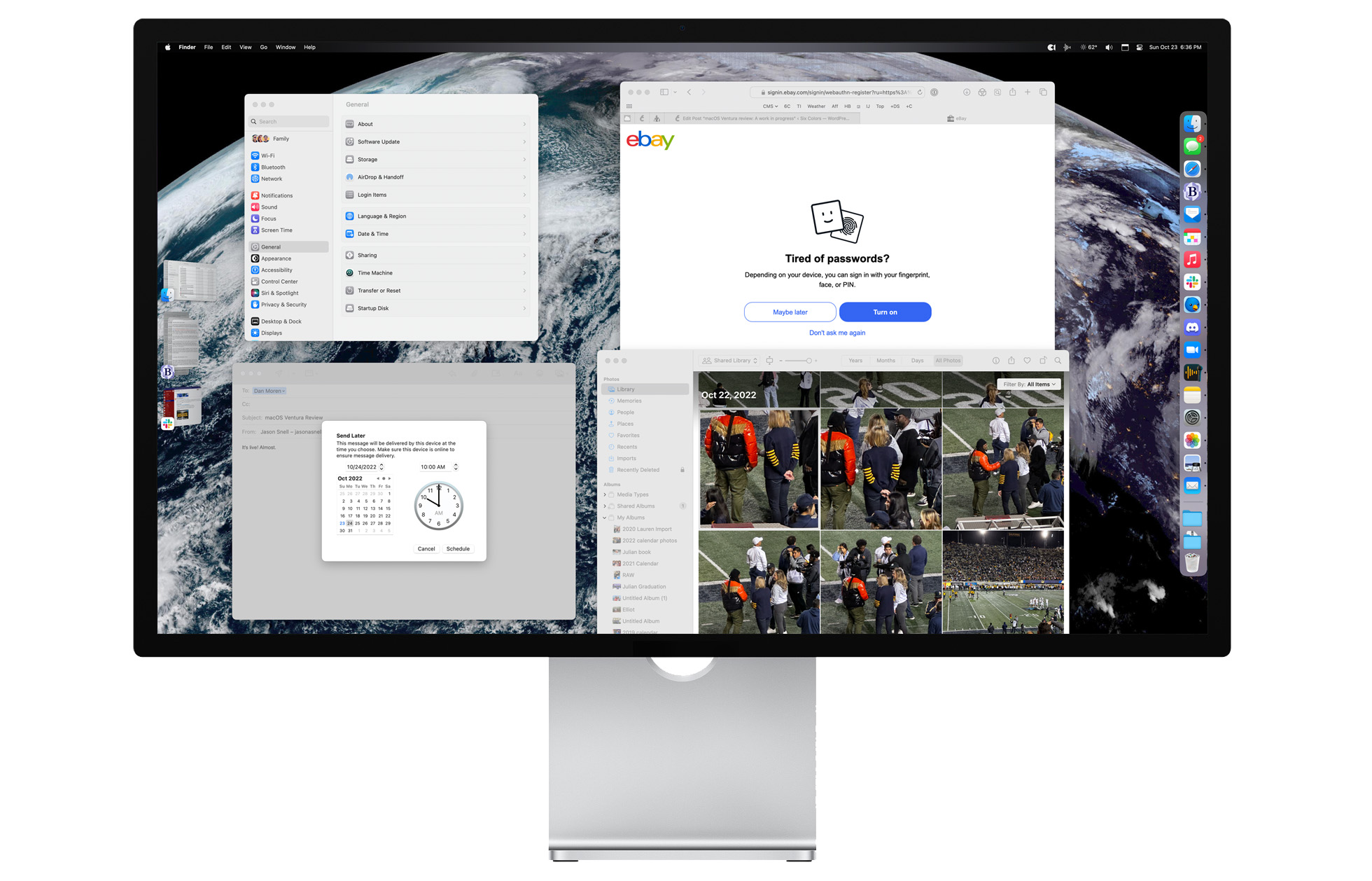
So here’s the good news about macOS Ventura: In using it the last few months as my primary operating system, I’ve found it to be not appreciably different than macOS Monterey. It looks the same, software acts the same, I haven’t noticed any bugs… it’s been solid. Upgrading to macOS Ventura will probably not be particularly dramatic for those who do it, and that’s a good thing.
But you do need a reason to upgrade to a new OS version. Motivation can come from small quality-of-life improvements, or major new features. macOS Ventura offers both, and many of them are quite welcome. From Mail to Safari to FaceTime, there are small upgrades that will delight.
In terms of the cornerstone features of this release, however, it’s more of a mixed bag. The new Continuity Camera instantly gives any Mac user with an iPhone access to a remarkably high-quality webcam (if you can find a way to mount it). Seven years after introducing iCloud Photos, Apple’s new iCloud Shared Photo Libraries feature finally lets people curate a shared photo collections with their loved ones. Both are huge updates, and huge improvements to the Mac experience.
But some other key features feel unfinished. Stage Manager, a new way of grouping windows together, creates too much window-management busy work to make it worth the trouble. The new System Settings app replaces the long-in-the-tooth System Preferences app that’s been with macOS since OS X 10.0, but lacks coherent organization and offers an inconsistent and frustrating interface.
Viewed individually, the 10th-generation iPad and the M2 iPad Pro don’t seem strange at all. In fact, the new iPad Pro is extremely familiar—it’s a look that hasn’t changed much in four years. The 10th-generation iPad is a notable improvement on its predecessor—but let’s lower our voices a little, since the ninth-generation iPad is still alive and kicking and it might get awkward if it hears us.
It’s when you look at them together that they don’t quite add up. That’s not relevant if you’re in the market for one of these iPads. They’re good—in fact, I think the 10th-generation iPad is a tremendous value. But if you’re someone who is invested in the iPad and is trying to get an idea of what Apple thinks the future of the platform is, it’s easy to have mixed feelings. The new low-end iPad suggests that Apple is stepping into the future of the iPad as a sometimes-laptop, from its default orientation to the use of a trackpad and a full function-key row. And yet that future is… strangely not a part of the top-of-the-line iPad Pro, which is (I say again) largely unchanged from four years ago, let alone last year.
Mixed feelings, indeed.
iPad 10th generation
The $449 new 10th-generation iPad is kind of great. Its A14 processor is speedy enough to perform pretty much any action that any regular user would ask of it, and it’s been paired with an accessory, the $249 Magic Keyboard Folio, that turns it into a solid computing device complete with a keyboard and trackpad for under $700.
However, Apple has made some choices with the iPad that will limit its appeal to some users. Some of those choices are understandable, given the availability of more expensive iPads, others less so.
The new iPad is an evolution from the ninth-generation model, which Apple is continuing to sell for $329. In addition to a faster processor, the tenth-generation model offers support for the Magic Keyboard Folio, a modern design without a home button (Touch ID is now located in the wake/sleep button, as it is on the iPad Air), a USB-C charging port, and three bright colors (blue, pink, and yellow) in addition to traditional silver.
Unfortunately, if you’re a fan of the Apple Pencil, I don’t think I can really recommend this iPad. The 10th-generation iPad only supports the first-generation Apple Pencil, which was supplanted four years ago by the Apple Pencil 2. Since it charges via Lightning, and this iPad doesn’t have a Lightning port, Apple has ginned up an awkward $9 adapter that lets you charge the Pencil via a USB-C cable. It’s small and will be easy to lose, and if your Pencil runs out of battery when it’s not around, you’re mostly out of luck. (Though if you’ve got an iPhone, you can plug it into that, and it’ll suck some power and charge itself back up.)
This is a ridiculous situation, but Apple has painted itself into a corner thanks to its design decisions with the two Pencil models and its choice not to bite the bullet and add Pencil 2 compatibility on this iPad. If you don’t need pressure sensitivity in your stylus, consider using the $70 Logitech Crayon, which is compatible with most modern iPad models and charges via USB-C.
In better news, Apple has relocated the user-facing camera on the 10th-generation iPad to one of its longer sides, meaning that if you hold your iPad horizontally (which I suspect most people do, most of the time), all your FaceTime calls will now look like you’re looking right at the camera, rather than off to the side. Very slowly, Apple is admitting that the iPad is a horizontal-first device—first, the power-on Apple logo displayed properly if you started up in a horizontal orientation. Now the camera has moved. All that remains is to rotate the Apple logo on the back by 90 degrees. Next time.
If you don’t care about the Apple Pencil and aren’t someone who pushes the iPad to its limits, this is a really good iPad. Getting rid of the home button improves this product just as it did the iPad Air. If you never want to attach a keyboard to an iPad or draw on it but just want to use it in its basic state as a touchscreen tablet, I think you’ll be more than satisfied with the 10th-generation iPad. Choose a bright color and have a fun time.
However, the truth is that people and institutions looking for the absolute lowest-cost iPad will probably continue to buy the ninth-generation iPad for a few years yet. It’s not as nice as this new model, but it’s cheaper, and its Apple Pencil story is substantially less complicated. I guess this model will be the go-to low-cost iPad selection… in a couple of years when the ninth-generation model disappears.
But seriously: If you’re someone who cares about the Apple Pencil, just don’t bother with this model. Spend the extra money and get the iPad Air, which supports the superior Apple Pencil 2.
Magic Keyboard Folio
For whatever reason, Apple has chosen to keep the old-style Smart Connector on the side of the 10th-generation iPad rather than move to the new version that’s located on the back. As a result, it’s not compatible with the Magic Keyboard, despite it being roughly the same size as the iPad Air and 11-inch iPad Pro.
Instead, Apple has built a new keyboard case just for the 10th-generation iPad, the Magic Keyboard Folio (available in white only). Its $249 price is $50 less than the Magic Keyboard for iPad, but still more than half the price of the base model 10th-generation iPad itself.
It’s a two-piece accessory: a magnetic back with a freely adjustable kickstand and a keyboard that attaches magnetically to the smart connector. This means you can fold the keyboard back or tear it off entirely when you’re using the iPad without the keyboard. However, that back piece is thicker and heavier than you might expect, and it doesn’t offer any screen protection on its own, so you’ll need to keep the keyboard portion handy if you plan on using the Magic Keyboard Folio as your only iPad case. (I use a Smart Folio for my iPad Pro and only swap in the Magic Keyboard when I’m typing because it’s so heavy and ungainly. The Smart Keyboard Folio offers more flexible ways of working, but you still might prefer to take it off if you only need to use it occasionally.)
The keyboard itself has the same Magic Keyboard mechanism as in the Magic Keyboard for iPad; the keys feel good, and it offers a good typing experience. The keys aren’t backlit like on the Magic Keyboard for iPad, but the Magic Keyboard Folio does add an additional row of function keys at the top. This is a feature that the Magic Keyboard for iPad is sorely lacking, and I’m encouraged that Apple apparently has decided that it’s worth putting the function row on an iPad keyboard. (Unfortunately, Apple hasn’t updated the Magic Keyboard for iPad to add a function row.)
While acknowledging that everyone’s ergonomics are different, I am not a fan of kickstands on mobile devices. By necessity, kickstands extend the depth required for a device to remain stable. If you’ve got a big table with lots of room, that’s great, but if you’re on a narrow surface or are sharing with other people, you may find that the kickstand requires more depth than is really available.
But to me, the most damning thing about kickstands is that they’re lousy on your lap. They lack stability and can even require more depth than my lap can provide. In the case of the Magic Keyboard Folio, the adjustment required to get it to perch on the edge of my knees ended up angling the iPad screen so that it was facing my chest, not my eyes. Your mileage may vary, but I would never buy a Magic Keyboard Folio expecting to use it anywhere but on a desk or table with plenty of room.
I’m glad Apple is making a decent keyboard with a trackpad available to users of the 10th-generation iPad. I just wish it had gone the extra mile and offered the actual Magic Keyboard. If you plan on using an iPad with a keyboard and trackpad and want to use it in your lap, it’s worth considering the iPad Air and Magic Keyboard, even though it will cost you about $200 more.
M2 iPad Pro
There’s a new iPad Pro, too, with an M2 processor that makes it a match for the M2 MacBook Air in terms of speed. But in terms of its exterior design, the iPad Pro is largely unchanged from the 2018 model, previously revised in March 2020 and May 2021.
That makes the fourth revision for this design without any substantial exterior changes. It’s a good design, yes, but it’s a little frustrating that it’s been in stasis for four full years. The 10th-generation iPad’s repositioned FaceTime camera would be welcome on a new iPad Pro. A revised version of the Magic Keyboard introduced in April 2020 with that extra row of function keys like the Magic Keyboard Folio would also be nice.
But while the low-end iPad points the direction to the future, the M2 iPad Pro remains in stasis. The display is unchanged from the M1 generation, meaning only the 12.9-inch model gets the excellent Liquid Retina XDR display, and the 11-inch model remains left out. There are several iPads available at the 11-inch size, so it would be nice if the iPad Pro were a bit better differentiated from (for example) the iPad Air. It’s not.
There’s one new feature in the M2 iPad Pro beyond the M2 processor itself: a new ability to detect when an Apple Pencil 2 is “hovering” just above the screen. This feature is a cousin to the hover state apps can adapt to when the pointer from an external trackpad is hovering over interface elements, but developers of Pencil-oriented apps can add more functionality.
There’s some real potential here. Hovering the Pencil in most drawing apps will show a preview of what will be drawn if you touch the tip to the iPad’s surface. When the Pencil is hovering, apps can also change their behavior. A double tap of the Pencil can mean something different when hovering than when not hovering. Swiping or pinching while hovering can also be coded to mean something completely different, perhaps even altering the displayed preview.
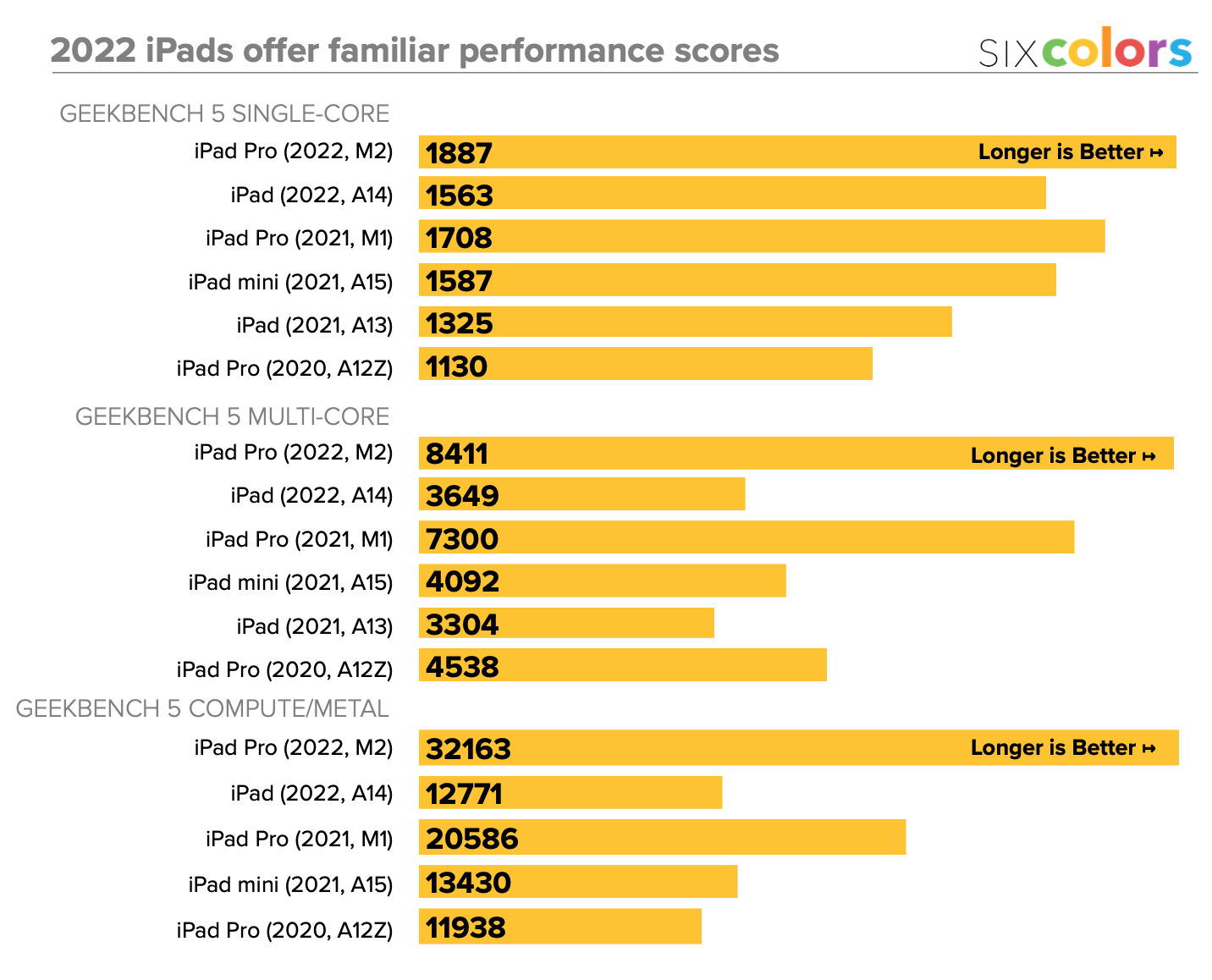
It’s a nice, albeit esoteric, feature. Perhaps some artists will find enough reason to upgrade for that feature alone, but in most cases, the buyers of M2 iPad Pros will likely be owners of lower-end iPads wanting to trade up or owners of older iPad Pro models who want something a bit faster and more capable. The M2 is a whole lot faster than the A12X and A12Z, and you’ll also pick up Stage Manager external display support. That said, if your 2018-era iPad Pro still does the job day in and day out, you could just hold on to it, and nobody will be the wiser.
I don’t have much more to say about the new iPad Pro. It’s really just the M1 iPad Pro, but with an M2. That’s not a bad thing, but it is a bit frustrating that while Apple is making changes to the iPad at the low end, the top-of-the-line iPad remains frozen in amber. As much as I’ve loved this iPad Pro design, I hope this is the last we see of it. It’s time for some more substantial improvements.
A sense of direction
I love what some of these changes signal about how Apple views the iPad. A trackpad is standard issue on even the low-end iPad’s keyboard accessory—that’s an endorsement in using the iPad with a traditional laptop-style input method. The new placement of the FaceTime camera suggests that Apple is acknowledging that horizontal orientation is preferred over vertical. Adding a function row to the keyboard suggests that Apple has gotten the message that iPad keyboard users would prefer the same quick controls that users of Apple’s laptops have had for ages.
I just wish that future iPad vision was here across the entire product line rather than scattered here and there. Apple seems to be taking the iPad in a good direction. I just wish we were there already.
My thanks to Kolide for once again sponsoring Six Colors.
If you build a dystopian and cynical security program born out of fear, mistrust, and suspicion, then you will inevitably make your fellow employees your enemies. I’ve seen it happen. It’s not good.
Kolide is different. (Really.) It’s an endpoint security and device management product that treats users as allies, not enemies.
Kolide works by notifying your employees of security issues via Slack, educating them on why they’re important, and giving them step-by-step instructions to resolve them themselves.
New iPad announcements include exciting new features in frustrating new places and an embarrassing accessory. What’s the calculation behind it all? Also, there’s a new, lighter Apple TV!
On Tuesday morning, Apple announced new iPad and iPad Pro models via press release. On their own, they are reasonable and understandable upgrades over the previous-generation model. Look at them together, along with the other members of the iPad product line, and everything’s a lot less understandable. The iPad continues to move forward, but sometimes that advancement is so fitful and even contradictory that it feels almost haphazard.
The new 10th-generation iPad is a nice update, adding Touch ID (on the wake/sleep button) and an A14 processor, kicking the home button to the curb at last. (Except not quite—the new iPad is more expensive at $449, so the ninth-generation iPad remains in the product line at $329.) It even comes in some nice bright colors—blue, pink, and yellow, plus a neutral silver.
But there are some also real head-scratchers, both positively and negatively. Apple has moved the iPad’s front-facing camera to its long edge, and as someone who uses my iPad almost exclusively in landscape orientation, this is a great step.
Apple has also built a new keyboard-and-trackpad case for the iPad, with the same key mechanism as the Magic Keyboard for iPad Pro and iPad Air. It’s a very different product, though: rather than creating a laptop-style flat surface via a clever cantilever method, Apple’s new $249 Magic Keyboard Folio resembles a lot of third-party cases in having an adjustable kickstand and the ability to detach the keyboard magnetically when you’re not using it.
I’m not a fan of kickstands—they’re good on tables but lousy in laps—but the Magic Keyboard is really an accessory that’s only good for typing, while the Magic Keyboard Folio could reasonably be your only iPad case since you can pull the keyboard off if you aren’t using it. The Magic Keyboard Folio also has a row of function keys that the Magic Keyboard sorely lacks. (The Magic Keyboard Folio lacks the key backlighting of the Magic Keyboard.)
While the iPad is basically a complete hardware redesign, the new M2 iPad Pro models are very subtly upgraded versions of last year’s hardware. This makes complete sense—but it also means that they haven’t been updated to support some of the advances in the 10th-generation iPad. It’s a very weird situation to be in when the low-end iPad is showing the way to a new front-facing camera position and an embracing of function keys, but the high-end iPad Pro is stuck in the past. (And the poor 11-inch iPad Pro couldn’t even get an upgrade to the XDR display in the 12.9-inch model.)
I get it. The iPad Pro isn’t ready for a complete hardware redesign, nor did Apple want to redesign the Magic Keyboard this year. But the result is that the leading iPad is missing innovations that the cheap iPad offers. It’s weird.
Awkward.
Speaking of weird: The Apple Pencil! The 10th-generation iPad has switched to USB-C, which is a great move. But the original Apple Pencil uses a Lightning jack to charge, and the Apple Pencil 2 was designed to magnetically attach to the side of the iPad to charge via induction. Apple sort of painted itself into a corner here and decided to punt rather than come up with a new version of the Apple Pencil.
Instead, Apple has made the awkward move of building a $9 Pencil-to-USB accessory, which will also now be included in the box with future Apple Pencils. To use it, you’ll need to plug the Apple Pencil’s lightning jack into one end and a USB-C cable into the other, and then plug the other end of the USB-C cable into the iPad.
The M2 iPad runs DaVinci Resolve, but not Final Cut Pro.
The big new feature of the M2 iPad Pro is Hover, a feature that detects when the tip of an Apple Pencil 2 is just above the top of the screen. This feature is a cousin to the hover state apps can adapt to when the pointer from an external trackpad is hovering over interface elements, but it’s not quite the same feature, and developers will need to use a new API to address it.
It feels like it’s about time for an Apple Pencil 3, but since Apple isn’t ready to go there yet, the Hover feature sort of adds an interface element to the Pencil 2 with no hardware upgrade required. When the Pencil is in the hover state, apps can change their behavior, which can lead to some very interesting interactions. For example, in the Procreate design app, you can pinch the screen while hovering to adjust the size of a paintbrush. Double-tapping on the Pencil while hovering can kick off a completely different command than double-tapping when it’s not hovering.
Just as with the MacBook Air and MacBook Pro, the move from M1 to M2 will offer some nice but modest speed boosts for the iPad Pro. And Apple is smart to show off video apps like DaVinci Resolve and Octane X that really take advantage of the full power of the M2. But when I see Apple boasting about how the M2 can be put to work for serious video work with those apps, it’s bittersweet because I’m reminded that Apple’s own pro video app, Final Cut, still hasn’t made it to the iPad.
There’s no getting around it: The absence of Apple’s pro media apps on the iPad Pro is an embarrassment. All these other apps are great, yes, but Apple has had an opportunity to take the lead in defining what the pro app experience should be on one of its platforms and has never seized it.
Overall, Tuesday’s announcements left me with mixed emotions. The individual products look fine, and I look forward to trying them out. But zoom out to the iPad line as a whole, and it’s kind of a mess. From the old ninth-generation iPad all the way up to the 12.9-inch iPad Pro, there’s an iPad for everyone—if you can figure out which ones have which features and whether those features are worth the extra price.
If the growth of the iPad is a journey, today shows that it’s still an erratic one. At least it’s moving forward—but there are an awful lot of weird sidesteps along the way.
Is “Monster: The Jeffrey Dahmer Story” the real winner of this fall’s battle between Dragons and Elves? Also: Netflix opens itself up to ratings, Sports Corner covers Apple’s negotiations with the NFL, and we discuss the merits of Paramount and Hulu.
In addition to new iPads, Apple unexpectedly revamped its Apple TV line Tuesday, offering two configurations: a 64GB model with Wi-Fi only for a lower cost of $129, and a 128GB model that also has Gigabit Ethernet and Thread for $149.
Both models are powered by the A15 Bionic chip and support HDR10+, bringing increased high-dynamic range to pictures. The new models are a few millimeters smaller than the old ones in each dimension and, astoundingly, weigh about half as much (7.5 ounces for the Wi-Fi and Ethernet model vs the previous model’s 15 ounces). Also the new model eschews the “TV” embossed branding on top simply in favor of the Apple logo, bringing into line with pretty much every other Apple product.
Perhaps the biggest news, though, is that Siri Remote ditches its Lightning charging port in favor of USB-C. Rumor already has it that Apple is planning on replacing Lightning on next year’s iPhone model, and this change seems to indicate that the writing is on the wall for all of Apple’s accessories, probably sooner rather than later.
It’s interesting to see Apple differentiate models on something other than storage capacity (a spec for which it has never made a very persuasive argument). Many people probably don’t need Ethernet on their set-top box, and Thread—which provides mesh networking largely aimed at smart home tech—remains a technology that most consumers aren’t well informed about.
The lower prices are probably the most welcome aspect of the new Apple TVs, although they’re still at the high-end of the market, where many streaming dongles can be had for $50 or less. But Apple seems to think there’s still a market for a premium streaming box, and Tuesday’s announcements demonstrate that consumers are probably still buying them.
[Dan Moren is the East Coast Bureau Chief of Six Colors, as well as an author, podcaster, and two-time Jeopardy! champion. You can find him on Mastodon at @dmoren@zeppelin.flights or reach him by email at dan@sixcolors.com. His next novel, the sci-fi adventure Eternity's Tomb, will be released in November 2026.]
Changes are afoot in Apple’s lineup of tablets, as the vanilla iPad gets a brand new design on par with the rest of the company’s iPad models, and the high-end iPad Pro adds the new M2 processor and a new Apple Pencil “hover” experience.
The redesign of the iPad—I hesitate to call it the “base-level iPad” for reasons that will be shortly apparent—makes it very similar to the iPad Air, including a USB-C port, Touch ID on the power button, and the same 12MP wide camera. It’s also very slightly larger than the iPad Air in every dimension by about a millimeter, and weighs in at 16 grams heavier. So I guess the “Air” is still earning its moniker there. Sort of.
Where the tenth-generation mainly differs are in a lot of little niceties: it lacks the fully-laminated display, wider P3 color gamut, and antireflective coating of the iPad Air; can’t work with accessories like second-generation Apple Pencil or the Magic Keyboard; and of course has a slower A14 Bionic chip, rather than the current generation iPad Air’s M1. (Interestingly, even though Apple recently expanded its new Stage Manager feature to work with older iPads powered by A12-generation chips, it seems like the A14-powered iPad won’t support it—perhaps because it has less RAM?)
For drawing support, Apple’s sticking with the clunky first-generation Apple Pencil, which will now include a Lightning-to-USB-C adapter (available separately for $9). And instead of the Magic Keyboard, there’s a new Magic Keyboard Folio, which appears to be a two-part design that has a magnetic back which can fold out to a kickstand as well as a keyboard that attaches to the Smart Connector, which is still on the edge with this model, and boasts for the first time a multitouch trackpad. It runs $249 and comes in any color you want, as long as it’s white.
That said, the tenth-generation iPad also comes in at $449 for 64GB of storage, which is still $100 less than an iPad Air with the same amount of storage. But that also means it’s $120 more than the ninth-generation iPad…which explains why Apple is keeping it in the line-up for now. The tenth-generation iPad is clearly not the budget tablet for most people, though it may eventually take up that spot?
It’s worth nothing there are actually a couple of other positives new developments on this model: For one thing, the new iPad features the first landscape-oriented front-facing camera on any of Apple’s tablets, finally seeming to concede that most people use their iPads in landscape, at least when video-chatting. And the iPad actually comes in eye-catching colors, including blue, pink, yellow, and silver1.
The iPad Pro also got a revision Tuesday, as both the 11-inch and 12.9-inch models were bumped to the new M2 processor, which includes hardware-acclerated ProRes encoding and decoding. Additionally, they add support for the faster Wi-Fi 6E protocol and Bluetooth 5.3, as well as a new “Apple Pencil hover” mode that can detect the Pencil’s height at up to 12mm above the display, and allow the iPad to react accordingly. Otherwise, they remain unchanged from the previous versions—weirdly, they even keep the portrait-orientation front-facing camera—and continue to start at $799 for 128GB for the 11-inch and $1099 for 128GB for the 12.9-inch.
[Dan Moren is the East Coast Bureau Chief of Six Colors, as well as an author, podcaster, and two-time Jeopardy! champion. You can find him on Mastodon at @dmoren@zeppelin.flights or reach him by email at dan@sixcolors.com. His next novel, the sci-fi adventure Eternity's Tomb, will be released in November 2026.]
This week we praise trackpad gestures, condemn Google’s Matter strategy, ponder whether looks matter when it comes to VR headsets, and think big thoughts about the AirPods Pro 2. Then it’s time for some final prognosticating about what products Apple might be introducing in the next few weeks.
According to the California Board for Professional Engineers, Land Surveyors, and Geologists, Ryan Crownholm is guilty of depicting “the location of property lines, fixed works, and the geographical relationship thereto,” which under California law is illegal unless you spend six years as a full-time land surveyor, pass four exams, and pay a fee. He’s been fined $1000 and told to take his site down, but is fighting the fine in federal court:
“As our complaint explains, it’s been long recognized that a literal interpretation of surveying practice statutes would make a lot of common everyday things illegal without a license: GIS data, the many uses now of things like Google Maps,” said Paul Avelar, the lawyer representing Crownholm and managing attorney at the Institute for Justice Arizona Office.
That’s right—one hilarious interpretation of this law is that it’s illegal to draw a map in California if you’re not a professional surveyor. Bad news for Apple and Google Maps, I guess.
Apple’s at the top of the world–and from this standpoint, it’s hard to see how the company could be anything other than the market leader and tastemaker that it’s been in recent memories. I’m not about to suggest that its decline and fall are imminent, but those who (like me) remember the dark days of the 1990s know that success is never guaranteed.
In any case, it’s unlikely that a company as massive and dominant as Apple would simply vanish into the ether–poof. But as the company’s grown and matured, it’s undeniable that its nature is changing.
Those changes aren’t without precedent. Over the last several decades, there’s been a pattern amongst dominant tech companies. Where once they might have ruled the world by producing the thing that everybody needed to have–whether it be a hardware product or a crucial piece of software–they seem to eventually evolve into a new form, one where they’re focused less on delivering a key product and more about what service they provide.
My thanks to Kolide for once again sponsoring Six Colors.
Kolide knows how challenging it can be to prove compliance to a third-party auditor—they just went through it themselves. They learned firsthand something their customers had been telling them for a while: that they couldn’t have gotten their SOC certification without using their own product.
Kolide is an endpoint security solution for Mac, Windows, and Linux devices. Kolide gives IT admins a single dashboard, through which you can prove that your fleet has the security measures in place that auditors care about.
Dan and Jason host “This Old HomeKit” and ponder whether the arrival of Matter will change the smart-home world for the better. Then it’s on to wondering about if Apple’s rumored product announcements will be accompanied by a video “event” or not.
Smart home tech is having a moment, thanks in no small part to the newly released Matter standard, which promises better interoperability between devices from various manufacturers. It’s even encouraged Apple to overhaul its Home app in its latest software platform releases, improving the interface and promising (at some point in the not too distant future) better reliability.
That’s no small thing: reliability remains the biggest frustration for a lot of smart home users. What’s the point in having a fancy light bulb that you can control with your voice if it’s harder to use than a normal light bulb?
But beyond issues of reliability, Apple’s smart home implementation has remained at times an exercise in frustration. Even now, years after its first release, it’s still missing a couple features whose absence leaves me scratching my head.
Pick a hub, any hub
Currently, HomeKit relies on a home hub to provide certain features, such as handling automations. You can see which of your devices are available as hubs under Home Settings in the Home app’s menu.
Red Five, standing by. And standing by. And standing by.
The problem is there’s no way to choose to prioritize a certain device as your home hub, especially if you have more than one that’s able to act in that capacity. Apple TVs allow you to disable the home hub feature in their Settings, but that’s not even possible on the HomePod.
So, as a result, you might end up with the “wrong” device being used as the hub for your home. Does that matter? Well, it can, especially if the device that ends up being the hub doesn’t have the most reliable network connection. Or if you want a Thread-capable device (a HomePod mini or the most recent Apple TV) handling hub duties.
Apple, as is its wont, tries to be smart about this, picking what it thinks is the best option for the home hub at any given moment, but in my experience that can leave you in a weird spot. More than once now, I’ve ended up with all four of my home-hub-capable devices on Standby, which can lead to some smart home devices working inconsistently and automations not working at all. A reboot of my router can often fix the problem, but that’s not exactly something I enjoy doing on a regular basis.1
The company could simplify matters by simply allowing you to designate which hub is the primary. It’s possible that the forthcoming revamped underpinnings combined with support for Matter will obviate this issue; in a Matter system, smart home tech doesn’t need a hub, instead communicating in a peer-to-peer fashion. But at the moment, it’s still a major annoyance.
Oughta-mations
The smart home shortcoming that really gets me banging my head against the wall, though, is automations. Apple’s smart home automations are pretty easy to set up: for example, you can make it so your lights turn on or off at certain times of day—or even have them automatically adjust to turn on, say, an hour before sunset.2 You just step through the process, picking the trigger, conditions, and action. Voilà!
Apple also lets you make personal automations via the Shortcuts app, that do things like, say, trigger based on a condition on your device. (You know this. It’s not like we don’t write about it enough.)
The maddening part, however, is that these two systems are utterly unconnected. Recently I wanted to set up an alert to go off if a sensor detected the temperature in my kid’s bedroom rose above a certain level. Seemed like a perfectly reasonable use for a home automation: I created a new automation, selected the temperature sensor, chose the threshold, and then…hit a brick wall. Because the only options for actions to be triggered by smart home devices are to control other smart home devices or set a scene.
The bizarre assortment of apps available to Home automations converted to shortcuts.
So, okay. I guess I could have it turn on the lights in my room if it got too hot. Or have the Sonos speaker in our bedroom belt out Buster Poindexter & His Banshees of Blue’s “Hot Hot Hot”3. But I can’t simply have it send an alert to my iPhone.
I find this utterly baffling.
Yes, there are some third party systems that can intermediate and handle this fucntionality, but they’re clunky and require more configuration than the average person’s going to go through. Apple does offer a Convert to Shortcut option when you’re setting up a Home automation, but as far as I can tell, it only offers a subset of actions (Calculator? Contacts? iTunes Store) and, frankly, seems so restrictive as to be broken.
Some smart home devices can send notifications, but users have little control over the content of those alerts or even what conditions trigger them. (For example, the sensor for my ecobee thermostat can detect temperature and motion, but the Home app only allows it to send notifications for motion activity.)
I’d love to see Apple enable the option for a home automation to run any shortcut as an action. I can understand that there might be concerns about which device in the house will run said shortcut, but even the HomePod can trigger shortcuts, so I’m not sure that issue quite holds water with me. Either way, it’s a glaring oversight that really holds back the utility of smart home tech, and it’s one I hope Apple fixes in the not too distant future, because it would surely open up a ton of possibilities.
“Restarting your router” is second only to “logging out of iCloud and then back in again” on the list of Worst Troubleshooting Steps. ↩
Growing up, my parents had an analog automated timer where you had to press down all these pins to set up the time. And then, twice a year, you had to get down on your knees, pull it out, and painstakingly reconfigure it because of good old daylight saving time. Everything about that tech was worse. ↩
[Dan Moren is the East Coast Bureau Chief of Six Colors, as well as an author, podcaster, and two-time Jeopardy! champion. You can find him on Mastodon at @dmoren@zeppelin.flights or reach him by email at dan@sixcolors.com. His next novel, the sci-fi adventure Eternity's Tomb, will be released in November 2026.]