Six Colors
Six Colors

Apple, technology, and other stuff

Support this Site

Become a Six Colors member to read exclusive posts, get our weekly podcast, join our community, and more!

Our hardware upgrade cycles, what an Apple foldable would bring, UI decisions that bother us, and what piece of tech we would use our magic wands on.


By Joe Rosensteel

Shake it off: Remembering Apple’s Academy Award–winning failure

People are reminiscing about 25 years of the iMac, which is fine and all, but I’m doing to do something a little different. I’m reminiscing about 21 years of Apple’s Shake.

What’s that? You have no idea what I’m talking about? You just want candy-colored computers? Too bad. You’re going to learn something you’ll never need to know, whether you like it or not.

In February of 2002 Apple acquired Nothing Real, a software company based in Venice, California that made the industry-leading Shake compositing software. It was in that weird period where Apple was picking up steam, and trying to convert PC users to Mac users. There was no Shake version for the Mac, but there was for Linux, Windows, and Irix (RIP).

Just a few months after that acquisition, Apple released Shake 2.5 for the Mac (along with the existing supported platforms). Shake 2.5 would be the final version for Windows. Apple’s goal was pretty clear just from the press release—Shake cost half as much on Mac as it would on another platforms. (And this is a product that cost $10,000 per seat.) By Grabthar’s hammer, what a savings!

Apple was trying to convert high-end professionals, who would theoretically buy high-end Macs. As with Apple’s acquisitions of Final Cut Pro and Logic Pro, here was another pool of potential Mac buyers. (For context, this is the same year Apple released the second-generation iPod that added Windows support in an effort to get people to use Apple products in their personal lives.)

There were some problems with Apple’s strategy, though. While Apple managed to kill Shake for Windows, it could never do the same to the Linux version. That’s because all the big VFX houses were doing their work using Linux. It was easier to convert an editor or a small group of editors to Final Cut Pro than it was to pitch a corporation on converting hundreds of desks, and their render farms, to Power Macs or Mac Pros—even with the steep software discounts. (Not even Pixar!)

Yep, this is a Mac app. From Apple.

For Mac users, Shake never made any effort to fit in. It was born of an era where professional software tended to have its own custom interfaces so that the apps could run on a variety of platforms and work more or less the same. It never even adopted the Mac’s file open and save dialogs, buttons, or anything. It had bevels out the wazoo, which was the style at the time. It had some 3D-effect turquoise slider elements, but I wouldn’t call the interface “lickable.” Don’t lick the bevels, kids.

This custom UI was part of the reason it could be quickly ported to Apple’s Mac OS X Unix-compatible system from Linux and Irix, because no one needed to worry about how interface elements would be placed. It was literally the same interface.

Nodes and noodles

While Shake was not the first piece of software with a node-graph interface, it was arguably the most widely available at the time of its initial release.1

The benefits of a node-based approach might not be clear at first glance. After all, when most people think of image editing, they think about it linearly: You open a file, you change some colors, add a blur, and save your file. (Or, alternately, consider a bunch of vertically stacked Photoshop layers.)

When it comes to video compositing, things get a lot more complicated. You might need to re-use the same element twice, or combine many elements instead of just editing one. And what if all your work needs to be done over a thousand frames of moving footage? A linear workflow just won’t do. You need to have the ability to branch and merge your work.

The node graph allows for the visual representation of complex, interconnected assets and adjustments. It allows for multiple inputs and outputs. It allows for reusing work, where the file being operated on can be swapped out for some other file while still applying the same edits.

This interface also helps you evaluate the output at any point along the line, including walking up or down the tree to see which node is causing a certain effect. This comes in handy when you’re working on version 100 and your client has decided that the thing you added 80 versions ago is something they want to take out. You can’t just keep pressing Command-Z—you need to alter just that one choice.

This was real non-destructive editing. And it was powerful.

It’s also important to note that this interface wasn’t a stack (like Apple’s Shortcuts, or Photoshop’s History palette) that runs from top to bottom. It was a web of nodes, all connected to one another. Shake visualized these connections between nodes with noodles—not straight lines, but a curving piece of spaghetti. (This is whimsy, as manifested by the developers of high-end professional software.) If you preferred straight lines, and you could straighten out those noodles by adjusting a preference called Noodle Tension. (I’m not making that up.) As for me, I’m a monster. I love my curvy noodles.

Everything flowed logically. Nodes that generated images didn’t have a little input bump on the top of the node, because they didn’t accept input, only generated output. Nodes that did operations had at least one input and one output. Any time there was more than one input or output, there would be a discreet and separate connection point for each so that things didn’t all collide in one spot. Each of these nodes also had a mask input, where any kind of alpha could be connected to limit the area that the node was editing. It was sort of like a Clipping Mask in Photoshop, but way easier to reuse and adjust for multiple nodes at once.

Shake even had a pretty comprehensive set of paint tools, where paint strokes were all saved nondestructively. There were warping tools that were used to create talking animals. All those things were there, editable, non-destructive, and portable.

And if you ever got a collection of nodes that you used a lot, you could group them and save them as a macro, which would appear as a single node. This was a great way to save time and reduce visual complexity.

The namesake feature of Shake was that if you wanted to remove a node and take it somewhere else, instead of disconnecting every noodle going in and out of it, and reconnecting those up and downstream, you could just hold down on the mouse button, and shake the node around until it until it was released. It wasn’t something you needed to do a lot of the time, but when you did do it, it was charming (and you were very relieved you didn’t need to reconnect things).

Multiple endings for Shake

From Apple’s March 2004 press release on Lord of the Rings: The Return of the King winning the Academy Award for Best Visual Effects in a Motion Picture:

“We’re thrilled that for seven years in a row, movies created with Shake have won the Oscar for best visual effects,” said Steve Jobs, Apple’s CEO. “Shake is helping Hollywood film editors communicate their vision and deliver their art at an Academy Award winning level. We couldn’t be happier.”

It’s always been weird to me that Steve Jobs referred to them as editors, but maybe that’s because of how Shake was often positioned as a companion to Final Cut. (It didn’t work anything like Final Cut, but whatever!) If you were a small shop that had Final Cut Pro and needed to do a few effects, than it was great to have this class-leading software available to you, even if you weren’t making a “Lord of the Rings” movie.

But Shake just didn’t pan out the same way Apple’s purchases of Final Cut Pro and Logic Pro did. While it was wildly popular, award-winning software, it was only ever wildly popular and award-winning on other platforms. The last major version of Shake was released in 2006, with a minor update was released in 2008. Shake’s price was slashed and slashed again over its lifetime, with the final offer being a $50,000 site license so a VFX house could intall it on as many Linux boxes as they could muster. (That would have been five Linux workstation licenses under the original Shake pricing.)

This meant that I got to use Shake once again at Imageworks on Watchmen, including a wild day and night where I was working in a Shake script on Dr. Manhattan, and then copying and saving those changes to the main comp script where the plate photography was being stitched together for a bunch of mobsters exploding. The other compositor would tell me when he was done, and I’d copy more nodes and adjustments to the file. Back and forth. The workflow was still powerful, even if it hadn’t seen active development in three years.

Shake was unceremoniously discontinued in 2009. Apple wasn’t the company trying to convert visual effects houses to buy cheese graters any longer. It had become a company printing money from selling iPhones. Shake’s developers were moved on to other projects, or departed the company altogether.

I know there was never a financial case for Apple to have continued development of Shake. But it’s sad to see that misguided acquisition kill a product that was formative for me, and others. (Christa Mrgan mentioned it as an influence on Audio Hijack 3’s redesign.

Fortunately, node-based compositing didn’t die with Shake—far from it. Foundry helped “productize” Digital Domain’s Nuke just as Shake died, and that’s now the industry standard.

Apple was the wrong company to acquire Shake and the wrong company to attempt to be an industry leader in tools for visual effects artists. Sadly, Shake’s legacy isn’t about those smart nodes and fun noodles—it’s as a cautionary tale about misguided acquisitions.


  1. The original Shake design sketches have been uploaded to Flickr by Nothing Real co-founder Ron Brinkmann. 

[Joe Rosensteel is a VFX artist and writer based in Los Angeles.]


By Shelly Brisbin

Editing the sound of silence

Note: This story has not been updated since 2023.

Stripping silent passages in Adobe Audition leaves blank areas between the spoken clips on each track.

Jason has used a feature in Logic Pro and Ferrite Recording Studio to remove silence from podcast recording tracks for years now. It’s a technique that makes it easier to produce a podcast panel show like The Incomparable, or my own Lions, Towers and Shields.

Up to now, I’ve been using Ferrite’s Strip Silence feature to pre-process my audio and suppress background noise. But a while back, Adobe added a version of the feature to Audition. I’ve been trying to decide if Audition’s implementation might be worth making a change, since I prefer to edit and produce my shows on the Mac, in Audition.

Diagnosing silence

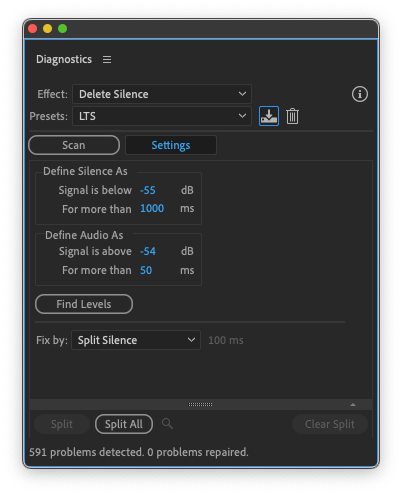
In Audition, the option to remove silence is buried way down in the Diagnostics panel, where you can also deal with clipping or clicking in individual audio files. To remove a silent portion, you first need to decide what constitutes one—the high-end or level of audio you want to filter out, expressed in decibels, and how long a quiet passage should last before the removal kicks in, expressed in milliseconds. Or you can use the Find Levels command to scan your project’s tracks as a whole and suggest values, which you can accept or adjust before clicking on Strip All.

In Audition’s Diagnostics panel, choose settings for “remove silence”, or use the defaults.

When I loaded up a show we recorded awhile back, I tried all the presets and also tested out Find Levels. They all quieted audio I actually wanted to keep, like a short laugh, or the dropped end of a word. In the most extreme case, Delete Silence identified silences between individual sentences in my show intro. After some experimentation, I came up with values that work for a typical panel show, and saved them as a preset. If a new guest sends me audio with an air conditioner running in the background, or a mic technique that includes breathing or tapping on a desk when they aren’t speaking, I might try different silence settings on their individual track, possibly after applying some noise reduction.

When I’m done scanning for silences across my multitrack session, I can choose to select silent parts or delete all silent clips, as Jason does. But there’s a better way.

Preview and label your cuts

After “remove silence” has done its thing for me, the silent portions of each track are selected. If I trust Audition, I can delete them all now. Of course, I don’t, so before I click away to work on my edit, I’ll mark the silent bits for later removal. From the Essential Sound panel, I’ll choose to label all the selected clips as Ambience. (It doesn’t matter which of the four labels you use. I’m essentially just tagging these clips so I can work with them as a group.) Next, I right-click on the selection and mute them all. This way, what I hear when I’m editing the show will be the same as if I had deleted the silent bits. But I can still bring one back if I need to.

Using Strip Silence, rather than Delete Silence, the bits Audition thinks are not audio are selected. From here, you can delete them all, or tag them so you can do it later, when you’re sure you haven’t accidentally marked audio you want, for removal.

Now, I just edit the content as normal. If a clip sounds cut off, I use the handle on the right edge of the clip to expose the part that’s been silenced, bringing it back into my show. I keep listening and editing until I’ve been through the whole episode, and am satisfied that I’ve brought back any good audio that the silence-removal tool took out.

It’s important to do things in the right order when using this technique. First, I place each panelists’ raw track in the Audition multitrack session, syncing them up. Next, I select and drag all of those tracks to the Match Loudness panel. Here, I’m establishing an audio level that’s consistent across all tracks—I’ve chosen -19 LUFs.

With everything leveled out, I’m ready to strip silence on all tracks based on the preset I’ve made. If a track has some other issues, though, I’ll deal with those first. For an echoey track, I’ll apply Audition’s Dereverb effect first.

I found a set of levels I liked and turned them into a preset for my LTS podcast.

Observations

Lions, Towers and Shields is a conversation, not a scripted narrative, like so much of what I do in public radio. That means that laughter, an occasional off-mic comment, or speech that rises and falls unpredictably are all allowed to happen. That’s why my silence-removal settings are more forgiving (lower threshold, longer timing) than they might be for a radio interview.

On the other hand, recording setups and skills vary among guests, so the chances of extra noise I need to dial down on a particular podcast track are pretty high. Part of editing these shows is making a thorough enough pass in the multitrack that I can catch anomalies that the processing misses. That, and always working on a copy of the audio—with originals safely tucked into the cloud.

I don’t know if I’ll be abandoning my Ferrite workflow. When I found a settings sweet spot, and once importing large audio files from Dropbox became more reliable sometime in the past few months, Ferrite met all my needs. And on a workflow level, I like unwinding after the pod by importing and stripping silences while I watch some mindless TV show, checking to see that everyone’s files are in and sound OK. I’ll lose that vibe if I move to an all-Audition process.

Then again, now that I know what Audition can do, I have options.

[Shelly Brisbin is a radio producer and author of the book iOS Access for All. She's the host of Lions, Towers & Shields, a podcast about classic movies, on The Incomparable network.]


The iMac turns 25, Relay turns 10 (next year in London), print magazines apparently still exist, and listeners have questions about why Apple would ever want to buy Disney.


By John Moltz

This Week in Apple: Band of bothers

John Moltz and his conspiracy board. Art by Shafer Brown.

Change is coming and you will like it whether you like it or not. The iMac has a big anniversary and Apple dons a big rubber suit and crushes Tokyo.

Unband me, sir!

Are you burdened by too many Apple Watch bands? What if I told you you will soon be able to throw out all those bands?

And buy new ones.

OK, it’s not a perfect solution, but it’s a solution.

Yes, (all together now) according to Mark Gurman (not bad, could have used a little more volume from the people in the back), Apple is prepping a big Watch redesign to mark the tenth version of the much flopped device. So, conceivably, a year after changing the port on our iPhones, Apple could make us buy all new Watch bands.

In this economy.

Look, Apple’s just doing you a favor.

“Your Apple Watch band is likely covered in bacteria, new study says”

How dare you. I washed it… once.

The current band mechanism is an underrated innovation of the current century. If you wanted to change your watch band prior to the Apple Watch, it required a special tool, a lot of squinting and retrieving that little springy thing from across the room four or five times. With the Apple Watch’s band connector, it was more like plugging in a USB A cable. You might get it wrong the first time, but it was still much easier.

That doesn’t mean there isn’t room for improvement. Reportedly, changing the band connector would allow Apple to make the Watch thinner or add more components, like a larger battery. Apple has even been experimenting with magnetic band attachments.

If there’s one takeaway from technology, it’s “don’t get attached to connectors.”

iMac, still alive at twenty-five

Happy 25th birthday, iMac!

Let’s see, the iMac could already drink. I guess now it can also rent a car? This seems like a bad combination.1

Widely considered the device that “saved Apple”, the iMac has undergone a number of design changes over the years and seems to finally have settled on… rectangular.

Sweet. My phone is rectangular. It’s a shape I’m comfortable with. I wouldn’t have wanted a rhombus. Or a tesseract. Or a forbidden shape. Some shape that would drive you insane every time you looked at it. Others might like that, but it’s not for me.

The iMac is a perfect example of why sometimes it’s good to throw out things you’re comfortable with. I’m not familiar with any studies that might have been conducted at the time, but just imagine how much bacteria was in your floppy drive (not a euphemism). You don’t know where those disks had been.

Despite the iMac’s success, despite the fact that it blazed a Bondi blue path for any number of other devices from Apple and other companies, we still regularly complain about change. But sometimes change is not only good, it’s necessary to move forward.

King of the mon-stars

One of the knocks against Apple TV+ has long been that it lacks a back catalog with big names. Well, they don’t get any bigger than this.

“Apple TV+ unveils first look at highly anticipated Godzilla and Titans live-action original series, ‘Monarch: Legacy of Monsters’”

Get it? Big names? Yeah, you get it.

Tim Cook justified Apple’s TV+ subscription price hike last year by noting its catalog was bigger than it was when it had shipped. And that’s true. That’s kind of how that works but… not all the time, as we’ve seen lately with services dumping shows to save money. Despite a brief panic when Frog and Toad temporarily disappeared from U.S. streaming, Apple has yet to remove a show for gross accounting reasons.

Gross like disgusting, not gross like before expenses are taken out. Because in that instance, it’d be net accounting reasons.

Despite Apple’s history of shipping finished products, TV+ was quite the exception. It’s a product Apple iterated over time and has slowly built into a real competitive service.

Does it really need Disney if it has the King of the Monsters?


  1. Finally, the Apple Car we deserve.—Ed. 

[John Moltz is a Six Colors contributor. You can find him on Mastodon at Mastodon.social/@moltz and he sells items with references you might get on Cotton Bureau.]


iMac anniversaries and Disney’s value to Apple

What will the iMac’s next few years bring? And what would make Apple even consider buying some or all of Disney?

[The Six Colors podcast will be off next week, returning September 1.]


‘A brief history of the corporate presentation’

What was PowerPoint before PowerPoint? Slide presentations. Big, fancy, multi-projector, multi-media slide presentations. As Claire L. Evans of the MIT Technology Review reports:

Before PowerPoint, and long before digital projectors, 35-millimeter film slides were king. Bigger, clearer, and less expensive to produce than 16-millimeter film, and more colorful and higher-resolution than video, slides were the only medium for the kinds of high-impact presentations given by CEOs and top brass at annual meetings for stockholders, employees, and salespeople. Known in the business as “multi-image” shows, these presentations required a small army of producers, photographers, and live production staff to pull off.

Want an example of a slide-based presentation? I’m pretty sure that’s how the, uh, “Flashdance”-inspired “We Are Apple (Leading the Way)” was created for Apple in 1984.

Also included in Evans’s story is a link to the proposal that led to PowerPoint being created, which is itself remarkable.

[via Scott McNulty]


By Dan Moren

In macOS Sonoma, Touch ID for sudo can survive updates

Note: This story has not been updated since 2023.

One of the great things about having a Mac with built-in biometric authentication is not having to constantly type in your password. It’s particularly nice for those of us that work in Terminal, where you can set up Touch ID to authenticate the sudo command that bestows administrative powers.

However there’s been one drawback to enabling that feature: because it means altering a system file, the change wouldn’t generally survive a system update—the file would get overwritten by the stock file every time macOS released a new version, meaning you’d have to go in and make the change again. I’m probably not alone in having given up on having Touch ID enabled, rather than playing the constant cat-and-mouse game.

But wait, there’s good news: in macOS Sonoma, Apple appears to have provided a new framework to work around this problem. As Mastodon user Rachel pointed out, Sonoma allows for an additional file that will persist through updates. So you can make the change once and it should stick.

From what I can tell, this system was put in place precisely for this feature. Apple provides a sudo_local.template file as an example, which not only contains a comment explaining that sudo_local will survive updates, but also even includes the code necessary to enable Touch ID.

So, without further adieu, here are the steps for enabling this feature in macOS Sonoma, once and for all:1

Open the Terminal app. Navigate to the directory that stores the authentication files by typing the following:

cd /etc/pam.d

Next, copy Apple’s provided template to the actual file that the system will read. You’ll need to use sudo and enter your administrator password to get permission:

sudo cp sudo_local.template sudo_local

Finally, open up the file you just made using your text editor of choice; I prefer pico.2 You’ll need to use sudo again here.

sudo pico sudo_local

In that file, navigate to the line that contains with pam_tid.so and delete the hashtag (#) at the beginning. Save the file out by pressing Control-X, typing ‘Y’ to save your changes, and hitting Return.

That’s it; you’re done! We’ll have to wait and see if this truly works as described, but fingers crossed you should be able to keep Touch ID access for sudo for ever and ever.


  1. With the caveat that Sonoma is, of course, still in beta, and this could change upon the official release, as unlikely as that seems. 
  2. Miss me with your command-line text editor wars. 

[Dan Moren is the East Coast Bureau Chief of Six Colors, as well as an author, podcaster, and two-time Jeopardy! champion. You can find him on Mastodon at @dmoren@zeppelin.flights or reach him by email at dan@sixcolors.com. His next novel, the sci-fi adventure Eternity's Tomb, will be released in November 2026.]


Video

iOS 17 beta walkthrough: StandBy

If you don’t have a horizontal MagSafe stand handy and aren’t running iOS 17 beta, you may have not seen the new StandBy feature, so here’s a quick walkthrough of how it works.


Whether we speed up audio and video media, how we’d want Apple to change Disney Parks, our thoughts on new Apple Watch bands, and what we’re hoping to see from Apple’s Shortcuts.


By Jason Snell for Macworld

Why Apple might actually buy Disney after all

The close corporate ties between Disney and Apple have created all sorts of speculation over the years that the two companies might end up being one company. Steve Jobs sat on the Disney board, and Disney CEO Bob Iger sat on Apple’s. In his memoir, Iger even suggested that had Jobs lived, the two companies might have combined.

I always considered that speculation ridiculous. But these are different times, and Disney and Apple are very different companies than they were a couple of decades ago. Which is why, when The Hollywood Reporter took the possibility of an Apple purchase of Disney seriously, I realized that the speculation I used to roll my eyes at when I was the editor of Macworld now seems… not that implausible, actually.

Continue reading on Macworld ↦


By Jason Snell for The Verge

How the iMac saved Apple

The original iMac entered a computing world that was in desperate need of a shake-up.

After the wild early days of the personal computer revolution, things had become stagnant by the mid-1990s. Apple had spent a decade frittering away the Mac’s advantages until most of them were gone, blown out of the water by the enormous splash of Windows 95. It was the era of beige desktop computers chained to big CRT displays and other peripherals.

In 1997, Steve Jobs returned to an Apple that was at death’s door, and in true Princess Bride style, he rapidly ran down a list of the company’s assets and liabilities. Apple didn’t have a wheelbarrow or a holocaust cloak, but it did have a young industrial designer who had been experimenting with colors and translucent plastic in Apple’s otherwise boring hardware designs.

With Jobs’ brains, Jony Ive’s designs, and the new PowerPC G3 chip supplied by Motorola, the company began to form a plan. Essentially, Jobs went back to his playbook for the original “computer for the rest of us,” the Mac, to sell simplicity. The Mac’s mouse-driven graphical interface may have changed the course of the PC world, but its all-in-one design just hadn’t clicked. Jobs decided it was time to try again.

Continue reading on The Verge ↦


For years, rumors about Apple and Disney combining seemed ridiculous—but in light of Apple’s transformation and Disney’s difficulties, suddenly it seems a lot more possible. Myke and Jason examine Disney’s business and try to imagine what portions of it Apple would actually want. Also: What would be in an Apple Watch X?


The controversy over unlimited digital lending is anything but simple

A really great and nuanced piece by the New York Times‘s David Streitfeld on the legal case over the Internet Archive’s National Emergency Library, which it launched during the early days of the pandemic:

Libraries have traditionally been sanctuaries for culture that could not afford to pay its own way, or that was lost or buried or didn’t fit current tastes. But that is at risk now.

“The permanence of library collections may become a thing of the past,” said Jason Schultz, director of New York University’s Technology Law & Policy Clinic. “If the platforms decide not to offer the e-books or publishers decide to pull them off the shelves, the reader loses out. This is similar to when songs you look for on Spotify are blanked out because the record company ended the license or when movies or television shows cycle off Netflix or Amazon.”

The National Emergency Library, in which the Internet Archive made the titles it had scanned into electronic form essentially without limits, was highly contentious. Publishers, obviously, viewed it as piracy that cut into their bottom line. Authors were heavily divided.

Part of what makes it tricky, as this piece does a great job explaining, is that there’s a disparity between how the rules are and how people think they should be.

The law, as it stands now, is largely against the Internet Archive. That’s just the way it is. Whether that law should be changed is a different matter—one that’s not going to be solved in the courts, as my good friend and colleague Glenn Fleishman wrote:

I am an absolute fan of the Internet Archive and all the work they’ve done to preserve cultural and technical history. But as this article makes clear, they are fighting a legal battle they cannot win, because the law is clear. They need to be fighting a structural battle, all about the law, because they will not win these cases. A judge would have to come up with novel interpretations that would surely be overturned at appellate or Supreme Court level.

As an author, I think there’s yet a third level to this discussion. At the end of the day, the writers are usually the ones who get squeezed.

Most authors don’t make a living from their work, but I think the vast majority of them (if not all) support libraries and the free access to information. Most of us have used libraries a lot during our lives1, some have even depended on them. I don’t think most writers view people borrowing their books from the libraries as lost sales—we view them as possible lifelong fans of our future work.2

The solution, perhaps, is to find other ways to recompense authors for their work being borrowed. Right now, ebooks are usually sold to libraries under licensing procedures that regulate how many times a title can be loaned out before a new license has to be purchased. It’s an uncomfortable compromise, but the power remains in the hands of the publisher (as it usually does).

Other countries, including Canada and the United Kingdom, actually pay authors who live in those countries based on how many times their books are loaned out. Not huge amounts, to be sure, but when you’re a writer eking out a living, every little bit helps.

Sadly, I’m not sure such a program would fly here—especially in the current political environment, where getting funding for the arts is difficult enough as it is—but maybe there are better ways for publishers to recompense authors for these kinds of things as well. But unlike the writers of Hollywood, authors’ ability for collective bargaining is currently limited, and the publishers have deep pockets, so change isn’t likely to be fast or soon.


  1. As many readers of this site might know, both of my parents were professional librarians, so don’t come at me about libraries! 
  2. In some ways, this is reminiscent of the fight over DRM-free music in the mid-2000s, a victory that was eventually trodden over by the rise of streaming. 

By Jason Snell

Generation gap: Using Shortcuts with Folder Actions

Note: This story has not been updated since 2023.

Nothing like mixing a Mac feature from 2002 with one from 2021.

In my quest to improve my Apple analyst-call transcripts by using OpenAI’s Whisper technology, I’ve ended up in a position where I need to create an automation on my Mac that runs when an item is placed in a folder. In doing so, it turns out that I unearthed several layers of Apple automation sediment—and discovered a place where the company could get a quick win by declaring an ancient feature to be new and improved.

Chain of events

Here’s what led me here: I capture Apple’s quarterly analyst call with Audio Hijack and thought I could use its automation features to kick off the transcription of a segment of the call every few minutes.

It didn’t work. While Audio Hijack lets you run Shortcuts and shell commands from its scripting interface, those methods block the main thread of Audio Hijack, locking up the interface. Not acceptable, given how long it takes for Whisper to run.

As a result, I needed to find a way to automatically process a new recording without using Audio Hijack’s scripting interface to do it. It was clear what was required: I would tell Audio Hijack to move the finished recording to a different folder, and then run a script the moment the file was added to that folder.

I needed a utility that could watch a folder and then process any item that was added. And I had some choices.

Option one: Use Hazel

I use Noodlesoft’s $42 Hazel for various clean-up jobs on my Mac. Hazel watches folders on your Mac and then acts on the files inside.

I could’ve used Hazel to do this job, but I decided not to for a few reasons. I’ve found that connecting scripting into Hazel actions can be complicated and brittle. It can be done, but sometimes my actions break and I have to fix them, and I don’t really want to do that during my transcriptions if I can help it. Its Shortcuts support also seems suspect… I have tried to use it with little success.

But also, why use a third-party utility when there’s an equivalent feature built into the operating system itself? Because while many people will have forgotten, or perhaps never known, macOS has had this built-in functionality for ages.

Folder Actions via AppleScript

Folder Actions were a feature of Mac OS 9, and they were introduced back into Mac OS X with version 10.2 “Jaguar” in 2002. And more than twenty years later, they’re still there. Folder Actions used to be accessible by control-clicking on any folder in the Finder, but that easy access was ripped out years ago. In today’s macOS (and yes, it works on macOS Sonoma), you need to open the Folder Actions Setup utility, which is located in the /System/Library/CoreServices/Applications/ folder.

Folder Actions is pretty clever—you can run scripts when items are added or removed from a folder, when the folder is opened or closed, or when the window of that folder is moved in Finder.

Unfortunately, this is a feature that is wired directly into AppleScript. So in order to use a version of my existing shortcut with Folder Actions, I needed to write a three-line AppleScript script:

on adding folder items to this_folder after receiving added_items
    tell application "Shortcuts Events" to run the shortcut named "Apple Result Transcriptor" with input added_items
end adding folder items to

Pretty dumb — for those keeping score we’ve now gone from Audio Hijack to AppleScript to Shortcuts in order to get what we want. (I could’ve rewritten my Shortcut in AppleScript, but… I don’t want to do that!) And yet also pretty brilliant, because I’m using a 21-year-old OS feature to run a Shortcut, an automation system that didn’t appear on the Mac until 2021.

Don’t forget Automator

Automator also has Folder Actions.

I should mention that there is an additional built-in way to act on items added to a folder in macOS: Automator. Automator, introduced to Mac OS X three years after Folder Actions, uses a different pathway to the same result.

When you create a new Automator action, you’re asked to choose a type for your document. Among the types is Folder Action, which runs when files and folders are added to a specific folder. I could’ve used this method, but I would again have ended up using a shell command or an AppleScript to run my existing Shortcut.

A new feature that already exists

On iOS and iPadOS, you can set various triggers to run Shortcuts automatically. It’s clever and useful. I have a Shortcut that turns on Do Not Disturb when my iPhone connects to the Bluetooth speaker in my shower—and turns it off again when it disconnects. But Shortcuts contains no such automation functionality on the Mac.

That’s pretty dumb. It’s really useful to be able to run automations when certain events happen, such as—just for one example—when files are added to a folder. Given that Folder Actions are old enough to drink, perhaps the underlying tech might not be the most modern and efficient way to implement such a feature. Maybe there’s a modern, better way.

What I’m saying, though, is that the Shortcuts team should lift the entire concept of Folder Actions (from both AppleScript and Automator) and implement (or re-implement) it for Shortcuts. Along with all the other automation triggers that iPhone and iPad have that, for some reason, just aren’t available on the Mac.

Sure, I can solve these problems on the Mac via other means, but I shouldn’t have to. macOS should provide this functionality itself.


By John Moltz

This Week in Apple: An onmouseover Event

John Moltz and his conspiracy board. Art by Shafer Brown.

Apple scores a victory against Epic. Does it want to celebrate by going to Disneyland? And buying it? Also, keep this under your hat, but Apple is rumored to be shipping new phones next month. Huge, if true.

The App Store doth protest too much

It’s hard to believe that Apple’s conflict with Epic has now been going on for 35 years, but here we are.

I’m sorry, I’m being informed that it just feels like 35 years. I regret the error.

This week Apple won a battle, but not the war.

“Apple Doesn’t Have to Change App Store Rules Yet, Rules Supreme Court in Ongoing Epic Dispute”

This pertains to Apple’s anti-steering rules, which prevent app developers from mentioning that websites exist in the year 2023. While the App Store has many objectionable rules, habits, inconsistencies, vagaries, and mysterious, unwritten spells bound to the ancient powers of mercurial spirit demons, the anti-steering rules are among the worst—even if it’s sometimes hard to pick a least favorite.

Apple loves to claim that the App Store is where customers and developers come together, and that people love the easy payment mechanism, but it’s kind of hard to tell when no one actually has a choice. If the company really believes in-app purchasing is beloved by all, you’d think it could put its money where its mouth is and allow developers to link to their sites for alternate means of paying for apps.

Epic is not a great standard bearer for developers, as it would love nothing more than to set itself up as the store owner taking a cut, but it’s not wrong about Apple’s anti-steering rules.

Buy n Large

Long-time Apple observers may well remember the mid-nineties, when speculation was rampant that the company was going to be acquired by Sun or Dell or Gateway or a guy standing in the back of CompUSA who found a $20 outside… or even Disney.

Well, now the white glove is on the other… paw? What do anthropomorphic mice have?

Jason concurs with The Hollywood Reporter that, while such a scenario is still not likely, it’s not far-fetched, either. While Apple probably wouldn’t acquire the whole company, if it could get access to the firehose that is Disney’s IP, it could hook it up to, say, a Vision Pro and spray it right into your eyeballs.

Virtually speaking.

The company, however, generally does not like making moves this big. To date its biggest acquisition was Beats for $3 billion. The multiplier on this deal would put a fairly big dent in Apple’s $62 billion pocketbook. While it’s fun to think about, it’s probably still more likely the company would rather develop the Ted Lasso Cinematic Universe than the Marvel one.

Particularly after Secret Invasion. Eesh.

USB I C what you did there

iPhone rumors are like blackberries.

No, not those BlackBerries. Just stay with me for a sec.

See, they flourish in late summer and… they’re a thorny problem. And, uh, there’s a lot of buzz around them?

OK, I gave it a shot.

Still, both are currently in season and who’s ready to switch ports again?! Whoo!

Yes, this week brought us supposed photos of the iPhone 15’s USB-C port. Somewhere the IT director at a hotel chain that finally just got rid of its last 30-pin dock connector alarm clocks angrily threw a Lightning charging stand against the wall. As Dan points out, this doesn’t resolve Apple’s dependence on the Lightning port completely, but it will help it continue to sell iPhones in certain jurisdictions.

Other rumors indicate the Pro models will feature an Action button like the Apple Watch Ultra, and storage on them will get to a whopping 2TB. The event is now widely expected to be on September 12th, with phones shipping on the 22nd.

Whatever will we talk about after these devices are announced? Probably what a letdown they are.

[John Moltz is a Six Colors contributor. You can find him on Mastodon at Mastodon.social/@moltz and he sells items with references you might get on Cotton Bureau.]


Transcripts, Personal Voice, and Galactic Starcruiser

We discuss the potential for AI text handling, and Jason thinks millennials and Gen-Z types might want different theme park experiences after they finish their avocado toasts and such.


Search Six Colors