When it comes to iPhone upgrades, Apple is incremental. So are iPhone reviews. Those of us who review iPhones are, for understandable reasons, focused on what’s new between this year’s model and the last.
Fortunately, Apple’s release of a new iPhone SE in March 2022 is an opportunity to zoom out and take the long view. Most people don’t buy a new iPhone every year. The primary upgraders to the third-generation iPhone SE will be coming from older models. So here’s an attempt to provide a little more of a big-picture overview for owners of older iPhones who are wondering what’s new in the iPhone SE.
Studio Display reviews, Mac Studio, and Dan’s iPad
Jason’s spent a week with new Apple products. Lots of opinions about what’s wrong and right with the Studio Display. Jason third-thinks his Mac Studio purchase and comes out ahead.
Matter, the new smart home interoperability standard being developed by Google, Apple, Amazon, Samsung, and others, has been delayed. Again. Expected this summer, the launch has been rescheduled for fall of 2022, Michelle Mindala-Freeman of the Connectivity Standards Alliance (CSA) which oversees Matter, told The Verge.
CSA claims that the delay is because a lot more platforms than expected are planning on building in Matter support, which certainly makes it sound like a good problem to have, although given that the second part of the explanation is that the software development kit (SDK) needs more time makes me wonder which one of those is truly responsible. That said, they are promising a complete SDK in the second quarter of the year, with a spec to manufacturers by the end of June.
So we’ll need to wait a bit longer for our interoperable smart home tech, which is a bummer on one hand, but on the other, seems totally predictable. These things never launch on time.
On Thursday Jason and Dan went on YouTube and talked about the new Mac Studio and Studio Display and answered your questions. Here’s the video in case you missed it:
Apple’s most popular devices come with their own displays. The iPhone, iPad, MacBook, and iMac can all be used right out of the box. In some ways, it’s the ultimate triumph of the original iMac’s “there’s no step three” ethos.
But some Macs—the Mac mini, the Mac Pro, and the new Mac Studio—don’t play by these rules. They’re old-school computers, and you need to bring a display to the party. If you’re a Mac laptop user, you might want to sit down at a desk sometimes and spread out in front of a larger screen. An external display is just what the doctor ordered!
Apple used to recognize these facts and made Apple-branded displays that were a good fit with their current products, both in terms of style and of onboard technology. But in the mid-2010s, just as Apple was losing its way in terms of Mac product design, it also abdicated its role as the maker of monitors for Mac users.
The idea was that a vibrant market for external displays already existed and that Apple didn’t need to be involved. Other companies would fight over Apple’s customers and compete to make great displays for them.
That didn’t happen. Instead, there were a few Mac-focused displays that people liked but didn’t love and a whole bunch of PC displays at resolutions that weren’t a good fit with how Apple has defined the Mac Retina display experience.
Just as Apple’s getting the Mac back into shape, it’s also returned with an external display designed for just about any Mac user who might want a little more screen space on a desk. The $1599 Apple Studio Display isn’t cheap, and it isn’t perfect, but who’s complaining? This is the monitor that Mac users have deserved for years, and it’s finally here.
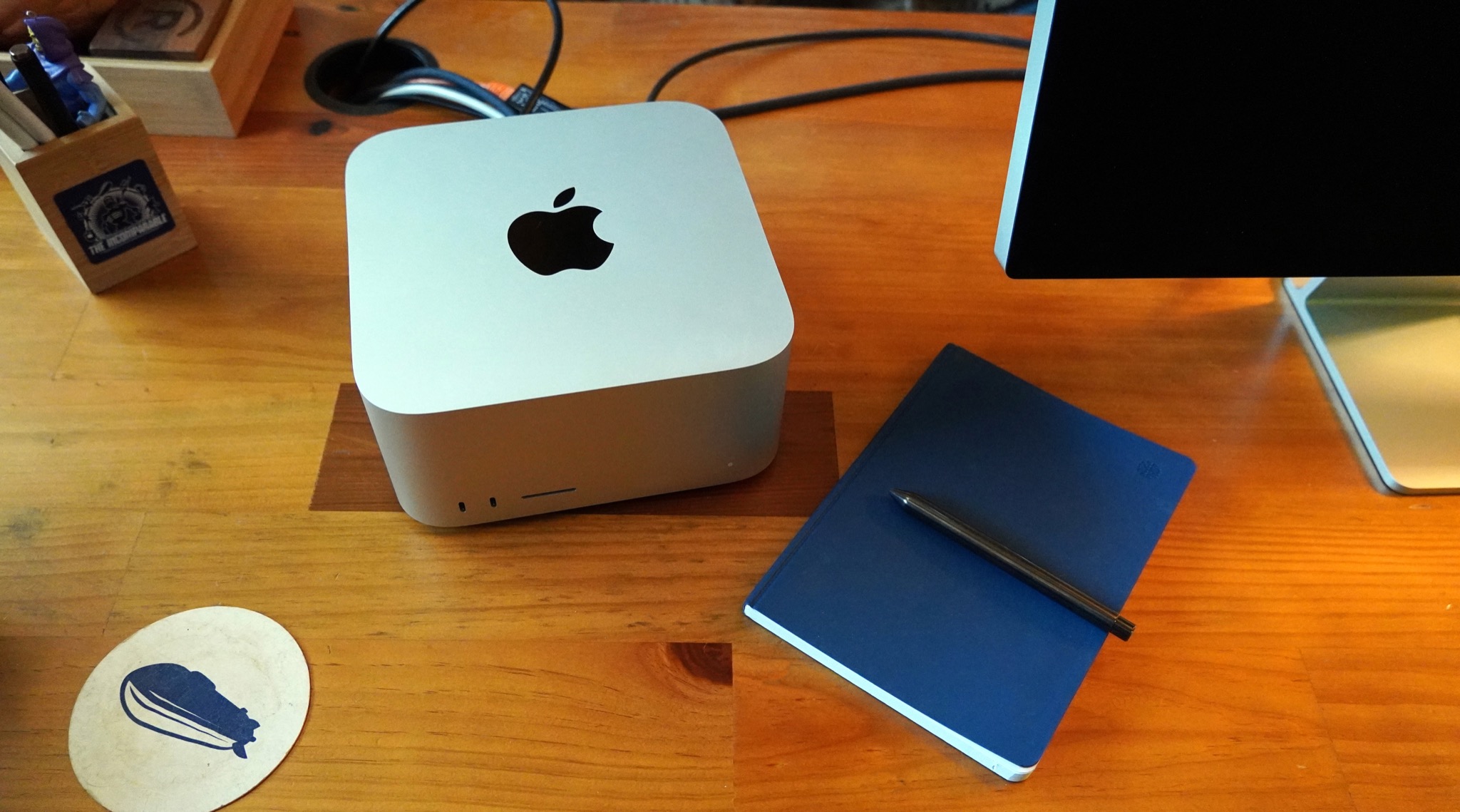
The Mac Studio is the first entirely new entry in the Mac product line in a very long time. It’s a kind of Mac—the mid-range-desktop—that used to be common, but vanished shortly after Steve Jobs returned to Apple. It’s more powerful than an iMac or Mac mini but more affordable than a Mac Pro.
The Mac Studio isn’t for everyone, that’s for sure. Some will find it utterly boring—but others will consider it the fulfillment of a decades-long dream. For the moment, it’s the fastest Mac ever made—and yet if you’re a MacBook Pro user, you might find that your laptop offers equivalent performance.
The beauty of the Mac Studio is, I suppose, in the eye of the beholder. I bought one for myself on the day the product was announced, and after a week of using one provided by Apple, I’m sticking with that purchase, but plenty of people will be better served by a different Mac model. In fact, that might be the most beautiful thing about the Mac Studio: It fills a very specific ecological niche to perfection.
Our experience with game streaming services, our thoughts on Elden Ring, whether we order tech online or choose to pick it up, and the products we purchased from Apple’s March event.
There comes a time in one’s life when, no matter how long one puts it off, one must buy a new iPad. For me, that day came immediately following last week’s Apple event, at which the company unveiled the fifth-generation iPad Air.
But, before you ask: no, I didn’t buy an iPad Air.
I was tempted, I must admit. Given that the previous generation of iPad Air already had many of the great features of the iPad Pro (as Jason has pointed out), but at a lower price, it seems like an obvious choice.
What ended up tipping me over the edge, however, was the one thing that Apple didn’t change. Like its predecessor, the base $599 model of the new iPad Air comes with just 64GB of storage.
As I was weighing my options, I took a look at my current iPad Pro, the 10.5-inch model from 2017. Despite having a spacious 256GB of storage, I was using only around 60GB. Which, yes, is less than 64, but not enough so that I wouldn’t have to constantly police how much stuff I had on it. (I’d already enabled a bunch of space-saving measures, like letting iPadOS offload apps that I don’t launch regularly.)
So, I was clearly going to need more than 64GB. Unfortunately, upgrading to a 256GB iPad Air raises the price to a decidedly less cheap $749. More to the point, that’s just $50 short of the 11-inch iPad Pro with 128GB of storage.
At that point, I had to ask myself some hard questions. For $50 more than that 256GB iPad Air, I could not only get a probably sufficient 128GB of storage, but also pick up all those extra features that the Air lacks: Face ID, a ProMotion display, better rear-facing cameras, Thunderbolt, and so on. Were those features worth $50, especially compared to storage space that I wasn’t likely to use?
The answer, for me, was an unequivocal yes. Don’t get me wrong, the new iPad Air’s a great device. But as someone who enjoys the finer tech in life, I couldn’t resist the lure of all those step-up features. If I end up keeping this iPad as long as I did my last one, I don’t want to feel like my technology is falling behind.
So far, in the day that I’ve had it1, I haven’t been disappointed. As with any piece of technology, there’s a delight to upgrading to a many years’ newer device, giving you several models’ worth of new features. Though I am still retraining myself not to look for the Home button, and not to accidentally cover the camera when I want to use Face ID.
If there’s anything that I’m missing from the Air, it’s really down to a matter of aesthetics: honestly, I like the colors, and it’s a disappointment that the iPad Pro doesn’t offer more than staid old silver and space gray. (I’m sure Apple will release a version of the Pro with colors within the next year, just to shame me for not waiting longer.)
Despite the added expense of the Pro, I did cut my costs in a few ways. For one thing, I stuck with the Wi-Fi-only model: Convenient as cellular may be, I rarely go some place with my iPad where I need Wi-Fi but there isn’t any.2, and in those few cases, it’s just as easy for me to tether to my iPhone. I also decided not to immediately buy a second-generation Apple Pencil or Magic Keyboard, given that they actually go on sale not infrequently these days, and I don’t need them right away. Instead, I bought an inexpensive cover to protect it until I probably end up upgrading to the Magic Keyboard. But hey, at least it comes in green.
Interestingly, I put my order for the iPad in directly after last week’s Apple event, and it told me it would ship between March 16th and March 23rd. When the 15th rolled around and it still hadn’t moved from the “Processing” stage, I decided to pull a Snell and check my local Apple Store inventory. Sure enough, they had the exact model I wanted in stock—128GB Wi-Fi in Space Gray—so I canceled my online order and made a new one for pickup. A couple hours later, I’d returned with my new iPad. ↩
These days, if I’m going somewhere without Wi-Fi, it’s because there’s no Wi-Fi. That’s a feature, not a bug. ↩
[Dan Moren is the East Coast Bureau Chief of Six Colors, as well as an author, podcaster, and two-time Jeopardy! champion. You can find him on Mastodon at @dmoren@zeppelin.flights or reach him by email at dan@sixcolors.com. His next novel, the sci-fi adventure Eternity's Tomb, will be released in November 2026.]
The new iPad Air is coming this week. It’s an enticing mid-range iPad for people who don’t need the extra features of the iPad Pro but want something bigger than the iPad mini and better than the base-model iPad.
What it isn’t is new. The iPad Air offers features that premiered on the previous-model iPad Air (released in October 2020) and the 2021 iPad Pro. So just as the iPad Air remixes features from other iPads, this review is a remix of my previous reviews of those other iPads.
On Monday, Apple released macOS 12.3 and iOS/iPadOS 15.4. The two biggest features in these updates are Universal Control and mask support for Face ID. I recommend the excellent MacStories summaries of macOS and iOS.
Universal Control
The pointer goes where no mouse has gone before: from a Mac (left) to an iPad.
Universal Control lets you control different Apple devices—Macs or iPads—without lifting your hand from your keyboard and pointing device. If you’ve got two Macs, or a Mac and an iPad, or two Macs and an iPad, or a Mac and two iPads—look, you get the idea. Universal Control lets you push the pointer off the edge of your screen… and it magically appears on the other device’s screen.
This isn’t Sidecar, which turns an iPad into an external Mac display. When you move the pointer around on an iPad from your Mac, you’re driving the iPad and iPadOS. That’s why it’s best to think of Universal Control as a keyboard-and-pointing-device sharing system, not a display sharing system.
(And yes, there’s more than just display sharing going on—there’s clipboard sharing and the ability to drag-and-drop across devices and other stuff that’s clearly an expansion of the proximity functionality Apple’s been building since the early days of AirDrop.)
What Universal Control has meant for me is that I can plop my iPad Pro down next to my Mac and control it without having to reach over and pick it up. My iPad gets to stay an iPad—I never use Sidecar because if I’m going to display my calendar or Twitter on the iPad screen, why wouldn’t I use the iPad versions of those apps? And I get to type or click without needing to find my Magic Keyboard, attach it to my iPad, and switch back and forth between the two devices. This is better.
Which is not to say that Universal Control is all the way there yet. When it works, it’s like magic, but Apple has labeled it as beta software in macOS 12.3, and that makes sense to me. I frequently found that my keyboard just stopped talking to one of the devices, and the pointer would frequently stutter when I tried to move it on a remote device. Bugs to be worked out. But the promise is real.
To turn on Universal Control, go to the Displays section of System Preferences, click Universal Control, and then check the box “Allow your cursor and keyboard to move between any nearby Mac or iPad.”
Face ID and masks
A few weeks ago I enrolled my iPhone in iOS 15.4 and trained Face ID with me wearing a mask. The training’s a little more extensive since glasses-wearers have to train it on your face while wearing glasses and without. If you wear more than one pair of glasses, you need to train Face ID with additional glasses.
But once all was said and done… it just worked. I repeatedly unlocked my iPhone while wearing an N95 mask on a flight back from a vacation, and it worked like a charm. I’m sure we all wish this feature had existed back in 2020, but at least it’s here now, and everyone who wears a mask in any context will be relieved that they can unlock their iPhone without having to key in a password.
John Siracusa joins Jason to talk about the Mythical Mid-Range Mac Minitower, the distortion of the iMac over time, the modular possibilities offered by the Apple Studio Display, and other fallout from last week’s Apple announcements.
Last week’s “Peek Performance” event saw the company launch its latest low-cost iPhone, a revamped iPad Air, an external display and, oh yeah, the first brand new Mac model in years. Those announcements picked off a bunch of the low-hanging fruit and rumored hardware introductions, with about three months to go until the next likely gathering, Apple’s annual Worldwide Developers Conference.
Of course, the company could take a load off and put up its feet until the iPhone launch in September, leaving June for dealing with the many updates to its software platforms, but that doesn’t seem likely. This past week’s announcements may have answered some questions about the future of Apple’s product roadmap, but it definitely raised some new ones as well.
Apple’s announcement of the Mac Studio on Tuesday may have fulfilled a dream that some Mac users have been clinging to for a couple of decades. Finally, there’s a modular desktop Mac that’s more powerful than the Mac mini without carrying the Mac Pro’s high price tag.
Back in the ‘90s and early 2000s, being a Mac nerd meant using a Power Mac. The arrival of the original iMac in 1998 was greeted with enthusiasm by Mac nerds because it meant that Steve Jobs might be able to restore Apple to greatness after it foundered in the mid-’90s—but none of them would ever stoop to using one themselves.
When Jobs returned to Apple, he presided over a dramatic and necessary simplification of the product line. The desktop Power Mac, a go-to model for power users, vanished in 1998. The choices dwindled to the underpowered iMac (and later, the Mac mini) on one end, and the increasingly expensive Power Mac/Mac Pro tower on the other.
In between, at least for Mac power users, was a desert. And rising out of the desert was a glorious mirage: a mythical mid-range Mac minitower like the Power Macs of old. This legendary creature was known as the xMac.
Late in 2021, my wife and I moved to a new house, which meant packing up everything in my office of more than a decade and then setting it up all over again in my new (but somewhat smaller) office.
In some ways this was a good opportunity to revisit my setup, try to simplify some aspects of it—perhaps discovering some items I could do without, or maybe enhancing my current setup with new devices to help me do different types of things.
I’ll let you guess which one of those impulses largely won out.
Six months later, there are still some parts of my office that remain in disarray (some pesky piles of old papers that I can never quite seem to get rid of), but my work setup has at least been pretty stable for my most common tasks: writing, recording and editing podcasts, and the occasional bit of video streaming.
With that said, here’s what I’ve got powering my home office these days.
My thanks to Magic Lasso Adblock for sponsoring Six Colors this week. Magic Lasso Adblock is an efficient and high performance ad blocker for the iPhone, iPad and Mac. It runs as a native Safari content blocking extension, and blocks intrusive ads, pop ups and trackers, including best-in-class YouTube ad blocking.
Magic Lasso Adblock respects your privacy, doesn’t accept payment from advertisers and is 100% supported by its community of over 150,000 users. You can download it for free today via the Magic Lasso website, the App Store, and Mac App Store.
Mac Studio, A missing Mac, and a new iPad
Jason bought a lot of stuff this week, some of it more unexpected than others. Dan bought a new iPad—but not the one you’re thinking of. And where does the Mac Studio fit?
Consider the features of that iMac: An optional nano-texture display and a 3.6GHz 10-core Intel Core i9 processor. Macworld’s reviewed iMac configuration cost $4,499—clearly aimed at pro users. Now consider that the original iMac, when it was introduced in 1997, was underpowered and cost $1,299 for the general consumer. The evolution of the iMac took a strange turn. What happened?
One takeaway from Apple’s Peek Performance event this week: the Mac is increasingly a platform for pros.
After years of pros feeling ignored by the company, that’s a heck of an about-face. But Apple’s delivered a slew of impressively powerful Macs: the iMac Pro, the new Mac Pro, redesigned MacBook Pros, and so on.
But when the dust from this week’s event cleared, I found myself wondering about the space between the low-end consumer offerings and those computers aimed at professionals1—or rather, the lack thereof, especially on the desktop.
If you’re someone looking to pick up an affordable desktop Mac just for some basic tasks—browsing, email, light media creation—you’ve got two pretty solid options: the M1-powered Mac mini, which starts at $699, and the M1-powered iMac starting at $1299 (or, to get one with a comparable GPU as the mini, the $1499 model).
Meanwhile, those looking for more power now have the option of the $1999 or $3999 Mac Studio models, or the $5999 Intel Mac Pro—none of which, of course, include a display. The Mac Studio packs a punch with the M1 Max chip that was, until this week, the most powerful chip ever put in a Mac. (Not to mention the 13-inch, 14-inch, and 16-inch MacBook Pros on the laptop side.)
But what if you’re someone who falls in the middle, what once was called the “prosumer” market? There’s actually a surprising dearth of options on the desktop side. The Mac mini and iMac offer only the 8-core CPU/8-core GPU M1 processor—even in the top of the line iMac, starting at $1699. To get anything more than that, you’d have to jump to a $1999 Mac Studio, and then add a display like Apple’s new $1599 Studio Display.2 That’s $2000 more than that top of the line iMac.
Moreover, because of the limitations of the M1 chip, the iMac and the Mac mini offer only a maximum of 16GB of RAM and two Thunderbolt ports—the same as an M1 MacBook Air.
As someone who falls squarely in that gap—and I’ve talked to more than a few other people in the same situation over the past 24 hours—I’ve been scratching my head. What exactly is the option for someone who needs more power than an M1 Mac mini or 24-inch iMac—or for that matter, a larger display—but doesn’t have an extra couple grand in the budget?
Previously, that gap was filled by the 27-inch iMac, but as that’s now been discontinued, there’s now a gaping hole in Apple’s line-up.
It sure feels like there’s another shoe to drop here. The most obvious option would be to offer better chips in the iMac and Mac mini, and fortunately, Apple’s already got a template for that over on the laptop side: namely, the M1 Pro.
Currently, the M1 Pro exists in only two products: the 14- and 16-inch MacBook Pro. That’s a little peculiar when you think about it. The M1 has been spread through a variety of computers, the M1 Max exists on both the laptop and desktop, and the new M1 Ultra is bound to the desktop mainly because the included thermal system would be way too big and heavy for laptops.
But there doesn’t seem to be any reason that the M1 Pro, with its 10-core CPU, 16-core GPU, support for 32GB of memory, and more than two Thunderbolt ports, couldn’t make an appearance in the iMac and Mac mini. That would provide some desktop options comfortably in the $2500 range (including an M1 Pro mini paired with a Studio Display), which is a price point that Apple’s desktops don’t really hit at the moment.
I’d be shocked if those chips weren’t available as a build-to-order option3 at some point, perhaps even around WWDC, though it’s also possible that Apple is waiting to skip those models directly to the M2.
As someone who is personally looking to replace a 2017 27-inch Intel iMac, I’m a little at loose ends right now. I’ve got an M1 Air, so an M1 mini or M1 iMac is mostly just a lateral move from that. And buying a Studio Display to pair with that Air means both getting everything off of my iMac, as well as locking myself in to probably a Mac mini.
Apple’s focus on the pro markets is definitely commendable: with the Mac Studio, MacBook Pro, and forthcoming Mac Pro, it’s clear that they take that audience seriously. But I’m hoping the prosumer story has more to it than just “M1 or bust.”
On the Mac, anyway, “pro” seems to have a bit more meaning behind it than on the iOS/iPadOS side. ↩
And while, sure, you could connect a lower-cost monitor, there’s a reason Apple fans have been clamoring for a display that’s comparable to the one found in the iMac line. ↩
Not that I’d say no to an M1 Max option either, though on the mini side, that has the potential to cannibalize Studio sales. ↩
[Dan Moren is the East Coast Bureau Chief of Six Colors, as well as an author, podcaster, and two-time Jeopardy! champion. You can find him on Mastodon at @dmoren@zeppelin.flights or reach him by email at dan@sixcolors.com. His next novel, the sci-fi adventure Eternity's Tomb, will be released in November 2026.]