Six Colors
Six Colors

Apple, technology, and other stuff

Support this Site

Become a Six Colors member to read exclusive posts, get our weekly podcast, join our community, and more!

By Dan Moren for Macworld

The incredible M4 Macs create Apple’s biggest challenge yet

As the cavalcade of M4 Macs rained down upon us last week, it became clear that Apple has established a solid rhythm for updates to its processor line. So far, it’s been four years and we’ve seen four generations of Apple silicon chips, each more impressive than the last. In everything from computational and graphics capability to power efficiency, the era of Apple-made processors has proven to be a ground change for the company.

But even such an astounding success comes with challenges. As Apple has increasingly carved out its own category in the PC market, the company has left behind many of its classic competitors. It’s rarely compared to old rivals like Dell or HP, and even its biggest counterparts, such as Meta and Google, don’t care about the same categories.

In truth, Apple’s been left with just one real challenger—the one company it can never quite beat.

Itself.

Continue reading on Macworld ↦


How we read (with or without tech), our favorite pet tech, whether we’d get a HomePod with a screen, and the small cute tech we like.


By Jason Snell

2024 Kindle Colorsoft and Paperwhite Review: No perfect choices

The Kindle Paperwhite (left) and Colorsoft (right).

The world of ebook readers is in a weird place, but when hasn’t it been?

E-readers have always been a strange product niche, not just since that oddball first-generation Kindle, but since our first attempts to make computerized books in Hypercard or on PalmPilots.

Paper books are a great medium, tested by the centuries—but the prospect of packing as many books as you want into a small computing device has been a temptation too great for many of us to ignore. Others remain unmoved; the Kindle didn’t destroy paper book sales, and even in my own house, I’m usually found reading an ebook while my wife is almost always reading a paper book.

For those of us who love e-readers, though, that love can be fierce: I love reading books, mostly fiction, and according to GoodReads I’ve read 58 so far this year! Almost all of those were ebooks. E-readers take up very little space (even for massive thousand-page tomes!); download books (either from a bookstore or library) instantaneously; offer a respite from the distractions of our phones, tablets, and computers; let you pick your own typeface, size, and other visual specs; work flawlessly in bright sunlight but also light themselves gently when they’re inside; are easy on the eyes because they’ve got reflective screens that work just like paper; have batteries that last vastly longer than our other tech devices; and are generally waterproof, so you can read at the pool or in the tub or on the beach without worry.

My love for e-readers is strong. But there apparently aren’t enough people like me to feed the growth of a technology category, so the last few years the e-reader manufacturers—and I’m going to focus on Amazon’s Kindle and Rakuten’s Kobo because they are the leaders in this space—have been trying to find other use cases beyond reading text on a page, so they can bring in more users and make more money. Many e-readers support a stylus for handwritten notetaking, something that makes sense to me on a large, PDF-friendly device like the Kindle Scribe, but makes less sense on a small, trade-paperback-sized device.

The latest tech innovation in e-readers, driven by some remarkable engineering breakthroughs by E Ink, the maker of the screens on all of these devices, is the addition of color. Earlier this year, Kobo rolled out a series of color displays, and replaced its excellent Libra 2 with the $220 Libra Colour.

As remarkable as E Ink’s color screen tech is, it comes with one huge tradeoff: the screen’s got a visible light gray dot pattern, which is always there and decreases contrast when you’re just reading words on a page. Words on a page! It’s kind of the top priority when you’re reading a book, I think. If you’re going to degrade that experience, even a little, the trade-off needs to be worth it.

Continue reading “2024 Kindle Colorsoft and Paperwhite Review: No perfect choices”…


By Jason Snell

Quick Tip: One-touch Screen Sharing

Edit a file to save your screen sharing steps

One of the most-used buttons on my Stream Deck is a one-touch connection to the Mac mini server sitting in a closet in my house. I’m frequently popping in to manage files on my RAID, or reconfigure a script that’s fed by my weather station, all sorts of odd jobs.

Beginning with macOS Sonoma, the built-in Screen Sharing on macOS has gotten really good, with support for a high-quality stream and even multiple virtual displays. But connecting to another Mac on your local network via Screen Sharing can be a bit fiddly. Here’s how to make it easy.

First, you’ll need to connect. The easiest way to do this is to open Finder, choose Network from the Go menu, double-click on the Mac you want to connect with on your local network, and then click Share Screen. (If you don’t see the Mac in the Network window, you may not be on the same network or it might not have Screen Sharing turned on. To turn it on, open System Settings, search for Sharing, and then turn on Screen Sharing.)

You’ll be asked to log in with a user name and password (you’ll want the ones that grant you access to that Mac, not the ones on the Mac you’re using to connect), and then you’ll be prompted to choose if you want to use high-quality sharing and how many virtual displays to use. (If you’re on a local network, be sure to turn on the high-quality mode.)

Once you’ve connected, you’ll see that Mac’s screen in a window. Now here’s the sneaky part: Under the Connection menu in the Screen Sharing app, choose Save As. This will save a .vncloc document to your Mac. Later, after you’ve closed the Screen Sharing window, you can re-establish that session by double-clicking this file. it’ll automatically connect you back to the server, and all you’ll have to do is re-enter in the user name and password.

That’s a nice shortcut, but it can get better. If you use a text editor like BBEdit or TextEdit to open that document, you’ll find that it’s the special kind of text file Apple uses to store preferences—a property list.

Now, everyone who is extremely concerned about passwords being stored in insecure ways should close their browser window and forget you ever read this article.

Okay, we’re safe now.

You can embed the user name and the password in the .vncloc document, at which point it will open your session with just a double-click. Toward the top of the file, there’s a line that says <key>URL</key>. On the next line, surrounded by <string> tags, there’s the URL for the screen sharing connection, starting with vnc://.

A little-known (and hated by people who care about password security) trick in the URL specification is that you can embed a user name and password in any URL. The format is:

protocol://username:password@name-of-computer

So if I edit that VNC URL in the property list to begin vnc://jsnell:mycoolpassword followed by the Mac’s address, and then save the file, it will automatically connect and log me in when I double-click.1 A step saved. And the .vncloc document contains a bunch of additional information based on your session preferences, so if you’re using something other than the defaults, this is a nice way to lock all that in. You can take the .vncloc file, give it a nice name and icon, and put it in your Dock or launch it from a launcher utility or even just leave it out on your desktop.

Here’s another second secret: the Stream Deck has a “website” option that will open any arbitrary URL when you click on it. The format of the URL in the .vncloc document gives away what you need to do to form a proper VNC URL:

vnc://username:password@name-of-a-mac.local?quality=5&numVirtualDisplays=1

If you paste that URL (with all the proper names and passwords swapped in for my placeholders) into Safari, it should ask you if you want to open it in Screen Sharing. If I paste that URL into Stream Deck’s website option, then it will launch Screen Sharing and connect without any .vncloc file at all.

In my case, I prefer to use the .vncloc file method because it does lock in all my other preferred Screen Sharing settings. I added the Stream Deck’s Open command, pointed it at the file, and presto—one touch brings my server up on my screen, no additional interaction needed.


  1. As my pal Dan Sturm points out, if your password contains special characters like spaces, you’ll need to escape them using a simple tool like this one

Report: Apple might ship ‘Home Hub’ in early 2025

Bloomberg’s Mark Gurman has been reporting for some time that Apple is planning a “smart display” to be used in the home, but Tuesday he reported a remarkable level of detail:

The product has a touch interface that looks like a blend of the Apple Watch operating system and the iPhone’s recently launched StandBy mode. But the company expects most people to use their voice to interact with the device, relying on the Siri digital assistant and Apple Intelligence. The hardware was designed around App Intents, a system that lets AI precisely control applications and tasks, which is set to debut in the coming months.

Gurman says that there will be no third-party App Store at launch, but the use of App Intents strongly suggests to me that one will come down the road, since the features of App Intents with third-party apps should dramatically increase the usability of Apple Intelligence.

His report says the product could launch as early as March, and includes optional attachments including a base with included speakers, which would make it more like the “HomePod with a screen” that many of us have been expecting. In some ways, making it modular seems unlike Apple, but it would allow the product to cover many different use cases, including a home that’s already got plenty of speakers to play audio through.

This kind of product has seemed like a no-brainer for Apple for some time, since it’s largely built out of features and functionality Apple is already shipping, or is about to ship. It seems like Apple Intelligence is the feature that is finally putting it over the top.


Jason’s gotten his hands on the M4 MacBook Pros, the M4 iMac, and a visionOS widescreen Mac display. (And we’re both considering Mac mini purchases.) Plus: Apple’s issues with new products, and the threat of huge EU fines.


By John Moltz

This Week in Apple: Muddling through

John Moltz and his conspiracy board. Art by Shafer Brown.

Tech CEOs put their heads together to keep the industry afloat, the new Macs are out and the reviews are good, but the Vision Pro forecast has turned to “Outlook hazy, ask again later”.

Tim’s rolloverdex

As you may have heard, there was an election here in the U.S. this week. Yep. So, that happened. And, sadly, it was not for cutest puppy in the Puppy Bowl or whatever (Rufus is definitely the cutest one). After all was said and done, our fearless tech CEOs lined up to congratulate the winner, with Tim Cook tweeting:

Congratulations President Trump on your victory! We look forward to engaging with you and your administration to help make sure the United States continues to lead with and be fueled by ingenuity, innovation, and creativity.

OK, now I actually believe Tim Cook does use Apple Intelligence. Only an AI could come up with bland platitudes like that.

Cook: [type type type] “Siri, make this professional.”

Siri: [bloop]

Cook: “Now make it friendly.”

Siri: [bloop] “Send it?”

Cook: “Sigh. Yes.”

John Gruber noted how similar the congratulatory missives from Cook, Jeff Bezos, Mark Zuckerberg, Sundar Pichal and Satya Nadella were, almost as if they’re all on a text thread together (which, if Cook named it, would be called “CEOs”) and worked together on getting that tone juuust riiight. Gruber notes:

I wonder how much it stings to be reminded that all the money in the world cannot buy dignity.

Still, at least Tim still has that cool “Best At Services Revenue” trophy. They might take his dignity, but they’ll never get that.

Three hits, one error

Reviews of the M4-based Macs are now out for your reading pleasure. Jason took a look at the colorful new iMacs and the new MacBook Pros, while Dan tilted with—get it?—the new Mac mini. All of these devices seem like winners with very little to complain about.

The Verge’s Chris Welch says the new Mac mini is “Now the best value in Apple’s lineup”. Pretty good for a device that started out as a way to attract switchers. Remember switchers? We were so young then.

All reviewers noted the odd positioning of the power button on the bottom of the Mac mini but generally agreed that while it was inconvenient it was not a big deal.

Like Kevin, the guy who’s at the coffee shop all day. What does he do for a living? No one knows.

Further, the low-end Mac mini no longer has the issue of slower storage and the storage in the new design is upgradable, if not all that easily. Upgradable storage?! In 2024?! What’s next, upgradable RAM?

No, that is most definitely not next.

Lack of Vision

After rumors of a cheaper Vision product possibly coming as soon as next year, hopefully boosting the number of users and expanding the ecosystem, Ming-Chi Kuo says a cheaper headset is delayed beyond 2027. Mark Gurman chimes in to say Apple is “seriously considering” a Vision device that offloads the computing stuff (my degree is in International Studies) onto your iPhone.

Is that a hot iPhone in your pocket or are you just oh, I see, you’re wearing a Vision Air.

It’s possible this device might come sooner than the “low-cost” Vision product.

In another sign that the future of the Vision line is still being sussed out, Apple launched an internal survey about smart glasses, asking employees to try out the ones currently on the market.

“Better A…” [puts Meta Ray Bans on employee] “…or B?” [puts Bose Frames on employee]

“A… or B?”

Whatever Apple does, it might want to pick up the pace a little bit.

“Apple Consolidating Vision Pro Demo Areas in Stores Amid Rumors of Slowing Sales and Reduced Production”

As the Mac was to CompUSA in 1995, so the Vision Pro is to Apple Stores in 2024.

[John Moltz is a Six Colors contributor. You can find him on Mastodon at Mastodon.social/@moltz and he sells items with references you might get on Cotton Bureau.]


New Mac week

We discuss our reviews of the M4 iMac, MacBook Pro, and Mac mini, as well as the ongoing challenge of Apple silicon being so good that it’s hard to sell upgrades. [More Colors/Backstage members get an additional 17 minutes about Vision Pro accessories and Apple design leadership challenges.]


By Jason Snell

Review: Belkin Travel Bag and Head Strap for Vision Pro

Ready to go, a more respectable Vision Pro travel case.

Belkin has just released two new Vision Pro accessories—a $50 add-on Head Strap that supplement Apple’s Solo Knit Band, and a $100 Travel Bag. They’re now for sale at Belkin’s website and the Apple Store.

I’ve been given a sneak peek at both, and they’re really nice—so nice that I’m starting to wonder if Apple is admitting after the fact that it missed the mark with the original Vision Pro configuration. (Unfortunately, they’re not giving these products away—you will need to pay for them.)

First, the Head Strap: It’s a soft, adjustable hook-and-loop enclosure band that’s quite similar to the one included with Apple’s Dual Loop Band. However, at both ends, there’s a plastic attachment that slides on the end of the Vision Pro’s built-in straps. This is a bit different than the $40 Spigen Head Strap, which is padded and seems less adjustable.

Belkin’s strap connects to the Vision Pro at the end of the built-in straps.

I haven’t been able to use Belkin’s Head Strap in a marathon Vision Pro session yet, but in my first uses, it seems to be very adjustable and comfortable, offering a little more support than just using the (otherwise quite comfy) Solo Knit Band on its own. It’s also a lot less wild than some of the 3-D printed options you’ll find out there, including the Solotop, which I was previously using to add a second Solo Knit Band as head support.

Hello, it’s a man with a thing on his face, but like it’s 2023.

I’ll just point out that during Apple’s initial Vision Pro demos in June 2023, the devices were equipped with a combination of a Solo Knit Band and an over-the-head band that was extremely similar to the experience with the Belkin Head Strap. I don’t know why Apple went with the options it did, but if you’re struggling to get a proper fit with the Vision Pro, Belkin’s accessory is a nice compromise between Apple’s two included options. (And, yeah, it’s $50—I’m resigned to the fact that every Vision Pro accessory is going to cost a lot.)

Belkin’s case looks nice and offers a perfect fit.

Now, to the Belkin Travel Bag. It’s half the price of Apple’s Vision Pro travel case, which kind of looks like a pillow, but of course, at $100, it’s not cheap, either. I’ve been traveling with a no-name case I bought on Amazon for $25, which was clearly designed for the Meta Quest. It was fine, but the Belkin bag puts it to shame.

I’m impressed with almost everything about Belkin’s bag. It’s got a carrying strap as well as a longer, adjustable and removable shoulder strap. It perfectly fits the Vision Pro, which is smaller than your garden-variety Meta Quest, so it feels compact. It’s not big and puffy like the Apple case, but it feels like it offers at least some padded protection. It’s got a flip-up protector that covers the device’s eyepieces, and there’s a velcro-enabled battery holder to hold the battery unit in place. I was able to slightly zip open the bag and plug in a USB cable to charge the battery, which I really liked.

The bag also has a pocket on the back and a zip pocket on the front, so there’s room for some small additional storage (so long as it’s small and thin). My only complaint is that you can’t open the flap entirely when you unzip it, but that’s probably better in terms of making it impossible for the Vision Pro to fall out when the case is partially unzipped.

Basically, I refused to buy Apple’s case, and while I thought my cheap Amazon case was better than nothing, Belkin’s case really puts it to shame.

It’s funny—the Vision Pro has been out for many months now, and by all accounts there aren’t that many of them out there in the wild. Yet here’s Belkin rolling in with some new accessories that feel very strongly like they’re the accessories Apple should have initially launched with the Vision Pro. And they’re both available at the Apple Store! Hmm.

So is this Apple working with a partner to right some initial wrongs? It sort of feels like it. Regardless, both of these products feel practical and sensible in a way that some of the decisions around the original Vision Pro launch didn’t.


By Jason Snell

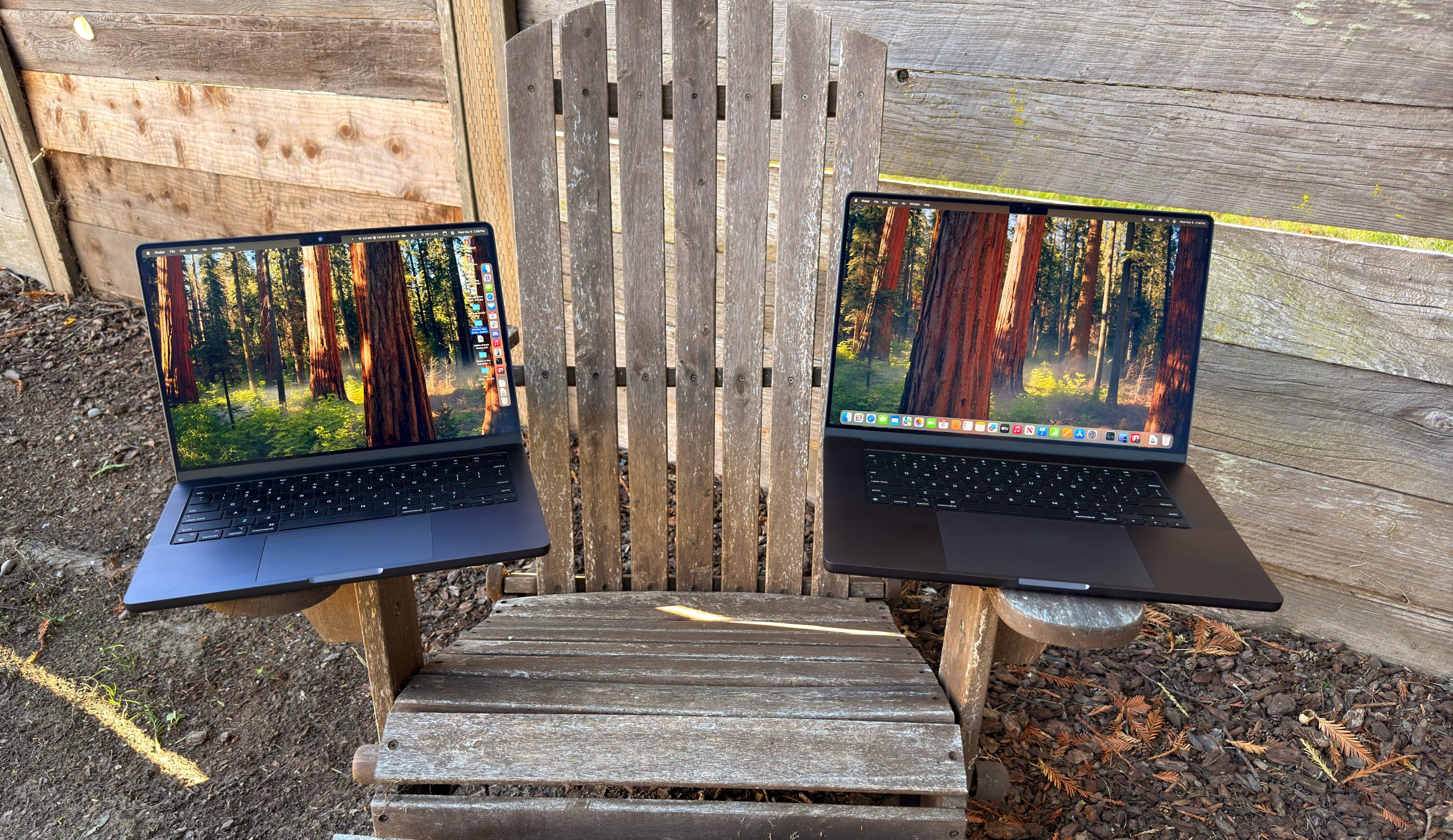
M4/M4 Pro MacBook Pro review: Brighter, clearer, faster

The latest update to the MacBook Pro is not a radically different laptop than what has come before. Since the product was redesigned in 2021, subsequent updates have been largely the same, at least on the outside.

But just as the MacBook Air is the default Mac for a majority of consumer Mac users, the MacBook Pro is the tool of choice for most Mac professionals. As a result, even a small update can be of great importance.

Anyway, here’s the good news: All the things that have made Apple silicon-based MacBook Pros great are still here, now powered by the impressively upgraded M4 chip. Apple has also sufficiently improved the base model to finally elevate it out of “Why does this exist?” territory, boosted the device’s world-class display, and seriously upgraded the built-in webcam. Not bad for a small update.

Continue reading “M4/M4 Pro MacBook Pro review: Brighter, clearer, faster”…


By Dan Moren

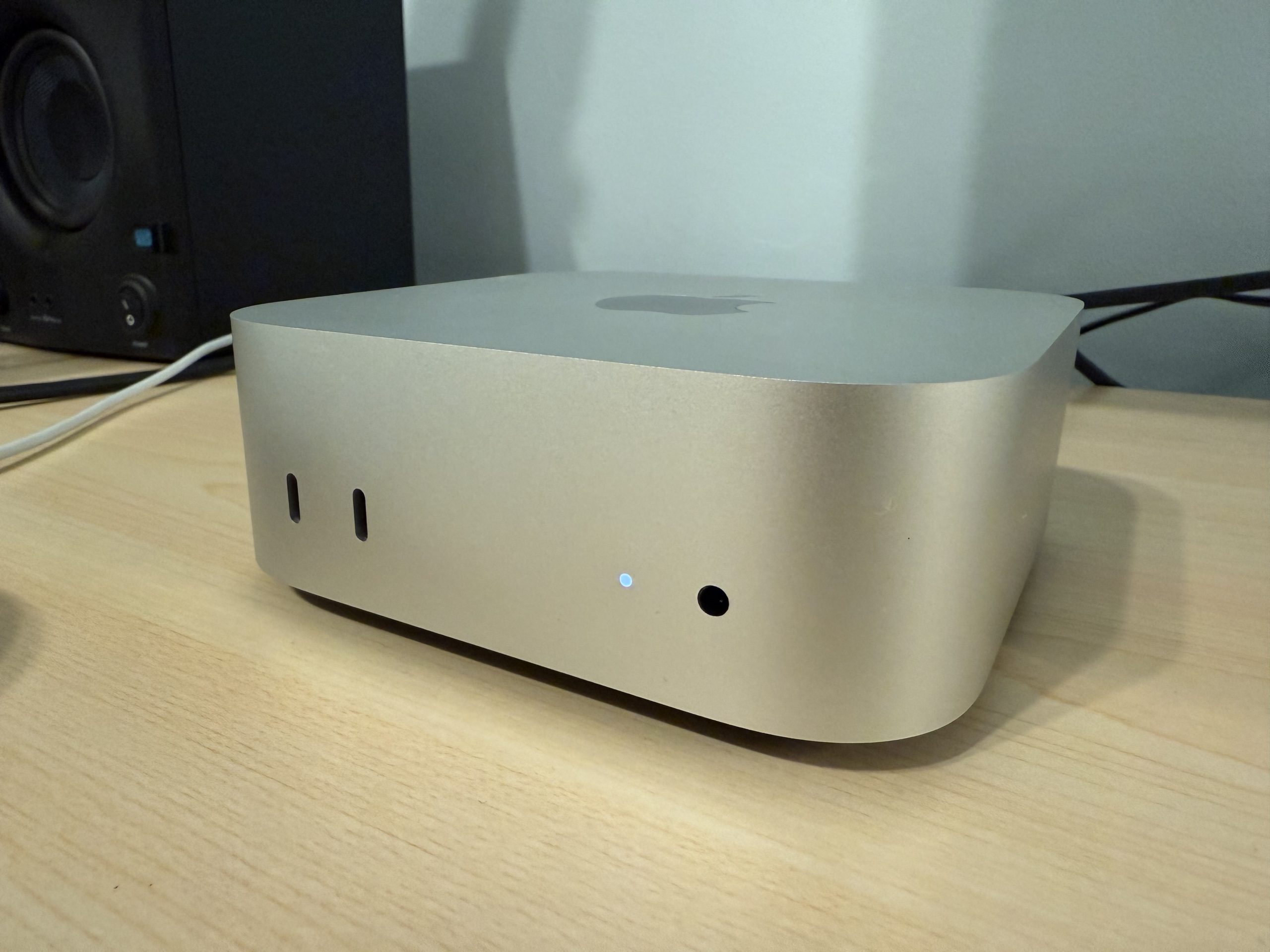
M4 Mac mini Review: Phenomenal cosmic power, itty-bitty form factor

Meet the new Mac mini—for the first time in the last fourteen years, not the same as the old Mac mini.

The latest iteration of Apple’s most diminutive Mac really earns that superlative in its newest incarnation, only the third in its history. The form factor really shouldn’t come as too much of a surprise: it’s basically a smaller version of the Mac Studio, which was itself a taller version of the Mac mini. Time, as they say, is a flat squircle.

As the most versatile Mac, the Mac mini finds itself into all sorts of niches that no other Mac can easily (or cost-effectively) fill. Whether it’s rack-mounted as a server, hooked up to a TV, or even tucked somewhere in a car, the mini is the Mac of all trades.1

Since the Apple silicon revolution, it’s also become more powerful than ever, and the new M4-powered models are no exception. The mini holds its own against consumer models like the iMac and MacBook Air, and can be upgraded into the mid-range with an M4 Pro chip, positioning it comfortably alongside some MacBook Pro models.

When it comes to desktop Macs, it’s quite possibly the best one Apple offers.

Continue reading “M4 Mac mini Review: Phenomenal cosmic power, itty-bitty form factor”…


By Jason Snell

M4 iMac Review: Gloriously niche

The iMac, redesigned for Apple silicon in 2021, is a gorgeous reinvention of Apple’s venerable all-in-one. It’s colorful (if you want it to be), powerful (enough), and designed to show itself off at home and in public spaces.

After a very basic update to M3 last year, Apple has now updated the iMac again, adding the more powerful M4 processor—and addressing a few of this fun desktop computer’s few shortcomings.

Continue reading “M4 iMac Review: Gloriously niche”…


Our default apps on iOS, how we feel about Genmoji, our favorite end-to-end encrypted messaging platforms, and whether we use Live Activities for news and sports.


By Jason Snell for Macworld

Where Will Apple Intelligence go next?

If you didn’t notice, Apple Intelligence is here. But it would be hard not to notice—Apple is marketing its new collection of AI features everywhere it possibly can, from television ads to its website to every single product announcement it’s made in the last two months. (Each video announcement Apple released last week—iMac, Mac mini, and Macbook Pro—featured an original, extended Apple Intelligence segment.)

But to say that Apple has gone all-in on Apple Intelligence wouldn’t be quite true. Yes, the Big Three are covered: iPhone, iPad, and Mac. But Apple makes many more devices than just those three! This year, understandably, the company is going to be focused on getting as many AI features up and running on the Big Three as it can. But sometime soon, probably next year, Apple is going to need to roll out a strategy regarding everything else in its product line-up.

So, how’s it going to manage that?

Continue reading on Macworld ↦


iPads being used on college football sidelines

football players with iPads

You may remember Aaron Rodgers throwing a Surface on an NFL sideline, but this year football teams in three college conferences are using iPads, as detailed in this feature from Apple Newsroom:

“Having iPad on the sidelines makes coaching way more effective in-game,” says Mike Saffell, University of California, Berkeley’s tight ends coach. “Live feedback enables the players and coaches to correct quickly. It also makes the game more competitive since both teams are able to fix issues on game day.”

Cal’s starting quarterback, Fernando Mendoza, agrees. “Before, there were a lot of things that we couldn’t see until after the game, so it’s great to have that coaching on the sideline. When you’re on the field, football is the same football. But when you’re off the field, now you can go with the coaches, make adjustments, get coached up, and then go back in the game, which has helped young players’ development a lot,” he says.

Tim Cook promoted this story on social media by mentioning his Auburn Tigers, but as for me, this is probably just an excuse for me to post pictures and quotes from my beloved Cal Bears. Who, by the way, beat Tim’s team this year. Roll On You Bears!

Just don’t throw the iPads.


Scoring our very weird draft, The new Mac mini and MacBook Pro announcements, Apple’s latest financial results, our reactions to Image Playground and Genmoji betas, and pondering the actual job of a CEO.


Search Six Colors