Six Colors
Six Colors

Apple, technology, and other stuff

Support this Site

Become a Six Colors member to read exclusive posts, get our weekly podcast, join our community, and more!

Holiday specials and streaming rights; the questionable future of linear cable channels; Bob Iger’s Endgame gets interesting; Sports Corner with Rob Manfred, Jason Kelce, and Charles Barkley; Behold, the power of CBS; and some TV shows you should watch.


By John Moltz

This Week in Apple: Macs for days

John Moltz and his conspiracy board. Art by Shafer Brown.

The new Macs are here! The new Macs are here! Apple also updated its peripherals. Wow. Then it did a little shopping.

Sweet 16

As was foretold in prophecy, Apple introduced new M4-based Macs this week, starting with iMacs that come in colors so bright that Apple should have issued one of those seizure warnings at the beginning of the video. Your customers simply aren’t used to these parts of the spectrum, Apple.

On Tuesday the company followed up with the All-New Diminutive-Sized Mac mini, which looks not unlike a Mac Studio someone left in the dryer too long. It’s Apple’s fastest, smallest and most easy-to-lose Mac mini ever.

Because these things come in threes, Apple announced new MacBook Pros on Wednesday, rounding out the lineup and making it less weird that its most advanced processor was in the iPad. Say what you want to about AI (god knows I do) but it did give us the gift of a base RAM configuration of 16 GB. Don’t say it never did nothin’ for ya.

And, in a retcon anyone can get behind, even the M2- and M3-based MacBook Airs now start with 16 GB. Well, unless you’re someone who bought a MacBook Air last week because you were certain it wasn’t going to get updated. Also, it’s worth noting that while this change to the timeline did affect almost all of the MacBook Airs, Walmarts are apparently built inside some sort of space/time Faraday cage and exist in their own reality. Their M1 MacBook Airs still ship with just 8 GB of RAM.

I got your update right here

Well, it sure was nothing but good news this week, wasn’t it? Apple nailed it across the board, even updating its Magic peripherals, replacing the Lightning Ports with USB-C.

So, all is well and… Oh, don’t, uh, don’t look at those too closely. They’re great, no need to…

“Apple put the Magic Mouse’s charging port on the bottom again”

OK. Yes. Fine. Apple did not take the opportunity to move the charging port to a less ridiculous spot. Also… also… as long as we’re coming clean on these things, the smaller Magic Keyboard still does not have arrow keys in an inverted-T design.

[30 minutes of pandemonium. The judge repeatedly calls for order, but the gathered crowd is inconsolable. The bailiffs are ordered to clear the courtroom but are swept backwards and into the chambers of the judge as he attempts to flee. The system has failed the people yet again and this time they have had enough.]

Well, not everyone agrees. John Gruber suggests you people don’t deserve a nice bottom-charging mouse.

Putting the port on the belly is putting form over function, but in this case Apple’s designers think the better form is worth the trade-off.

It is truly the most beautiful mouse that I will never buy.

Burning a hole in its pocket

After all that announcing, Apple took some time on Thursday to relax and do some more announcing, revealing its quarterly results. The company had record fourth-quarter, earning $95 billion in revenue.

Then, it did exactly what I do when I get a big payday: go on a buying spree.

“Apple sinks $1.1 billion into Globalstar’s satellite network, takes ownership stake”

This orbital laser platform isn’t going to build itself. Also, the company seems to be betting big on satellite features for iPhone like Emergency SOS.

To top off the week, Apple acquired Pixelmator, makers of the photo editing app of the same name.

There will be no material changes to the Pixelmator Pro, Pixelmator for iOS, and Photomator apps at this time.

“At this time”, meaning 10 AM Friday morning, November 1st 2024.

[John Moltz is a Six Colors contributor. You can find him on Mastodon at Mastodon.social/@moltz and he sells items with references you might get on Cotton Bureau.]


Macs, tax, and the rules of acquisition

A huge week! We break down new Macs, Apple’s Mac release strategy, the financial results, and a surprising Apple purchase.


Apple buys Pixelmator

Pixelmator Team, announcing a shocker:

Pixelmator has signed an agreement to be acquired by Apple, subject to regulatory approval. There will be no material changes to the Pixelmator Pro, Pixelmator for iOS, and Photomator apps at this time. Stay tuned for exciting updates to come.

Pixelmator is great. Photomator is great. This team has been making great image-editing apps for years, and apparently now… they work at Apple? I don’t know what this means for the future of Apple’s apps—though I hope it means Photos is going to get a serious infusion of new talent and functionality!

If you’re a Pixelmator Pro or Photomator user, this has to be a bit of a bummer, but there’s some good news: It will probably take a few years for Apple to fully integrate the team into whatever is happening next, and the existing apps will probably still be around until then.


By Dan Moren

Apple sinks $1.1 billion into Globalstar’s satellite network, takes ownership stake

If you had any idea that satellite connectivity isn’t a key part of Apple’s strategy, well, the company’s satellite partner Globalstar has disclosed changes to its deal with Apple, including a new influx of $1.1 billion from Apple tied to capital improvements, and $400 million in equity, which gives Apple a 20-percent stake in the company.

That is quite a bit of money, but it’s not necessarily a huge surprise. There aren’t that many companies around with these kind of capabilities and by locking down an investment in Globalstar, Apple ensures bandwidth and access.1

Apple’s been offering satellite connectivity since the introduction of the iPhone 14 line in 2022, which debuted with the Emergency SOS via Satellite feature. At the time Apple said it would be offering two free years of service, though it later extended that by a year. Alongside the introduction of the iPhone 15 line, it added Roadside Assistance capabilities; this year, it added Messages via Satellite. All these features are under the same aegis.

Apple has never said what these features might cost after the expiration of the initial free period. The company’s been content to kick that can down the road—the latest expansion of this deal suggests that it might be happy to kick that can right into orbit. It’s gotten a whole lot of good publicity on the back of the Emergency SOS Satellite feature, not infrequently highlighting the lifesaving stories it’s enabled. It’s hard to imagine it would ever want to be in a position of dealing with a scenario in which somebody’s life could have been saved if only they’d paid Apple for the feature.

The real question is what additional features might be enabled by the improvements to Globalstar’s infrastructure: true satellite calling? Globalstar already offers some plans for that, as do competitors. FaceTime via Satellite? (Bandwidth and latency would seem to be real challenges there.) Perhaps even general internet access?

It still seems most likely to me that Apple will eventually offer tiers of these, perhaps bundled along with its Apple One subscription, leaving some features like Emergency SOS free, while others will cost an additional fee. But Apple seems confident enough that adding these capabilities are helping sell iPhones, and for the moment, that seems to be enough for it to keep investing.


[Dan Moren is the East Coast Bureau Chief of Six Colors, as well as an author, podcaster, and two-time Jeopardy! champion. You can find him on Mastodon at @dmoren@zeppelin.flights or reach him by email at dan@sixcolors.com. His next novel, the sci-fi adventure Eternity's Tomb, will be released in November 2026.]


By Jason Snell

This is Tim, that was Luca: Apple’s Q4 results phone call, transcribed

Tim Cook

Every quarter after releasing financial results, Apple CEO Tim Cook and CFO Luca Maestri hop on a conference call with analysts to detail the quarter gone by, give a peek at what’s to come, and dodge—er, I mean answer—questions from analysts. This is a transcript of the call, Maestri’s last (sniff) as Apple CFO.

Continue reading “This is Tim, that was Luca: Apple’s Q4 results phone call, transcribed”…


By Jason Snell

Apple’s Q424 results: $95B revenue–with a twist

Apple reported its financial results on Thursday for its fourth fiscal quarter, which ended on September 28. Revenue was $94.9 billion, up six percent versus the year-ago quarter and an all-time fourth quarter record.

The one twist: Apple recognized a one-time charge of $10.2 billion related to Apple finally having lost a long-time tax case in the European Union. That’s a lot of cash, and it bit into Apple’s profit for the quarter.

All in all, Apple’s business was relatively flat. iPhone sales were up 6% but flat for the fiscal year; Mac sales were up 2%, which is about how they’ve been all year; Services continues to have reliable double-digit growth, but the rate of growth slowed to 12% year-over-year.

After the results, Apple did its traditional call with financial analysts and we’ve got a complete transcript. And now, here are the charts:

Apple quarterly revenue by category pie chart

Continue reading “Apple’s Q424 results: $95B revenue–with a twist”…


By Dan Moren

The Back Page: Tim Cook’s busy schedule

Dan writes the Back Page. Art by Shafer Brown.

It should come as a surprise to no one that Tim Cook is a very busy man. He’s the CEO of one of the world’s largest and most valuable companies—and he’s not just a stuffed, button-down blue shirt; he really cares. As we learned from a recent Wall Street Journal article, he uses every single Apple product every day.

Now, most of us are Apple product users. Many of us have more than a device or two. But even the most ardent among us may wonder how Tim can use every single product every day. It seems impossible.

So I did some digging, reached out to some sources, and I can now exclusively report that I have obtained a rare copy of Tim Cook’s detailed schedule. Behold.

4am: Wake up. Use HomePod mini to turn on lights, start coffee machine.

4:30am: Start Apple Fitness+ workout (dance, naturally) on Apple Watch Ultra 2, Apple TV 4K, and AirPods Pro 2.

5am: Check email on 11-inch iPad Air with Magic Keyboard over breakfast (yogurt, blueberry, and Cheerios smoothie).

5:30am: Drive to Apple Park, using Apple Maps on CarPlay.

6:30am: Finally reach Apple Park.

7am: Lament lack of Diet Mountain Dew. Check emails on 13-inch iPad Pro with Magic Keyboard for iPad Pro. Reply using Apple Pencil Pro. Doodle in Apple Notes.

8am: Morning staff meeting. In person, but all don Vision Pros to hold meeting in virtual environment of Apple Park conference room. Agree Tim’s spatial persona is as realistic as Tim, if not more.

9am: Thinking time. Don AirPods Max, stroll through Apple Park ring and check customer sat numbers on iPhone 16 Plus.

10am: Return to desk. Check email on M4 iMac (silver) with Magic Keyboard and Magic Trackpad. (Magic Mouse is charging.)

10:30am: Visit Caffe Macs. Diet Mountain Dew still absent. Perch at table with 13-inch MacBook Air. Check email.

11am: Pop in AirPods 4 for walk back to office. Text group chat with John Ternus, Jeff Williams, and John Gianndrea (Named “The Johns and also Jeff”) on iPhone SE. Agree to meet for lunch.

11:30am: Return to desk. Check email on tenth-generation iPad. Use Apple Pencil (not Pro) to draw diagram of new possible project:

12pm: Lunch time. Use AirPods 4 with Active Noise Cancellation to walk to Caffe Macs. Buy lunch for the Johns and also Jeff at Caffe Macs with Apple Card via Apple Pay. Eat salad. With apples.

1pm: Focused time with new product [REDACTED]. Try to figure out how it fits into life and, more specifically, schedule. Use Mindfulness meditation feature on Apple Watch SE to calm down.

2pm: Take 15-inch MacBook Air to Rainbow Stage. Practice “Good mornings.” Use 11-inch iPad Pro as teleprompter. Ignore looks from bemused passing employees.

3pm: Mandatory Memoji FaceTime with Craig Federighi via iPhone 16 Pro Max.

3:30pm: Return to desk, check email on 14-inch MacBook Pro.

4pm: Assistant swaps in 16-inch MacBook Pro while Tim relaxes in Bali on Apple Vision Pro and checks his email.

4:30pm: Afternoon stroll to close rings and use iPhone 16 Pro to track down AirTag that Phil Schiller hides daily on Apple Park campus.

5pm: Evening check in call with global division chiefs via iPhone 16.

5:30pm: Assistant wheels in Mac mini and Apple Studio Display. Check email.

7pm: Eat dinner while continuing Ted Lasso rewatch on 13-inch iPad Air. Finally drink Diet Mountain Dew and remember why living is worthwhile. Make note to FaceTime Jason Sudeikis with Season 4 thoughts. Put feet up on Mac Pro.

8pm: Drive home, listen to latest episode of Six Colors Subscriber podcast via CarPlay.

9pm: Relax with iPad mini in bed, reading latest Dan Moren novel in Apple Books.1

9:30pm: Use Siri via HomePod to turn off lights. Fire up Apple Watch Series 10 sleep tracking.

11pm: Wake from dead of sleep to fumble for bedside Mac Studio and Pro Display XDR. Check email. Breathe sigh of relief and go back to sleep.


  1. WHAT HE HAS GOOD TASTE. 

[Dan Moren is the East Coast Bureau Chief of Six Colors, as well as an author, podcaster, and two-time Jeopardy! champion. You can find him on Mastodon at @dmoren@zeppelin.flights or reach him by email at dan@sixcolors.com. His next novel, the sci-fi adventure Eternity's Tomb, will be released in November 2026.]


By Shelly Brisbin

Taking the AirPods Pro hearing test

Three iPhone screens displaying steps in an AirPods hearing test feature.
The hearing test first checks your fit and environmental noise (left). During the test, you tap the screen when you hear a tone, as the screen image throbs (center). Even if your AirPods Pro hearing test says you have little or no hearing loss, you’ll get a number that quantifies the small amount it finds (right).

When Apple launched new phones and other hardware in September, I said on a couple of podcasts that the AirPods Pro’s forthcoming hearing aid tech was the most important item on that day’s bill of fare. And finally, this week, the release of iOS 18.1 and updated AirPods Pro firmware brought the promised hearing test functionality to my AirPods Pro, along with the promise of software tuning to meet any hearing loss the test found.

Of course, all of it seems to have been eclipsed by the multi-day rollout of a bunch of new Mac computers. Still, somewhere between ordering a new Mac Mini and showing my coworkers the updated iMac colors, I took the AirPods Pro hearing test—along with a family member who has a longstanding hearing loss.

Is something wrong?

iPhone hearing test showing hearing loss.
When AirPods Pro detects a mild hearing losss, you can proceed to set them up as a pair of hearing aids.

I’ve suspected for a few months that I’d lost a few frequencies in my left ear for age-related reasons. I don’t seem to hear as much detail from a big Sonos speaker in the kitchen, when I’m facing the other way, in the living room. I have some tinnitus, too, which is relatively new. Meanwhile, I’ve been spending a lot of time with a family member whose hearing has never been the greatest due to a number of childhood infections. So we both took Apple’s hearing test.

Once you’ve installed iOS 18.1, the test is offered by the AirPods Pro configuration screen. First, iOS runs a version of the AirPods Pro fit test, which I don’t think I’ve ever taken before. When I got my ‘pods, I just chose the smallest ear tips in the box.

Sure enough, I passed the fit test, and it was on to the hearing check. You’re tested one ear at a time, touching the screen anytime you hear a tone. Meanwhile, the image onscreen throbs in a way that convinced me that I should be hearing something, whether I did or not. I’m sure I tapped once or twice when I thought I was something was happening, but was not.

Hearing upgrade?

When the test for both ears was completed, I got the verdict: little to no hearing loss. iOS did offer to tune my earbud so that media listening would be the best it could be for me—sure, why not? Music did sound noticeably better with Media Assist. It felt like a nice qualitative improvement. A podcast I listened to sounded as though they had slightly more high frequencies. Nice, but the improvement in music listening was greater for me.

My family member, who is not a power user by any means, had been gifted a pair of AirPods Pro precisely because of the hearing evaluation and assistance features. Her test showed mild hearing loss, and she was offered the chance to set up her AirPods Pro as hearing aids. (Despite the ruling, she believes her hearing loss is more than mild.)

She wore her AirPods at home and in the car throughout the day. She has worn hearing aids before, and says that like those devices, AirPods Pro sometimes accentuate sounds she doesn’t want to hear, like the noise of paper being crumpled. Overall, her take is that everyday sounds are sharper in tone. She said she wasn’t able to lower the required volume of her kitchen television as she had hoped. She also noted that AirPods Pro need to be charged during the day. While that process is quick, she perceives the buds’ battery life as a limitation versus other hearing aids.

For my part, it’s tough to tell if AirPods Pro have made listening to media mind-blowingly better. It’s good, though. Your mileage will almost certainly vary. It’s also worth pointing out that you can retake the AirPods Pro hearing test at any time. That might offer some peace of mind if you’re worried about the trajectory of your hearing.

[Shelly Brisbin is a radio producer and author of the book iOS Access for All. She's the host of Lions, Towers & Shields, a podcast about classic movies, on The Incomparable network.]


Our use of tech in Halloween celebrations; the smallest tech we regularly use and the small gadget that wowed us; which Apple Intelligence features we’re using and looking forward to next; and the one item we’d give up this week, tech or non-tech.


By Dan Moren for Macworld

The truth behind Apple’s most unpopular decisions: It’s not about you

Twelve years ago, my former Macworld colleague Lex Friedman and I were at an Apple focused conference where we presented a talk called “Apple is Huge Now (And That Sucks For You)”. The long and short of it was that the Apple of 2012 was not the same Apple of the 1980s, 1990s, or even the 2000s—now Apple was a giant company that could less afford time worrying about you as an individual.

A decade-plus on, it’s hard to believe that Apple has gotten even bigger and that, fundamentally, each and every one of us matter that much less to it, but it’s unarguably true. Simply put, it’s a matter of scale—the company simply can’t afford to spend the same amount of time worrying about its customers that it could have twenty years ago, because there are just that many more of them.

In its role as one of the largest purveyors of technology in the world, Apple has no choice but to adopt a perspective of scale. This comes to play in all sorts of decisions the company makes, from the biggest of the big to the smallest of the small.

Continue reading on Macworld ↦


By Jason Snell

16GB for everyone: MacBook Air joins the RAM upgrade party

This guy gets more RAM now.

This week, all of Apple’s Mac announcements have featured one trend beyond the arrival of the M4 processor family on macOS: The lifting of base RAM configurations from 8GB to 16GB across the board on new models.

But it’s actually not just new models that are getting this boost. On Wednesday Apple also reconfigured its most popular laptop, the MacBook Air, to feature 16GB of RAM across all configurations at the same starting prices: $999 for the M2 model, $1099 for the M3 model.

With this move, there’s not a single new Mac being sold directly by Apple with less than 16GB of RAM. This is a big deal, because Apple doesn’t change base RAM that often—it’s a source of lucrative upgrade revenue.

As pointed out by Friend of the Site David Schaub, Apple’s base RAM figures tend to stick around for a long time. On consumer Mac laptops, since 2011 the base has only increased once—to 8GB, back in 2017.

Based on Schaub’s charts and the prevailing conversation in my own circles, these changes certainly feel long overdue. But let’s not be too quick to applaud Apple for its largesse here. Remember, Apple Intelligence (and AI models in general) tend to require a whole lot of memory to run well. The advent of Apple Intelligence seems likely to be the real motivator in giving even the cheapest Macs—a $599 Mac mini and a $999 M2 Macbook Air—a full load of 16GB of memory.

Whatever the reason, I’ll take it.


By Jason Snell

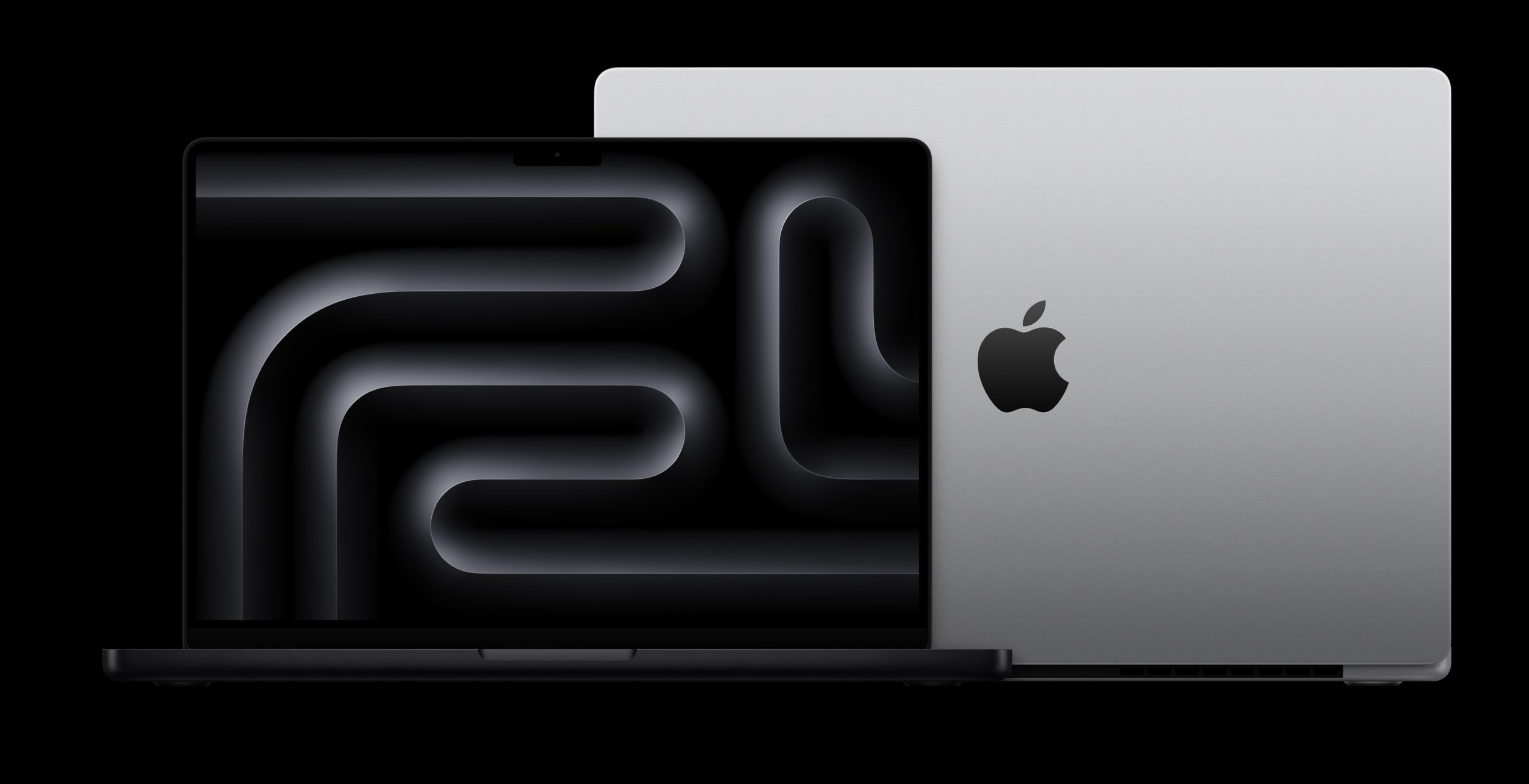
Apple introduces new MacBook Pros with M4 chips, brighter screen

Apple’s week of Mac reveals rolls on with Wednesday’s announcement of the M4 MacBook Pro line. In some ways this is the smallest update of the week, but I’d wager that Apple sells far more MacBook Pros than iMacs and Mac minis put together. So in some ways, this is the biggest announcement yet.

The new 14-inch M4 MacBook Pro base model now starts at 16GB of RAM—the days of base 8GB of RAM in Macs seem to be at an end—but retains the same base price of $1599. Unlike last year, where only more expensive configurations gained access to the Space Black shade, this year all MacBook Pro models come in just Silver and Space Black, even the base M4 model.

The 14-inch base model now has ports on both sides!

The M4 model sports three Thunderbolt 4 ports, one more than in the M3 model. And, yes, this means that the base-model MacBook Pro now has Thunderbolt ports on both sides.

The MacBook Pro’s best feature is its gorgeous Liquid Retina XDR display, which gets a boost in the M4 generation by getting quite a bit brighter, with a maximum of 1000 nits (up from 600) in standard-dynamic-range mode. (The max peak brightness in HDR mode remains unchanged at 1600 nits.) There’s also now a nano-texture display option, for laptop users who really need to get screen glare out of their eyes.

The 14-inch MacBook Pro also comes in higher-end chip configurations, and the 16-inch model only comes with the more powerful chips. The M4 Pro, which technically debuted Tuesday with the Mac mini, is of course also available on these models. It sure seems like the M4 Pro is the chip to gain the most between generations, with 75% more memory bandwidth and performance. Apple claims the M4 Pro is 30 percent faster than the M3 Pro, and three times as fast as the M1 Pro. The M4 Pro maxes out at 14 cores, 10 for performance and four for efficiency, can have as many as 20 GPU cores, and starts at 24GB of RAM with configurations up to 48GB. M4 Pro models start at $1999 (14-inch) and $2499 (16-inch).

But of course, there’s more—the M4 Max chip is making its debut in these systems. The M4 Max just offers more of everything, from its 16 CPU cores (12 performance, four efficiency) to up to 40-core GPU, to support for up to 128GB of memory.

Both higher-end chips support Thunderbolt 5, with doesn’t just support much faster data transfers, but also twice as much power delivery (200 watts, up from 100 watts in Thunderbolt 4), which is probably more relevant to a laptop than it would be to a Mac mini.

All three chip levels get a major webcam upgrade to the 12MP Center stage camera, which is the first Mac laptop webcam upgrade in quite a while. And Apple is claiming that all models can get up to 24 hours of battery life, which seems like a bit of a major milestone, even though (as always) battery life is not a simple thing to measure, and can vary widely based on how you use the computer in question.

Apple is taking pre-orders now, and the new MacBook Pro models will arrive in customers’ hands on Nov. 8.


Why Alexa hasn’t yet become the real computer of the future

Great piece by Jennifer Pattison Tuohy at The Verge about the evolution of the Amazon Echo and how an exciting project turns into a boring one:

Alexa is still mainly doing what it’s always done: playing music, reporting the weather, and setting timers. Its capabilities have expanded — Alexa can now do useful things like control your lights, call your mom, and remind you to take out the trash. But despite a significant investment of time, money, and resources over the last decade, the voice assistant hasn’t become noticeably more intelligent. As one former Amazon employee said, “We worried we’ve hired 10,000 people and we’ve built a smart timer.”

I’ve had some sort of smart speaker in my house since the first Echo, which I reviewed back in 2015, and I agree wholeheartedly with Tuohy’s assessment. There was a real feeling of breakthrough to that original product, but—not unlike Siri—it feels like it never really moved a base level of functionality, despite all of Amazon’s efforts.

I think a big part of what has stymied Amazon in particular is trying to figure out where the Echo fit into its overall strategy. If Apple’s business is selling hardware and Google’s is selling ads, Amazon’s biggest might be shopping? But the shopping experience from the Echo has always been weird and less than ideal. 1

Some of these problems might get resolved by the introduction of large language models that make voice assistants like Alexa and Siri more responsive, but again, as Tuohy points out, the real challenge is acting on our requests—to which I’d argue, the real underlying subtext is that whether we can get to a point where we can trust the voice assistants to do what we’re asking them. If you can’t—if the worry is that you will ask it to water your plants and come home to find your house flooded—then this whole technology is nothing more than an evolutionary cul de sac.


  1. My wife and I still regularly joke about the time when, after having bought several ceiling fans from Amazon in the process of renovating our now house, the Echo weeks later chimed, seemingly at random, and suggested that it might be time to order more ceiling fans. 

By Dan Moren

The M4 Mac mini: Tricks and treats

Just in time for Halloween, Apple has delivered a new version of its smallest Mac, which you could probably even fit into one of those plastic pumpkins.

As a current Mac mini user (and someone who’s owned three or four of them over the years), I eyed today’s announcement with interest and, if we’re being painfully honest, no small amount of envy. This M2 Pro Mac mini sitting on my desk? It’s fine. Well, truthfully, it’s better than fine: it’s great. I use it every day and it never bats an eye at any task I throw in its direction. It’s just a year and a half old, and as we know with Apple Silicon Macs, these things last. (Just ask my M1 MacBook Air.)

But the siren song of the new and shiny is always alluring, and I’d be lying if I said I hadn’t already priced out a new M4 model within a few minutes of its announcement. But in true Halloween fashion, there are some spoooooky factors to consider that make a swap not quite straightforward as you might think.

Treat: The mini-est Mac ever

M4 Mac mini held in a hand

It’s jut so wee. At 5 inches square, the M4 Mac mini is more than a third smaller in both width and depth than its 7.75-inch predecessor—in fact, it’s closer in footprint to the 3.66 inches of the Apple TV 4K. (Although at 2 inches, it’s a bit taller than both the M2 mini and the Apple TV.) I won’t say my desk space is at a premium—all you have to do is look at the junk strewn across it—but the idea of freeing up some room is pleasing, as is the fact that the M4 models weigh about a pound less than the M2 models—aluminum may be light, but it’s still metal.

Trick: Memory games

M4 Pro Mac mini memory configurations
32GB was dead all along!?

My current M2 Pro Mac mini has 32GB of RAM; the M4 Pro Mac mini ships standard with 24GB of RAM, but the upgrade options are 48GB for an extra $400 or 64GB for an extra $600. That’s not an insignificant cost to meet (and, to be fair, beat) my current specs. Would I choose to pay the money or downgrade? Now that’s a dilemma.

Treat: USB-C what I did there?

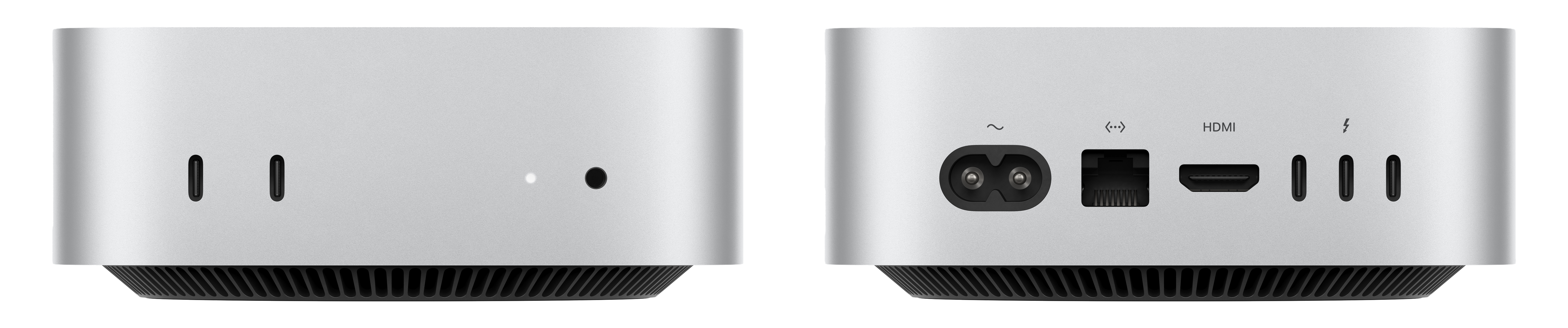
M4 Mac mini front ports

I’ve been calling for this ever since Apple proved it could put ports on the front of its desktop Macs with the Mac Studio, and I’m pleased as punch it delivered. No more maneuvering behind my mini or Studio Display when I want to plug in a thumb drive or security key. I could even plug in the audio interface on my desk with a shorter cord if I needed to. Convenience! Function over form! Who would have thunk it!

Treat/Trick: Audio port affront

…Wait, there’s an audio jack in the front too? Look, having just extolled the virtues of front-mounted USB-C ports, I feel that I would be a cad to ding the design for putting the headphone jack there too. After all, if you’re plugging in headphones, you don’t want to root around in back of the mini every time.

Except I use my audio port to keep a pair of desktop speakers plugged in, which is a little awkward from a cable management perspective. Sure, I could use a dongle, I guess, but then I’m eating up a valuable Thunderbolt 5 port for speakers. Maybe it’s time to—*gasp*—finally ditch those desktop monitors in favor of the Studio Display’s built-in ones.

Trick: Trade-in shun

Yes, I did go ahead and price out exactly how much Apple would give me for my pristine Mac mini with a 10 core CPU/16 core GPU M2 Pro, 32GB of RAM, and a 1TB SSD. It’s practically brand new, well, from April 2023. And the result was…$445.

Look, I’m not saying that’s nothing compared to the cost of a brand new computer, but it is on the sobering side. They say your computer loses half the value when you drive it off the Apple Store lot, but that’s more like two-thirds! I’d probably fare better selling it elsewhere.

Ultimately, I think an M4 Pro Mac mini is unfortunately not in my future, even though I keep getting misty-eyed when I look at the pictures. But good news: given the last design of the Mac mini lasted effectively fourteen years, this one’s not going anywhere soon. So I guess there’s always the M5.

[Dan Moren is the East Coast Bureau Chief of Six Colors, as well as an author, podcaster, and two-time Jeopardy! champion. You can find him on Mastodon at @dmoren@zeppelin.flights or reach him by email at dan@sixcolors.com. His next novel, the sci-fi adventure Eternity's Tomb, will be released in November 2026.]


By Jason Snell

New Mac mini shrinks down, gains M4 and M4 Pro chips

Apple’s big week, featuring a new iMac and the launch of Apple Intelligence, just got smaller. A lot smaller.

Just in time for Halloween, it’s a Fun Size Mac mini. The redesigned M4 Mac mini has a footprint of five inches by five inches (and two inches high), making it 60 percent less volume than the previous design and easily the smallest desktop Mac ever.

The previous Mac mini design dates from all the way back to 2010, when it was sized to incorporate an internal optical drive! That was terrible timing because of course that was the last generation of the Mac mini to even offer an internal optical drive as an option. Still, all the extra space inside that 7.75-inch-by-7.75-inch footprint was probably helpful in fitting in PowerPC and Intel hardware… and cooling it. Now, fourteen years later, the Mac mini is sized for the tiny, cool Apple silicon era at last.

Behold! (Image: Apple.)

Following the lead of its larger silver-aluminum cousin, 2022’s Mac Studio, the new Mac mini features two conveniently front-facing USB-C ports (but no SD card slot). On the back are three Thunderbolt ports, as well as Ethernet and HDMI. Apple says the new enclosure uses 85% less aluminum than the previous model, is partially made of recycled aluminum, and is officially Apple’s first carbon-neutral Mac.

The M4 Mac mini starts at the same $599 price point as the previous model, despite the fact that the base model now ships with 16GB of RAM, twice the previous 8GB minimum. (All M4 models come with 10 CPU and GPU cores.) Of course, prices escalate quickly from there, if you want to add RAM or storage capacity or a 10G ethernet option.

While the M4 Mac mini will undoubtedly be quite a bit faster than its M2 predecessor, there are more substantial gains to be made on the higher end. Just as with previous Apple Silicon-era models, the new Mac mini will also be available in a higher-end chip configuration.

The Mac mini with the new M4 Pro chip—which starts at $1399—supports the upgraded Thunderbolt 5 specification, comes with 24GB of RAM (upgradeable to 64GB), offers 14 CPU cores (10 performance and four efficiency) and up to 20 GPU cores, and 75% faster memory bandwidth (!!!) than the M3 Pro. The base model has 12 CPU cores and 16 GPU cores; a $200 upgrade gets you the full 14 CPU cores and 20 GPU cores. As with the M4 mini, the M4 Pro model can very rapidly cost you $2500 or $3000 if you boost RAM, storage, and more.

And keep in mind, the Mac mini was never updated to the M3—its last update was to the M2 in early 2023. So if you’re just looking at the Mac mini, the model-to-model speed boosts will be even more impressive than the gains between this chip generation and the last.

Finally, if you’re afraid Apple has cheated by moving its power supply outboard to make the Mac mini smaller, don’t worry. Just like the previous Mac mini, the new model’s power supply is internal, and it’s connected by the same two-pin power plug used in previous models. (The only difference is that Apple’s now using a braided power cable.)

The new Mac mini models will arrive in stores and customers’ hands beginning Nov. 8.


We kick off a busy week by analyzing the new M4 iMac, the arrival of two different waves of Apple Intelligence, and Jason’s review of the iPad mini, but we’ll have to wait a week to score our draft because there’s more yet to come!


Search Six Colors