With the release of iOS 18.1, iPadOS 18.1, and macOS Sequoia 15.1, Apple is hopping aboard the generative AI train. Apple Intelligence is a suite of disparate features, first announced earlier this year at the company’s Worldwide Developers Conference, that the company is gradually rolling out over the course of several software updates in the next months.
The first round of these features includes a few different capabilities, most prominently a systemwide set of Writing Tools; summaries of notifications and email messages; minor changes to Siri (with more coming later); and tools in Photos that led you remove unwanted elements or create themed movies with just a text prompt.
It’s unquestionable that Apple is putting its weight behind these efforts, but what’s been less clear is just how effective and useful these tools will be. Perhaps unsurprisingly, for anybody who has used similar generative AI tools, the answer is a definite maybe.
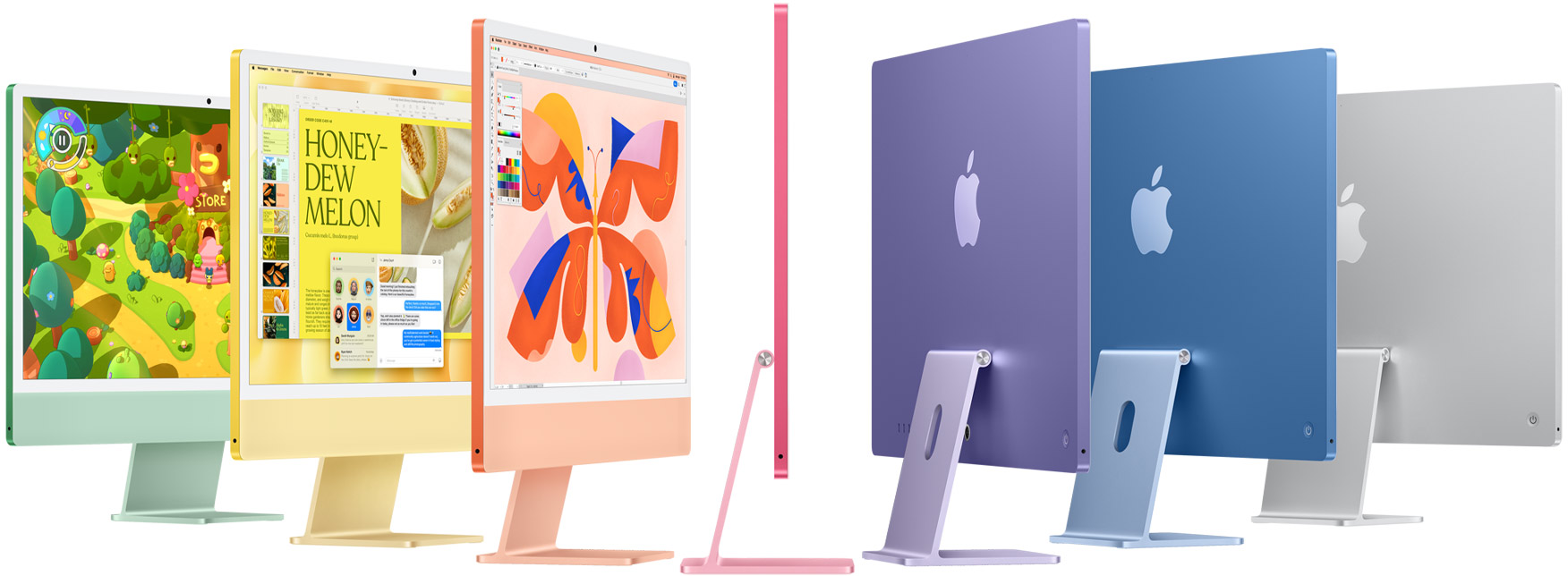
Begun, the week of Mac announcements has. Apple on Monday unveiled revamped iMac models, powered by its new M4 processors, in a series of bold new tints.
The iMac’s design remains largely the same as its predecessor, with a 24-inch 4.5K Retina display, although Apple has now added a nano-texture option, à la the Studio Display and the new iPad Pro, for some models.1 There’s also now a 12MP Center Stage capable webcam, replacing the previous 1080p option. Apple also notes that this version supports the Desk View feature that allows it to show the user’s desk in addition to their face.
While the colors remain the same—blue, purple, pink, orange, yellow, green, and silver—Apple has tweaked the backs of the computer with more vibrant versions of most of the colors.
The new M4 iMac green and pink colors (left) compared to the M3 models (right).
The M4 iMac comes in a handful of configurations: a $1299 base 8-core CPU/8-core CPU model with 16GB of RAM (double the previous 8GB, and expandable to 24GB) and a 256GB SSD (configurable up to 2TB), along with two Thunderbolt 4 ports. The previous model offered only two Thunderbolt 3 ports along with two USB 3 ports. This model supports a single external 6K external display at 60Hz in addition to the built-in display. Gigabit Ethernet is available as a $30 configuration option.
The higher end $1499 model features a 10-core CPU/10-core GPU processor and adds the ability to go up to 32GB of RAM as well as an additional two Thunderbolt 4 ports and Gigabit Ethernet standard. There are also $1699 and $1899 configurations as well; the former upgrades to 512GB of storage, while the latter includes both that and 24GB of RAM. Any of these configurations offer the nano-texture display for an additional $200, and can drive up to two 6K external displays at 60Hz or a single 8K external display at 60Hz. (Apple’s iMac website originally said 120Hz, but that was an error that the company has corrected.)
VESA mount versions of all models are available at the same price.
Along with the new iMacs, Apple has at long last updated its input peripherals with USB-C support, offering color-matched versions of the Magic Keyboard, Magic Mouse, and Magic Trackpad. They remain otherwise unchanged, including the lack of an inverted-T arrow key layout and the Magic Mouse’s underside charging port. It’s also worth noting that the $1299 base model includes a Magic Keyboard without Touch ID standard.
The new iMac models are available for pre-order today and will be on sale as of November 8.
However, those two products use different techniques to achieve that finish and it’s unclear as of this writing which the iMac is using. ↩
[Dan Moren is the East Coast Bureau Chief of Six Colors, as well as an author, podcaster, and two-time Jeopardy! champion. You can find him on Mastodon at @dmoren@zeppelin.flights or reach him by email at dan@sixcolors.com. His next novel, the sci-fi adventure Eternity's Tomb, will be released in November 2026.]
This week we get to know Tim Cook (did you know, for instance, that he is CEO at Apple Inc.?) and get a gut check on Apple’s AI position. Ultimately, however, we’re just biding time until next week.
Tim time
The Wall Street Journal got up close and personal with Tim Cook last weekend, getting all the dirty deets you want from the top dog at Apple. For instance:
The first thing Tim Cook does when he wakes up is check his iPhone.
No way! That’s what I do! Then I pull the covers up over my head and try to WISH IT WOULD ALL GO AWAY for an hour but ultimately give up and crawl reluctantly out of bed. Does he do that part, too?
Of course not! Cook checks emails and does work. Then he exercises. Also, Cook does this all of this like three hours before I even think about waking up. I’m saying there’s a reason he’s CEO of Apple and I’m not. (I’m guessing some kind of nepotism.)
Other details you will find in this creampuff of a piece: Cook also likes Diet Mountain Dew (but is above commanding his underlings to stock it at Apple) and only recently tried out naming a Messages thread, at the suggestion of the reporter.
The next time we meet, Cook proudly reports that he’s named the group chat with his college roommates: Roommates.
Nailed it.
Better late, then never
According to Mark Gurman, some at Apple believe the company is as much as two years behind on AI.
For example, internal studies at Apple reportedly show that OpenAI’s ChatGPT is 25% more accurate than the new Siri and can answer 30% more questions.
The good news for Apple is consumers really don’t care.
According to a YouGov survey, most consumers would rather have more battery life. Complaints about AI include it not being helpful (25 percent), not wanting to pay a subscription fee for it (45 percent), and privacy concerns (34 percent). One guy said AI “smelled funny” but I think that result was tossed as an outlier.
It wouldn’t be the first time Apple was behind on a technology and it didn’t end up mattering at all. Maps, for example, was a bit of a disaster on launch and now manages to get most people who use it where they’re going, with very few instances of people driving into ravines.
And it barely smells at all.
Big week
Rest up this weekend, because if the rumors are true then next week will be huge. But before we get all excited, let’s just see who’s spreading these rumors.
But if you put your money on Apple throwing an in-person event next week, looks like you’re out $5 (NO REFUNDS). The only event that Apple looks to be throwing is one for a select group of “media/creators”. I’m not sure if that’s “media and creators” or “media creators” or “media divided by creators”, the math of which I cannot do.
It’s unclear exactly how the company will stage this out but we are expecting to see new M4-based MacBook Pros, iMacs and a redesigned Mac mini.
The really big news, though, is the little things. According to Mark Gurman and the laws of common courtesy, Apple will finally (FINALLY!) be updating the Magic Keyboard, Mouse, and Trackpad, finally (FINALLY!) ditching the Lightning port for USB-C.
Which can only mean that USB-D is right around the corner.
[John Moltz is a Six Colors contributor. You can find him on Mastodon at Mastodon.social/@moltz and he sells items with references you might get on Cotton Bureau.]
Next week, the first round of Apple Intelligence will be loosed on the general public, including the Clean Up feature in Photos that lets you alter images to remove unwanted elements. This is not a new feature in photography—in fact, Photos is probably the last photo utility in the world to get a feature like this.
But that won’t stop some very loud, reactionary voices complaining about Clean Up as if it were the end of the world. And of course, as with any high-profile Apple announcement, there have been media reports that purposefully try to take features like Clean Up to extremes far beyond what anyone would reasonably do. The approach that leads to headlines like “I only ate peanut butter for a week!”
Last year, people were starting to get very existential about image editing because of the first version of Google’s Magic Editor, and everyone suddenly became concerned that Apple’s image pipeline was getting too over-engineered. People should really have not gotten so hung up on what even is a photograph, maaaaaan.
The photographs you take are not courtroom evidence. They’re not historical documents. Well, they could be, but mostly they’re images to remember a moment or share that moment with other people. If someone rear-ended your car and you’re taking photos for the insurance company, then that is not the time to use Clean Up to get rid of people in the background, of course. Use common sense.
Clean Up is a fairly conservative photo editing tool in comparison to what other companies offer. Sometimes, people like to apply a uniform narrative that Silicon Valley companies are all destroying reality equally in the quest for AI dominance, but that just doesn’t suit this tool that lets you remove some distractions from your image.
This is where everyone with a computer engineering degree starts saying, “But, but, but…” Because they are uncomfortable with any kind of ambiguity. How can removing a distraction from the background be ethical when hallucinating an image of the northern lights is not? Aren’t they all lies? Through the transitive property, doesn’t that make them both evil?
Yes and no. (Indistinct grumbling.) Ethically, what is the subject of your photo? Who is the audience for the photo? What do you want to communicate to the audience about the photo?
If the subject of the photo is my boyfriend, the audience is the people on Instagram who follow my boyfriend’s private Instagram account, and the thing that he wants to communicate is that he was in front of a famous bridge in Luzerne, then there is no moral or ethical issue with me removing the crossbody bag strap that he had on for some of the photos I shot.
I took the photo, composed with him in the center, as is the way he likes these things composed, and then he remembered he had the bag on and didn’t want the bright green strap. He did move and wanted different framing, though that I didn’t feel was as good as the first shot. I told him I thought the other one I took with him and the strap looked the best for the narrow 9:16 Instagram Story framing, and he agreed, but he wanted the strap removed.
See, that composition on the one without the strap just isn’t as good. However, he didn’t like the strap in the one with the strap. Problem solved with editing.
This was before the release of Clean Up, so I fired up Pixelmator on my iPhone, removed part of the bag with the retouching tool, and then copied and transformed the shoulder and part of the shirt collar from another image. Certainly not as easy as Clean Up, but things like his shoulder are genuine images from another slice in time instead of total reconstructions using only the image being edited as a source (I feel like this is a shortcoming of Clean Up and would like a 2.0 that can source from patterns in surrounding photos, but I digress.)
The point is that yes, the image is no longer courtroom evidence, but courtroom evidence of what? That he never wears bright green bag straps? Who would care about such a thing? Certainly not the audience of people who follow his private account on Instagram that just like to see a photo of him smiling in front of some bridge in Switzerland. That’s exactly what the photo was.
Morally, I’m totally fine with all that. He was at the bridge. He did, at one point, not have that strap on his shoulder. I wasn’t removing a tattoo. I didn’t fabricate a different background for the photo.
“But, but, but!” Yes, I know, it’s not 100% what happened all in that same sliver of time. “The bag strap is part of the moment!” Yeah, but there were all those photos where he’s holding it below the frame, off his shoulder. No one is going to argue that I should have framed the shot to include him holding the bag for truth. Why would they?
For some reason, even the most literal of literal people is fine with composing a shot to not include things. To even (gasp!) crop things out of photos. You can absolutely change meaning and context just as much through framing and cropping as you can with a tool like Clean Up. No one is suggesting that the crop tool be removed or that we should only be allowed to take the widest wide-angle photographs possible to include all context at all times, like security camera footage.
Another example from that day in Luzerne was when we got lunch in a neat brewery by the river. He had a big copper still behind him, but he also had that dreaded green bag and my reflection in that still. I just cropped it. It was the simplest solution. However, he did have a water bottle that I removed with a retouching tool. Is that different from cropping out the bag? Again, is there some court case about water bottles or bag straps? No. No one would care. This is for the people who follow his Instagram Stories. Crop it, and use Clean Up; it’s ethically equivalent.
Artistic considerations
I will provide two counterpoints for when not to use Clean Up that has nothing to do with morality, just to show that there are other artistic considerations. If you have a photo that has a crowd of people in the distance at a landmark, then leave them alone. Those indistinct clumps of people provide scale for the landmark and a sense that you’re not traveling in some world devoid of humanity.
Not every person in the background of a photo is a candidate for removal. You don’t want to be at a haunted beach or a waterfall that could be 2 feet or 200 feet tall. If one bozo has a highlighter-yellow fanny pack, then sure, remove, or selectively desaturate that in Pixelmator or Lightroom. (Gasp! More lies!)
The other time to not use Clean Up is when you have some overlapping areas of high detail behind, or in front, of what you’re trying to remove. Tools like Clean Up, just like all other retouching tools, work best when the thing you’re removing is fairly isolated and distinct, with a very indistinct area of fill behind them. If you’re trying to remove a guy standing in front of a tapestry, then it’s probably not going to go very well. If the foreground subject matter you’re keeping has long hair blowing in the wind, then the bozos behind that hair are not going to be removed cleanly. Wait until they at least walk to the screen left or right of the hair.
People can understand these limitations and use them to make creative choices while they’re framing their shots. If there’s a bozo that’s standing in front of a wall, and they’re just not going to move any time soon, then get a shot where he’s near the edges of your foreground subject (it’s a digital camera, so take a bunch of shots) and then you can have an easier time removing them. Also, things like Portrait Mode (more lies!) can help, especially since Portrait Mode has substantially improved its image segmentation and edge detection. That blurry bozo is even easier to fill in with blurry background than detailed background.
Above all else, remember that if it’s just a bad photo, then it’s just a bad photo. You can keep it for yourself instead of sharing it or trash it if you prefer. Even with every photo-editing tool under the sun, they can’t all be winners.
Don’t get it twisted
Like I said earlier, this is about common sense, and if, upon some introspection, the thing you find alarming is that you don’t know how to ethically use this tool, then it’s totally fine if you don’t use it.
However, I don’t want to see silly, sweeping statements from people that foist their anxieties based on their ignorance onto other people. I don’t want to see all image editing tools lumped together with one another, or worse, with every other thing that has “AI” in the name. These tools are not all the same thing. These photos aren’t all the same. Use your brain and not some puritanical binary rule to lump all edited photos together. Let people have photos that they like!
[Joe Rosensteel is a VFX artist and writer based in Los Angeles.]
With over 5,000 five star reviews; Magic Lasso Adblock is simply the best Safari ad blocker for your iPhone, iPad and Mac.
As an efficient, high performance and native Safari ad blocker, Magic Lasso blocks all intrusive ads, trackers and annoyances – delivering a faster, cleaner and more secure web browsing experience.
Last month, my Mac Studio stopped working. It went quickly from a bizarre error message to the inability to install software updates to a failure to reinstall the base operating system to a trip to the Genius Bar. (Shout out to Apple Genius Jim at the Corte Madera Apple Store for instantly detecting the problem!)
Unfortunately, the solution that got my Mac going again involved entirely wiping the drive. Once I got home from the Apple Store with a functional Mac Studio, I had to pick up the pieces and get my Mac back to a functional state.
It took almost no time because of one choice I made a few years back. And I’m going to encourage you all to make the same choice, if you haven’t already.
I got up and running in no time because I keep a USB drive permanently attached to my Mac Studio, and make sure it’s a complete clone of my drive. When I reinstalled macOS Sequoia, I was able to use Migration Assistant to restore from my cloned backup drive, and it returned me to more or less the same state I had been in when the computer died. (I also rely on files synced with the cloud, which was another help.)
So here’s my two-fold advice for every Mac user, especially if you tend to leave your Mac docked in one place most of the time1:
First, buy an external SSD that’s as big or bigger than your Mac’s internal hard drive. My Mac Studio has a 1TB internal drive and I bought a Samsung external 2TB drive on Amazon for about $175. Today’s external drives are small, silent, and bus powered—a far cry from the external drives of yesteryear. Since my Mac Studio lives under my desk, I just plugged the drive in and slid it next to the Mac Studio in its holding shelf. It’s invisible.
Next, I set a disk cloning program to run every day, in the afternoon, and clone my entire internal drive to the external one. My Mac Studio is currently using Carbon Copy Cloner, but other Macs of mine use SuperDuper! which works more or less the same way. The clone task is automatic and scheduled, so I don’t have to do anything, and it’s as invisible as the drive itself.
Yes, I also do a Time Machine backup—because it’s nice to have redundancy and it can be helpful in grabbing a file that’s changed in the past. It used to be that Time Machine was a must-have because your cloned disk wasn’t really a backup, since it only contained the most recent view of your disk, and if a file was deleted a few days earlier, it would not be retrievable.
But with the advent of Apple’s APFS filesystem, tools like Carbon Copy Cloner use the APFS snapshot feature to fill up all the excess space on your backup drive—remember, I bought a 2TB drive for a 1TB disk—with previous versions of your disk. So there are some extra layers of protection, though I’m still running Time Machine and Backblaze too. You can never have enough data protection.
It used to be that to restore from a clone, you needed to boot your Mac and then clone the copy back to the original disk. These days, they work perfectly with Migration Assistant, so it’s very easy to get up and running in a short amount of time. And of course, the disk I bought runs at USB 3 speeds, so it was even pretty quick. A couple of hours after I brought my Mac Studio home from the Apple Store, it was back in working order as if the disaster had never happened.
If you roam around with a laptop, it’s a little more cumbersome, though you should still do it. ↩
Over on Mastodon, I was embroiled in a whole conversation about fonts we use for writing. I write exclusively using monospaced fonts, and have done so for decades now.
Anyway, I shared my favorites: JetBrains Mono is my current go-to. Craig Hockenberry likes the old-school flavor of IBM Plex Mono. John Gruber uses Consolas in BBEdit’s dark mode, Source Code Pro in MarsEdit’s light mode, and Berkeley Mono in the Terminal.
And for the record: I write in light mode in BBEdit, MarsEdit, and (on iPad) 1Writer, but when I’m editing code in BBEdit or Nova I try to do that in dark mode. Similarly, my Terminal is eternally dark, with bright green letters, because I like to pretend I’m a cyberspace cowboy.
A couple weeks back on MacBreak Weekly, Leo Laporte pointed me to the very clever site Coding Font, which lets you step through a tournament-style bracket of monospace fonts to find the one you like the best. Unfortunately it’s lacking a bunch of the options mentioned above, but if you’ve ever been curious about switching up your terminal font, it’s worth a go.
All the Apple devices we use, the risks of switching to the Apple Password app, the games we play on our phones, and whether tech plays a part in our hobbies.
The first batch of features in Apple’s much-hyped entry into the artificial intelligence boom will be released to the general public sometime next week, but the company is already moving on to the next one.
On Wednesday, Apple rolled out developer betas of iOS 18.2, iPadOS 18.2, and macOS 15.2, which run Apple Intelligence features previously seen only in Apple’s own marketing materials and product announcements: Three different kinds of image generation, ChatGPT support, Visual Intelligence, expanded English language support, and Writing Tools prompts.
Three kinds of image generation
Apple’s suite of image-based generative AI tools including Image Playground, Genmoji, and Image Wand, will be put in the hands of the public for the first time. When it introduced these features back at WWDC in June, Apple said they were intended to enable creation of fun and playful images that are shared amongst family and friends, which is one reason the company has eschewed the generation of photorealistic images, instead opting for the use of a couple different styles that it dubs “animation” and “illustration.”
Custom-generated emoji with Genmoji will provide several options based on a user’s prompt, and allow the resulting images not only to be sent as a sticker but also inline or even as a tapback. (One could, just as an example, ask for a “rainbow-colored apple” emoji.) It can also create emoji based on the faces in the People section of your Photos library. Genmoji creation is not supported on the Mac yet.
Image Playground is a straight-up image generator, but with some interesting guardrails. The feature will offer concepts to choose from to kick off the process, or you can just type a description of what sort of image you want. Like Genmoji, Image Playground can use people from your Photo library to generate images based on them. It can also use individual images from Photos to create related imagery. The images that are created conform to certain specific, non-photographic styles such as Pixar-style animation or hand-drawn illustration.
Image Wand allows users to turn a rough sketch into a more detailed image. It works by selecting the new Image Wand tool from the Apple Pencil tools palette and circling a sketch that needs an A.I. upgrade. Image Wand can also be used to generate pictures from whole cloth, based on the text around it.
Of course, image generation tools open a potential can of worms for creating content that may be inappropriate, a risk that Apple is attempting to combat in a number of ways, including limiting what types of materials the models are trained upon, as well as guardrails on what type of prompts will be accepted—for example, it will specifically filter out attempts to generate images involving nudity, violence, or copyrighted material. In cases where an unexpected or worrying result is generated—a risk with any model of this type—Apple is providing a way for that image to be reported directly within the tool itself.
Third party developers will also get access to APIs for both Genmoji and Image Playground, allowing them to integrate support for those features into their own apps. That’s particularly important for Genmoji, as third-party messaging apps won’t otherwise be able to support the custom emoji that users have created.
Give Writing Tools commands
The update also adds some more of the text input, free-association flair frequently connected to large language models. For example, Writing Tools—which in the first-wave feature release mostly let you tap on different buttons to make changes to your text—now has a custom text input field. When you select some text and bring up Writing Tools, you can tap to enter text to describe what you want Apple Intelligence to do to modify your text. For example, I could have selected this paragraph and then typed “make this funnier.”
Along with the developer beta, Apple’s also rolling out a Writing Tools API. That’s important because while Writing Tools are available throughout apps that use Apple’s standard text controls, a bunch of apps—including some of the ones I use all the time!—use their own custom text-editing controls. Those apps will be able to adopt the Writing Tools API and gain access to all the Writing Tools features.
Here’s ChatGPT, if you want it
This new wave of features also includes connectivity with ChatGPT for the first time. That will include the ability for Siri queries to be passed to ChatGPT, which will happen dynamically based on the type of query, for example, asking Siri to plan a day of activities for you in another city. Users will not only be initially prompted upon installing the beta to enable the ChatGPT integration, but also asked again when the query is made. That integration can also be disabled within Settings, or you can opt to have the per-query prompt removed. In certain cases you might get additional prompts to share specific kinds of personal data with ChatGPT—for example, if your query would also upload a photograph.
Apple says that by default, requests sent to ChatGPT are not stored by the service or used for model training, and that your IP address is hidden so that different queries can’t be linked together. While a ChatGPT account isn’t required for using the feature, you can opt to log into a ChatGPT account, which provides more consistent access to specific models and features. Otherwise, ChatGPT will itself determine which model it uses to best respond to the query.
If you’ve ever tried out ChatGPT for free, you’ll know that the service has some limitations in terms of models used and the number of queries that you’re allowed in a given time. It’s interesting to note that the use of ChatGPT by Apple Intelligence users isn’t infinite—if you use it enough, you will probably run into usage limitations. It’s unclear if Apple’s deal with ChatGPT means that those limits are better for iOS users than for randos on the ChatGPT website, though. (If you do pay for ChatGPT, you’ll be held to the limits on your ChatGPT account.)
Visual Intelligence on iPhone 16 models
For owners of iPhone 16 and iPhone 16 Pro models, this beta will also include the Visual Intelligence feature first showed off at the debut of those devices last month. (To activate it, you press and hold the Camera Control button to launch Visual Intelligence, then aim the camera and press the button again.) Visual Intelligence then looks up information about what the camera is currently seeing, such as the hours of a restaurant you’re standing in front of or event details from a poster, as well as translate text, scan QR codes, read text out loud, and more. It can also optionally use ChatGPT and Google search to find more information about what it’s looking at.
Support for more English dialects
Apple Intelligence debuted with support only for U.S. English, but in the new developer betas that support has become very slightly more worldly. It’s still English-only for now, but English speakers in Canada, the United Kingdom, Australia, New Zealand, and South Africa will be able to use Apple Intelligence in their versions of English. (Support for English locales for India and Singapore are forthcoming, and Apple says that support for several other languages—Chinese, French, German, Italian, Japanese, Korean, Portuguese, Spanish, and Vietnamese among them—are also forthcoming in 2025.)
What’s next?
As part of these developer betas, Apple is collecting feedback on the performance of its Apple Intelligence features. The company plans to use that feedback not only to improve its tools but also to gauge when they might be ready to roll out to a larger audience. We definitely get the sense that Apple is treading as carefully as it can here while also rushing headlong into its artificial-intelligence future. It knows there are going to be quirks when it comes to AI-based tools, and that makes these beta cycles even more important in terms of shaping the direction of the final product.
Obviously there will be many more developer betas, and ultimately public betas, before these .2 releases go out to the general public later this year. And there are still a bunch of announced Apple Intelligence features that are yet to come, most notably a bunch of vital new Siri features, including support for Personal Context and in-app actions using App Intents. Today marks the next step in Apple Intelligence, but there’s still a lot of road left for Apple to walk.—Jason Snell and Dan Moren
The 2024 iPad mini has just been updated for the first time in three years, and yet, for some of the product’s biggest fans, it’s a bit of a disappointment. The truth is, very little has changed from the 2021 model, other than the processor.
Apple’s new tendency to name iPads after the processors they contain means that this new product is officially the 2024 iPad mini (A17 Pro). It’s a mouthful, but it also points out the fundamental contradiction that has bothered so many iPad mini fans: Finally, there’s an iPad mini with “Pro” in its name—but it’s only the name of the chip it contains. The iPad mini itself remains a notch below the iPad Air in Apple’s priority list.
Getting my hands on a new iPad mini always feels a little bit like a happy reunion. I use an iPad Pro all the time, so I haven’t handled an iPad mini since I gave back the 2021 model three years ago.
The new 2024 iPad mini, powered by the A17 Pro chip curiously taken from last year’s iPhone 15 Pro, is mostly the same iPad I reviewed way back then. The new processor is really the point, as it makes the iPad mini the latest Apple device to be ready for Apple Intelligence.
Beyond that, though, it’s pretty much the same iPad mini as three years ago. Apple appears to be content to let the iPad mini operate at relative feature parity with the iPad Air, a notch above the generic iPad but also a notch below the iPad Pro. Those who pine for an iPad mini Pro (and the terrifying capitalization regime that would follow) are going to go away disappointed—probably forever.
The iPad mini is already a niche product within a niche product line; it’s likely that Apple will never want to slice things even thinner than it already has. That said, the iPad mini’s got a comfortable niche: it’s great for kids, for people who prioritize reading over productivity, and generally for anyone who can fit an iPad into their lives—but there’s not a whole lot of space to fit into.
As I reported three years ago, iPad hardware is so fast that you can basically do anything you set your mind to do. I edited podcasts and wrote articles on the old iPad mini, and this one’s even more powerful, thanks to that new processor. The additional ray-tracing features of the M3/A17 processor generation mean that it’s even more capable when it comes to graphics-intensive games—though you’ll be playing them at 60 frames per second because ProMotion is a feature reserved for Pro-level Apple products.
In terms of sheer single-core performance, the A17 Pro processor will beat the M2 iPad Air, thanks to the superior processor core inside the one-better A17 Pro generation. But since the M2 has more processor cores than the A17 Pro, the iPad Air beats it out on other tests. Still, it’s not really important—the iPad mini is fast enough for anything. And, most importantly, it’s got enough system memory to run Apple Intelligence features when they arrive later this month. (The iPad mini I tested shipped with iPadOS 18.0, which, of course, doesn’t offer any of those A.I. features.)
When I hold the iPad mini in my hands, I’m reminded that it works incredibly well as a vertical/portrait-oriented device. That, and the fact that it’s just too small in any orientation to support a proper add-on keyboard, is probably why Apple has chosen to leave the FaceTime camera on the short side of the device rather than move it to the long side as on other iPads. I agree with the decision. Keeping the volume buttons to the top of the iPad, opposite the sleep/wake/Touch ID button, still seems odd to me, but it’s necessary to add proper magnetic charging support for the Apple Pencil.
With support for that Pencil—along with the standalone-charging USB-C model introduced in 2023—Apple’s Pencil story keeps getting simpler. Eventually, there will only be a couple of Pencil models supported across the line, but we’re not quite there yet. Still, since no iPhone supports the Apple Pencil, this iPad mini is the smallest device available for those who wish to write, draw, or drive the interface of other apps using Apple’s stylus.
A sign that I’m getting used to Apple’s modern iPhones and iPads is that I was a bit taken aback by the size of the bezels around the iPad mini’s display. Every other Apple device seems to have sucked in its gut a bit and either expanded its display, contracted its physical dimensions, or some combination of both. While the iPad mini’s bezels aren’t huge, relatively speaking, they feel enormous compared to those on my iPad Pro, let alone my iPhone.
I’m also disappointed with what Apple’s done with the colors of these models. After a set of vibrant colors on the previous generation, apparently the Fun Police have arrived and decreed that all colors should be watered-down versions indistinguishable from silver. I don’t understand modern Apple’s relationship with color, nor can I understand how a company that got it so right with the last iPad mini, the iPhone 16, and the M1/M3 iMacs can get it so wrong with a boring, washed-out color palette like this. I’ve been using a purple one, but if I hadn’t looked it up in my email, I wouldn’t have been able to tell that it wasn’t just silver.
One bit of good news, I think: Many users of the previous-model iPad mini complained about a “jelly scrolling” effect, where scrolling content in portrait orientation could lead to a visual artifact where one side of the screen updated before the other side. It’s my understanding that the new model’s display circuitry is different from the old model, and I couldn’t detect any “jelly scrolling” in my use. It doesn’t mean it’s for sure gone, and I’m looking forward to eagle-eyed “jelly scrolling” experts reporting back with their results, but I sure couldn’t see it, even when I recorded myself scrolling at a high frame rate and played it back frame by frame.
So beyond the goose for Apple Intelligence, I’m not sure what there is to say about the iPad mini that I didn’t say in 2021. It’s a great little iPad, capable of pretty much anything you can throw at it. It’s fun to hold in one hand. It makes an excellent device for reading, though it doesn’t replace my e-reader due to the e-reader’s lack of display glare, waterproofing, and distraction-free reading environment. It’s too small for typing, really. That’s okay.
What’s great about the iPad mini, ultimately, is also what limits it. It’s a small iPad with plenty of power. It fits in places other iPads just don’t. Depending on what you want to use an iPad for, it might very well be the perfect iPad. The jury is still out on Apple Intelligence—and may be for some time—but I’m glad that Apple cares enough about the iPad mini and the people who love it that it’s made sure that the iPad mini is ready to use those features on day one.
This week we recommend some TV shows, differentiate between types of vaporware, and break down the new iPad mini and Amazon Kindles. Then, Myke and Jason try to predict exactly what Apple might announce later this month.
Apple rains on the AI parade, some executives are leaving the company, and the seventh-generation iPad mini is just sort of mid.
Party pooper
Apple deposited a proverbial Baby Ruth in the proverbial punch bowl of AI this week when it released a study showing how easy it is to confuse these language models posing as some kind of intelligence.
Apple, please, we’re trying to prop up a new technology in order to push people to buy more crap. Get with the program. Gawd.
We found no evidence of formal reasoning in language models. Their behavior is better explained by sophisticated pattern matching—so fragile, in fact, that changing names can alter results by ~10%.
Well, what’s about 10 percent between friends? Besides, I’m sure it’s nothing that turning on a few more nuclear reactors can’t fix.
With Microsoft having already locked up Three Mile Island for its AI aspirations, makes you wonder if anyone’s written a piece yet about how Apple’s behind in the nuclear power race. No, I’m not going to look. I’ll just assume someone has or is working on it right now.
If you’re going to waste a bunch of energy coming up with the wrong answers to things, I guess it’s better to use nuclear power than a coal-fired steam engine or 9 million cans of Sterno. Just seems like maybe the power could be put toward something that actually works right.
No longer a people person
Apple is undergoing another periodic swell in executive departures (possibly related to either the recent larger than usual aurora borealis or the appearance of a comet) (or both). First the company’s long-time head of procurement announced he was leaving; then Dan Riccio, head of the Vision Products Group, said he will finally be emerging from Apple’s underground hardware development lab and smelling the sweet open air again. Be sure to apply a lot of sunscreen, Dan. You’ve been in that basement a long time.
Now, because these things come in threes, Apple’s first Chief People Officer, Carol Surface, is leaving. Possibly she was tired of all the “Sounds like more of a Microsoft person to me!” jokes. Totally understandable. So dumb. Who would make that joke? Apple has thrown its hands up and is just putting Deirdre O’Brien back in the role she had running both retail and people before Surface joined the company.
Apple’s hires from outside the company rarely seem to last that long. I blame the company’s inordinately complicated secret handshake.
A mini update in every sense
Apple announced a new iPad mini this week, shuffling buttons around to accommodate the Pencil Pro, increasing the storage options and bumping the processor just enough to run Apple Intelligence. This update was met with sighs from some but it’s not like Apple has ever given much love to its smaller devices. Jason has thoughts on why the new mini is using an A17 Pro processor that neither confirm nor deny the rumor that Tim Cook was heard to say “You get what you get, don’t get upset.”
This announcement raises the question of whether or not Apple will hold an event this month or simply announce new Macs via press releases. Seems to me with an entirely new form factor for the Mac mini and how much the company loves to talk about AI features it’s not even shipping yet, it has enough reason to hold an event. Either way, rest assured those new Macs are coming.
[John Moltz is a Six Colors contributor. You can find him on Mastodon at Mastodon.social/@moltz and he sells items with references you might get on Cotton Bureau.]
New Kindles and a new iPad mini appear on the scene. Also, Apple Pay turns 10.
More Colors and Backstage members get an additional 14 minutes with some thoughts about Passkeys, and an additional hourlong monthly Q&A session! (Chapter markers provided.)
My thanks to 1Password for sponsoring Six Colors this week.
Strings of data breaches and other cybersecurity failures have forced greater investment in vulnerability management. The SEC now requires companies to report on how their managers and board of directors deal with vulnerabilities. This is good news for IT and security teams; in a 2023 survey, 50% of respondents said that their organization’s vulnerability management program had support from leadership to “a large/great extent.” But obviously, that still leaves the other half out in the cold.
If you’re trying to get buy-in at your own organization, you’ll need to come equipped with the facts about the risks you’re facing and a clear plan to remediate them. Thankfully, there are plenty of resources available to help prioritize your needs. To learn more about how vulnerability management is changing, read 1Password’s full blog post.
To make these passwords easier to type on suboptimal keyboard layouts like my colleague’s game controller, where the mode switching might be difficult, these new passwords are actually dominated by lowercase characters. And to make it easier to short-term have in your head little chunks of it to bring over to the other device, the passwords are based on syllables. That’s consonant, vowel, consonant patterns. With these considerations put together, in our experience, these passwords are actually a lot easier to type on a foreign, weird keyboard, in the rare instances where that might be needed for some of our users.
Having had to repeatedly type the password I generated for my kid’s Apple ID, I have noticed a certain degree of…memorability?…there. Brains work in strange ways when it comes to words and reading, so I think this is a clever compromise between making sure that passwords are easy to type and also having them remain as secure as possible.
A side note: I first saw the link to Mondello’s blog post over at Daring Fireball, amidst several posts about passkeys and the relevant benefits and drawbacks, to which I’ll add one pro for passkeys that I think John didn’t mention: not only are passkeys resistant to phishing, but in a world where we all see countless compromises of servers that contain our passwords—hopefully securely hashed, but not always—there’s basically no valuable information that a remote server will store for passkeys.
At worst, what would end up leaking is the public key side of the private/public key pair, from which it is nigh impossible1 to do anything malicious. Moreover, with individual passkeys being mandatorily generated on a per-site basis, you can’t even compare that value to other leaked values. So it’s not just about you maintaining your security, but about improving the security of entities you need to trust who are outside of your control.
The exception would be if the algorithm generating the keys is flawed in some way—which is not impossible, but is unlikely. ↩